







Question: Question no.6, how can I create a query with criteria 'radio' and 'festival' AaBbC AaBbCl AaBbCl Aab Emphasis Heading 1 1 Normal Normal L Stre
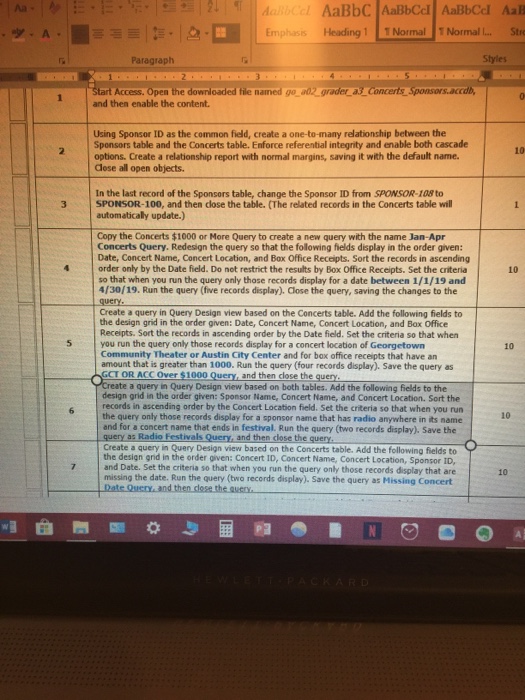
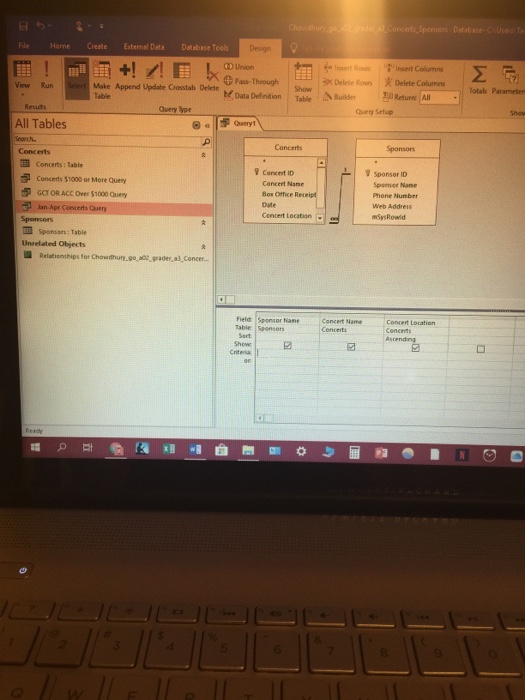
AaBbC AaBbCl AaBbCl Aab Emphasis Heading 1 1 Normal Normal L Stre Paragra Styles Access. Open the downloaded file nained go ao2 grader ts Sponsors.accdb and then enable the content. Using Sponsor ID as the common field, create a one-to-many relationship between the Sponsors table and the Concerts table. Enforce referential integrity and enable both cascade options. Create a relationship report with normal margins, saving it with the default name Close all open objects. 10 In the last record of the Sponsors table, change the Sponsor ID from SPONSOR-108 to 3 SPONSOR-100, and then dlose the table. (The related records in the Concerts table will automaticaly update.) Copy the Concerts $1000 or More Query to create a new query with the name Jan-Apr Concerts Query. Redesign the query so that the following fields display in the order given: Date, Concert Name, Concert Location, and Bax Office Receipts. Sort the records in ascending 4 order only by the Date field. Do not restrict the results by Box Office Receipts. Set the criteria 10 so that when you run the query only those records display for a date between 1/1/19 and 4/30/19. Run the query (five records display). Close the query, saving the changes to the Create a query in Query Design view based on the Concerts table. Add the following fields to the design grid in the order given: Date, Concert Name, Concert Location, and Bax Office Receipts. Sort the records in ascending order by the Date field. Set the criteria so that when 5 you run the query only those records display for a concert location of Georgetown 10 Community Theater or Austin City Center and for bax office receipts that have an amount that is greater than 1000. Run the query (four records display). Save the query as OR ACC Over $1000 Query, and then close the query a query in Query Design view based on both tables. Add the following fields to the design grid in the order given: Sponsor Name, Concert Name, and Concert Location. Sort the records in ascending order by the Concert Location field. Set the criteria so that when you run the query only those records display for a sponsor name that has radio anywhere in its name 10 and for a concert name that ends in festival. Run the query (two records display). Save the Create a query in Query Design view based on the Concerts table. Add the following fields to query as Radio Festivals Query and then close the query rder given: Concert ID, Concert Name, Concert Location, Sponsor n and Date. Set the criteria so that when you run the query only those records display that are missing the date. Run the query (bwo records display). Save the query as Missing Concert 10
Step by Step Solution
There are 3 Steps involved in it

Get step-by-step solutions from verified subject matter experts
 Study Help