







Question: QUESTION: Scan through a file and make a bar chart of the top 20 most common words(words of at least 4 letters, that way it
QUESTION: Scan through a file and make a bar chart of the top 20 most common words(words of at least 4 letters, that way it will exclude "the", "it", "a", "I", etc.)
-You'll have to remove the punctuation before you split a line into words.
-To count the number of occurrences of each word, there's a nice class called "Counter", This "Counter" class has a function called most_common(n), where "n" is the number of items you want. This function returns a collection of word/count pairs.
-You'll have to convert this collection of pairs (tuples) into 2 lists. You can iterate through the collection using a for loop
- Lastly, you'll have to make a bar chart. Use matplotlib plt.bar function.
I started the code for this problem but am having trouble finishing it to display the correct graph/have the correct code.
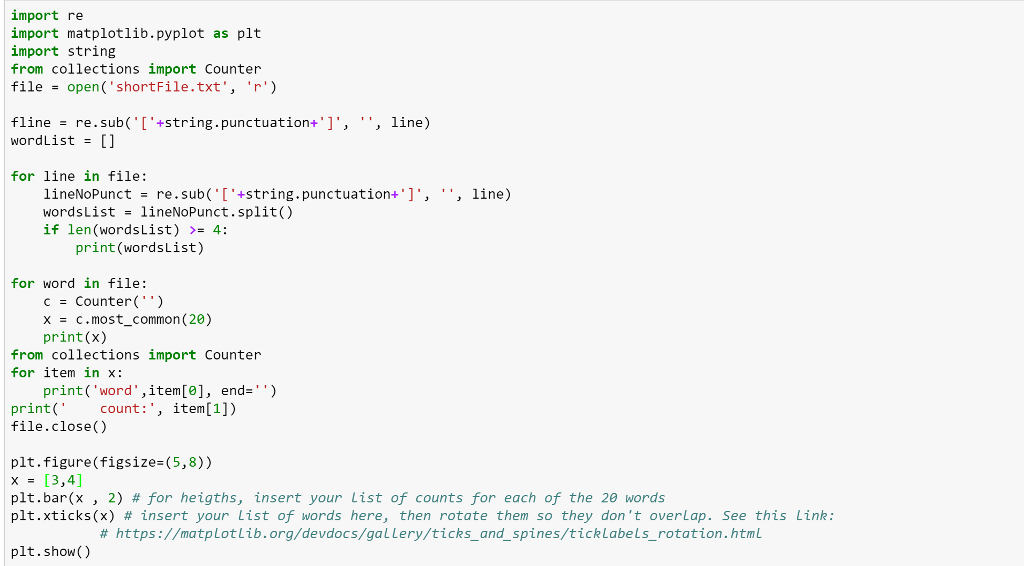
import re import matplotlib.pyplot as plt import string from collections import Counter file-open ( 'shortFile.txt 'r) fline - re.sub(+string.punctuation+']','', line) wordList = [] for line in file: line) lineNoPunct re.sub(T+string . punctuation-T, wordsList-lineNoPunct.split() if len (WordsL1st) >= 4: '', print(wordsList) for word in file: c counter(' ' ) x = c.most-common (20) print(x) from collections import Counter for item in x: print('word',item[], end-") print( count:, item[1]) file.close() plt.figure(figsize-(5,8)) x [3,4] plt.bar(x , 2) # for heiaths, insert your List of counts for each of the 20 words plt.xticks(x) # insert your List of words here, then rotate them so they don't overlap. See this Link: # https://matplot lib.org/devdocs/ga LLery/ticks_and_spines/ticklabels-rotation.htmL plt.show()
Step by Step Solution
There are 3 Steps involved in it

Get step-by-step solutions from verified subject matter experts
 Study Help