



Question: Question: The goal is to create a stored procedure that uses TRY/CATCH and error handling functions. The stored procedure, MyOrdersInsert, will insert into the dbo.MyOrders
Question: The goal is to create a stored procedure that uses TRY/CATCH and error handling functions. The stored procedure, MyOrdersInsert, will insert into the dbo.MyOrders table. Use the following drop and create statements supplied here to create the table.
DROP TABLE IF EXISTS dbo.MyOrders;
GO
CREATE TABLE dbo.MyOrders
(
MyOrdersId INT NOT NULL IDENTITY PRIMARY KEY
,OrderDate DATETIME NOT NULL CHECK (GETDATE() >= OrderDate)
,CustomerName VARCHAR(100) NOT NULL
);
GO
In addition, you will need to create an error log table. Use the following statements in your script to create the ErrorLog table.
DROP TABLE IF EXISTS dbo.ErrorLog;
GO
CREATE TABLE dbo.ErrorLog
(
ErrorLogId INT NOT NULL IDENTITY PRIMARY KEY
,ErrorDateTime DATETIME NOT NULL
,ErrorNumber INT NOT NULL
,ErrorLocation VARCHAR(MAX)
,ErrorMessage VARCHAR(MAX) NOT NULL
);
GO
Now write a stored proc called dbo.MyOrderInsert. The proc takes two input parameters and one output parameter. It also returns an integer value. The first input parameter is for orderdate and must be the DATETIME data type. The second input parameter is for CustomerName and must be of the VARCHAR(100) data type. The third parameter is an output parameter and is an integer datatype. It will contain the new OrderId if the procedure is successful. Use the SCOPE_IDENTITY() function to get the most recent value of a newly inserted row.
The integer return value will be zero if the procedure was successful. If the procedure fails, then the return value must be the error number representing the cause of failure.
If the procedure fails, it must log failure information in the ErrorLog table. Each value must be populated using error functions (except for the ErrorDateTime, which must use the get date function).
I will test your application with the following script
-- Used for every execution
SET NOCOUNT ON;
DECLARE @RC INT;
DECLARE @NewOrderId INT;
-- Execute with future date. Generate a 547 error
DECLARE @FutureDate DATETIME = GETDATE()+1;
EXEC @RC = dbo.MyOrdersInsert @FutureDate, 'E.F. Codd', @NewOrderId OUTPUT;
PRINT '#1 Exec with FutureDate return code = ' + CAST(@RC AS VARCHAR(10))
+ ' and new OrderId of ' + CAST(@NewOrderId AS VARCHAR(10));
-- Execute with null CustomerName. Generate a 515 error
DECLARE @NULLName VARCHAR(100) = NULL;
DECLARE @CurrentDate DATETIME = GETDATE();
EXEC @RC = dbo.MyOrdersInsert @CurrentDate, @NULLName, @NewOrderId OUTPUT;
PRINT '#2 Exec with NULLName return code = ' + CAST(@RC AS VARCHAR(10))
+ ' and new OrderId of ' + CAST(@NewOrderId AS VARCHAR(10));
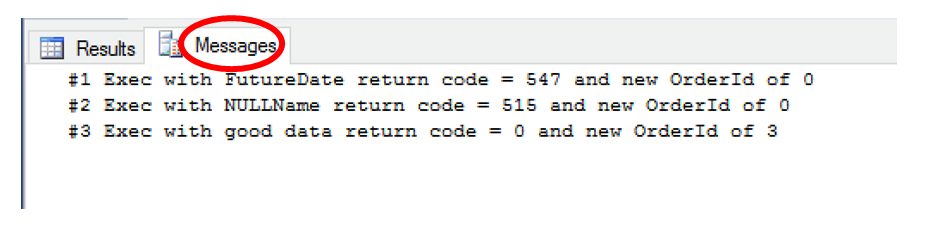
-- Execute with success. Return should be 3
EXEC @RC = dbo.MyOrdersInsert @CurrentDate, 'E.F. Codd', @NewOrderId OUTPUT;
Print '#3 Exec with good data return code = ' + CAST(@RC AS VARCHAR(10))
+ ' and new OrderId of ' + CAST(@NewOrderId AS VARCHAR(10));
SELECT * FROM dbo.ErrorLog;
SELECT * FROM dbo.MyOrders;
The procedure must produce the following results (with different ErrorDateTime values). Notice there are no row counts displayed
*Necessary style
Every object that you create (table, trigger, etc.) must include a check for an existing object with the same name, and if the object exists then drop it. You will also need to include GO commands in the appropriate locations. A good test is to execute your script multiple times
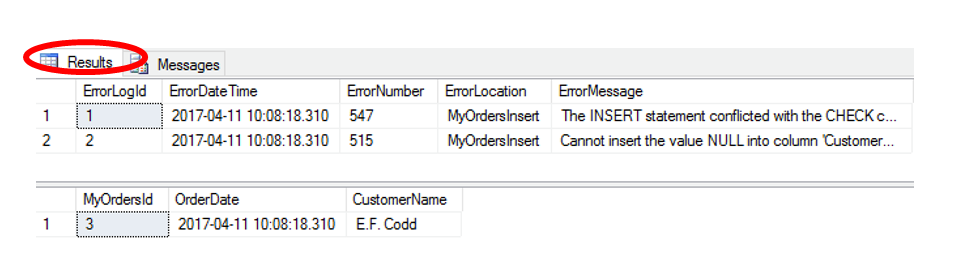
Result Messages ErrorLogldErrorDate Time ErrorNumber ErrorLocationrorMessage 2017-04-11 10:08:18.310 547 2017-04-11 10:08:18.310 515 MyOrders Insert The INSERT statement conflicted with the CHECK c MyOrderslnsert Cannot insert the value NULL into column Customer.. MyOrdersld OrderDate CustomerName E.F. Codd 2017-04-11 10:08:18.310 Result Messages ErrorLogldErrorDate Time ErrorNumber ErrorLocationrorMessage 2017-04-11 10:08:18.310 547 2017-04-11 10:08:18.310 515 MyOrders Insert The INSERT statement conflicted with the CHECK c MyOrderslnsert Cannot insert the value NULL into column Customer.. MyOrdersld OrderDate CustomerName E.F. Codd 2017-04-11 10:08:18.310
Step by Step Solution
There are 3 Steps involved in it

Get step-by-step solutions from verified subject matter experts