





Question: Question using C Sharp (C#) programming The XML file below contains two types of data. You need to submit a screenshot that contains one server's

Question using C Sharp (C#) programming

The XML file below contains two types of data.
Question using C Sharp (C#) programming The XML file below contains two

You need to submit a screenshot that contains one server's windows and two client windows. Each client window must show a different student ID, the returned major and the major's average GPA. Be sure your screenshot is large enough to clearly show its contents.

****************************XML FILE server_gpa.exe.config********************************

**********************************client_book.cs********************************

using System;

using System.Collections.Generic;

using System.Text;

using System.IO;

using System.Net.Sockets;

namespace ClientSocket

{

class Program

{

static void Main(string[] args)

{

TcpClient client = new TcpClient("127.0.0.1", 2055);

try

{

Stream s = client.GetStream();

StreamReader sr = new StreamReader(s);

StreamWriter sw = new StreamWriter(s);

sw.AutoFlush = true;

Console.WriteLine(sr.ReadLine());

while (true)

{

Console.Write("Enter a book title: ");

string title = Console.ReadLine();

sw.WriteLine(title);

if (title == "")

break;

Console.WriteLine(sr.ReadLine());

}

s.Close();

}

finally

{

client.Close();

}

}

}

}

******************************server_book.cs **********************************

/*

* C# program to accept a book title from clients and sends back

* its price using XML

*/

//SERVER SIDE PROGRAM

using System;

using System.Collections.Generic;

using System.Text;

using System.Threading;

using System.IO;

using System.Net;

using System.Net.Sockets;

using System.Configuration;

namespace ServerSocket

{

class Program

{

static TcpListener listener;

const int LIMIT = 10;

public static void Query()

{

while (true)

{

Socket soc = listener.AcceptSocket();

Console.WriteLine("Connected: {0}", soc.RemoteEndPoint);

try

{

Stream s = new NetworkStream(soc);

StreamReader sr = new StreamReader(s);

StreamWriter sw = new StreamWriter(s);

sw.AutoFlush = true; // enable automatic flushing

sw.WriteLine("{0} books available", ConfigurationManager.AppSettings.Count);

while (true)

{

string bookTitle = sr.ReadLine();

if (bookTitle == "" || bookTitle == null)

break;

string price = ConfigurationManager.AppSettings[bookTitle];

if (price == null)

price = "Sorry, no such book!";

sw.WriteLine(price);

}

s.Close();

}

catch (Exception e)

{

Console.WriteLine(e.Message);

}

Console.WriteLine("Disconnected: {0}", soc.RemoteEndPoint);

soc.Close();

}

}

static void Main(string[] args)

{

IPAddress ipAd = IPAddress.Parse("127.0.0.1");

listener = new TcpListener(ipAd, 2055);

listener.Start();

Console.WriteLine("Server started, listening to port 2055");

for (int i = 0; i

{

Thread t = new Thread(new ThreadStart(Query));

t.Start();

//Console.WriteLine("Server thread {0} started....", ++i);

Console.WriteLine("Server thread {0} started....", i+1);

}

}

}

}

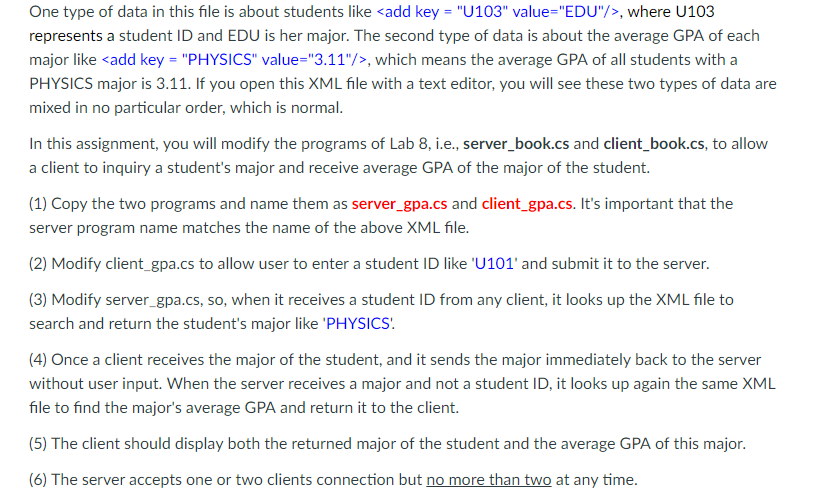
One type of data in this file is about students like , where U103 represents a student ID and EDU is her major. The second type of data is about the average GPA of each major like add key "PHYSICS" value-"3.11"/>, which means the average GPA of all students with a PHYSICS major is 3.11. If you open this XML file with a text editor, you will see these two types of data are mixed in no particular order, which is normal. In this assignment, you will modify the programs of Lab 8, i.e., server book.cs and client_book.cs, to allow a client to inquiry a student's major and receive average GPA of the major of the student. 1) Copy the two programs and name them as server_gpa.cs and client gpa.cs. It's important that the server program name matches the name of the above XML file. (2) Modify client gpa.cs to allow user to enter a student ID like U101 and submit it to the server. (3) Modify server gpa.cs, so, when it receives a student ID from any client, it looks up the XML file to search and return the student's major like 'PHYSICS 4) Once a client receives the major of the student, and it sends the major immediately back to the server without user input. When the server receives a major and not a student ID, it looks up again the same XML file to find the major's average GPA and return it to the client. (5) The client should display both the returned major of the student and the average GPA of this major. (6) The server accepts one or two clients connection but no more than two at any time. One type of data in this file is about students like , where U103 represents a student ID and EDU is her major. The second type of data is about the average GPA of each major like add key "PHYSICS" value-"3.11"/>, which means the average GPA of all students with a PHYSICS major is 3.11. If you open this XML file with a text editor, you will see these two types of data are mixed in no particular order, which is normal. In this assignment, you will modify the programs of Lab 8, i.e., server book.cs and client_book.cs, to allow a client to inquiry a student's major and receive average GPA of the major of the student. 1) Copy the two programs and name them as server_gpa.cs and client gpa.cs. It's important that the server program name matches the name of the above XML file. (2) Modify client gpa.cs to allow user to enter a student ID like U101 and submit it to the server. (3) Modify server gpa.cs, so, when it receives a student ID from any client, it looks up the XML file to search and return the student's major like 'PHYSICS 4) Once a client receives the major of the student, and it sends the major immediately back to the server without user input. When the server receives a major and not a student ID, it looks up again the same XML file to find the major's average GPA and return it to the client. (5) The client should display both the returned major of the student and the average GPA of this major. (6) The server accepts one or two clients connection but no more than two at any time

Step by Step Solution

There are 3 Steps involved in it

1 Expert Approved Answer
Step: 1 Unlock blur-text-image
Question Has Been Solved by an Expert!

Get step-by-step solutions from verified subject matter experts

Step: 2 Unlock
Step: 3 Unlock

Students Have Also Explored These Related Databases Questions!