







Question: Question-2. Use Excel Solver to determine the optimal price for a single product. Use the information below to formulate your pricing optimization problem. Demand as
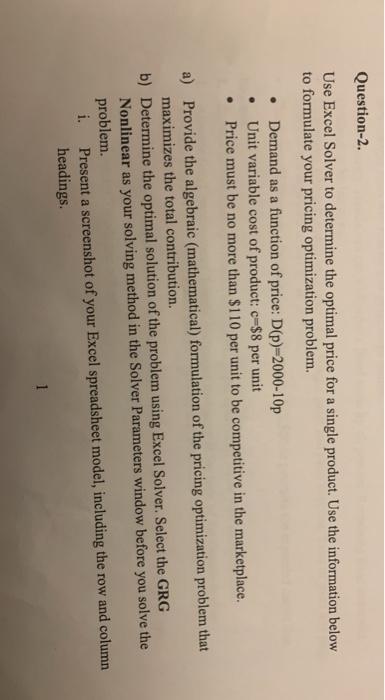
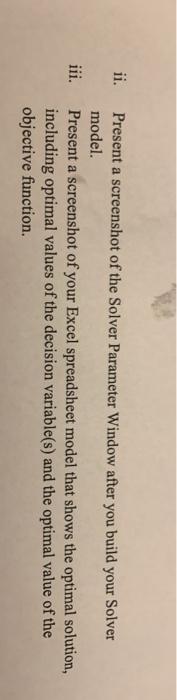
Question-2. Use Excel Solver to determine the optimal price for a single product. Use the information below to formulate your pricing optimization problem. Demand as a function of price: D(p)-2000-10p Unit variable cost of product: c-$8 per unit Price must be no more than $110 per unit to be competitive in the marketplace. a) Provide the algebraic (mathematical) formulation of the pricing optimization problem that maximizes the total contribution. b) Determine the optimal solution of the problem using Excel Solver. Select the GRG Nonlinear as your solving method in the Solver Parameters window before you solve the problem. i. Present a screenshot of your Excel spreadsheet model, including the row and column headings. 1 ii. iii. Present a screenshot of the Solver Parameter Window after you build your Solver model. Present a screenshot of your Excel spreadsheet model that shows the optimal solution, including optimal values of the decision variable(s) and the optimal value of the objective function Question-2. Use Excel Solver to determine the optimal price for a single product. Use the information below to formulate your pricing optimization problem. Demand as a function of price: D(p)-2000-10p Unit variable cost of product: c-$8 per unit Price must be no more than $110 per unit to be competitive in the marketplace. a) Provide the algebraic (mathematical) formulation of the pricing optimization problem that maximizes the total contribution. b) Determine the optimal solution of the problem using Excel Solver. Select the GRG Nonlinear as your solving method in the Solver Parameters window before you solve the problem. i. Present a screenshot of your Excel spreadsheet model, including the row and column headings. 1 ii. iii. Present a screenshot of the Solver Parameter Window after you build your Solver model. Present a screenshot of your Excel spreadsheet model that shows the optimal solution, including optimal values of the decision variable(s) and the optimal value of the objective function
Step by Step Solution
There are 3 Steps involved in it

Get step-by-step solutions from verified subject matter experts
 Study Help