







Question: Question-3 30 Marks This question analyses the students' knowledge and experience in Web Application Development using PHP and MySQL. This question will assess the students'
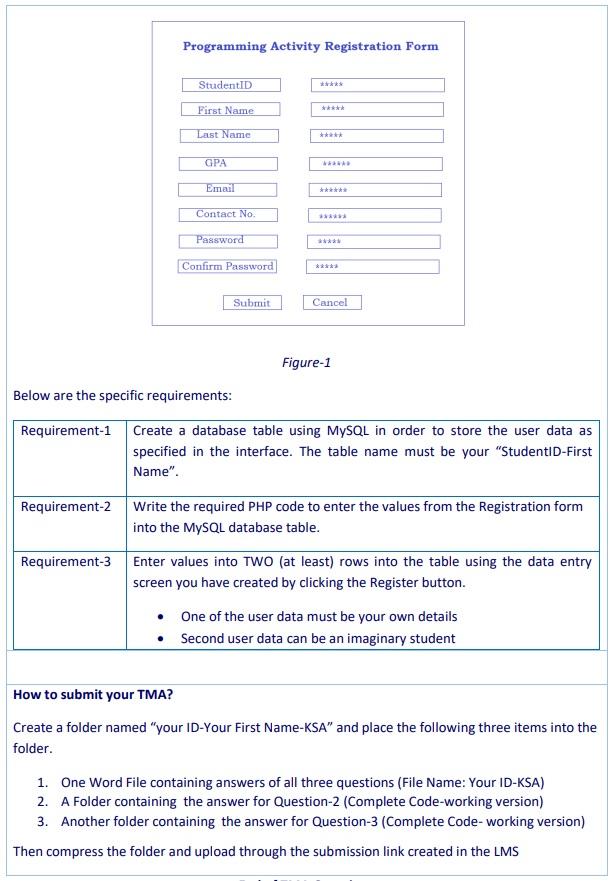
Question-3 30 Marks This question analyses the students' knowledge and experience in Web Application Development using PHP and MySQL. This question will assess the students' practical skills in web programming studied in Block-1 and Block-2 of the module. Assume that you want to update your IT Club application by adding activity participants' details into your database. So that the participants will become registered users and they will be able to login to your system using their credentials and will be able to select activities according to their choice and will be able to edit their profile. A sample Registration form based on the details we mentioned in Question-2 is given in figure-1. However, you can use your own creativity to design the Registration form. Programming Activity Registration Form StudentID First Name Last Name GPA Email Contact No. ***** Password *** Confirm Password Submit Cancel Figure-1 Below are the specific requirements: Requirement-1 Create a database table using MySQL in order to store the user data as specified in the interface. The table name must be your "StudentID-First Name". Requirement-2 Write the required PHP code to enter the values from the Registration form into the MySQL database table. Requirement-3 Enter values into TWO (at least) rows into the table using the data entry screen you have created by clicking the Register button. One of the user data must be your own details Second user data can be an imaginary student How to submit your TMA? Create a folder named "your ID-Your First Name-KSA" and place the following three items into the folder. 1. One Word File containing answers of all three questions (File Name: Your ID-KSA) 2. A Folder containing the answer for Question-2 (Complete Code working version) 3. Another folder containing the answer for Question-3 (Complete Code- working version) Then compress the folder and upload through the submission link created in the LMS
Step by Step Solution
There are 3 Steps involved in it

Get step-by-step solutions from verified subject matter experts
 Study Help