







Question: Question3 Show the correct JavaScript code for the following tasks using Lodash.js You may assume that the operation is working with the following array of
Question3
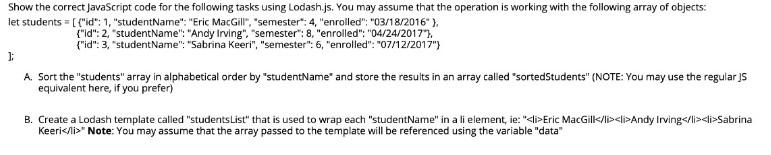
Show the correct JavaScript code for the following tasks using Lodash.js You may assume that the operation is working with the following array of object:
let students = [ {"id": 1, "studentName": "Eric MacGill", "semester": 4, "enrolled": 03/18/2016 }, [ {"id": 2, "studentName": "Andy Irving", "semester": 8, "enrolled": 04/24/2017 }, [ {"id": 1, "studentName": "Sanbrian Keeri", "semester": 6, "enrolled": 07/12/2017 },
];
Show the correct JavaScript code for the following tasks using Lodash.js. You may assume that the operation is working with the following array of objects: let students = [ {"id": 1, "studentName": "Eric MacGill", "semester": 4, "enrolled": "03/18/2016" }, {"id": 2, "studentName":"Andy Irving", "semester": 8, "enrolled": "04/24/2017"}, {"id": 3, "studentName": "Sabrina Keeri", "semester":6,"enrolled": "07/12/2017"} j: A. Sort the "students" array in alphabetical order by "studentName' and store the results in an array called "sortedStudents" (NOTE: You may use the regular ] equivalent here, if you prefer) B. Create a Lodash template called "students List" that is used to wrap each "studentName" in a li element, ie: "
" Note: You may assume that the array passed to the template will be referenced using the variable "data
Step by Step Solution
There are 3 Steps involved in it

Get step-by-step solutions from verified subject matter experts
 Study Help