







Question: Questions are to be implemented in the Oracle SQL-Plus environment Create an SQL file that contains the answers to the following questions: 0. set linesize
Questions are to be implemented in the Oracle SQL-Plus environment
Create an SQL file that contains the answers to the following questions:
0. set linesize 120; set echo on and set serveroutput on.
1. Create a duplicate table for Employee, call it Employee2 without inserting any tuples. (Hint: use an insert into command with a query see the SQL tutorial in the Data drive). To test: Show the table description, and the table content.
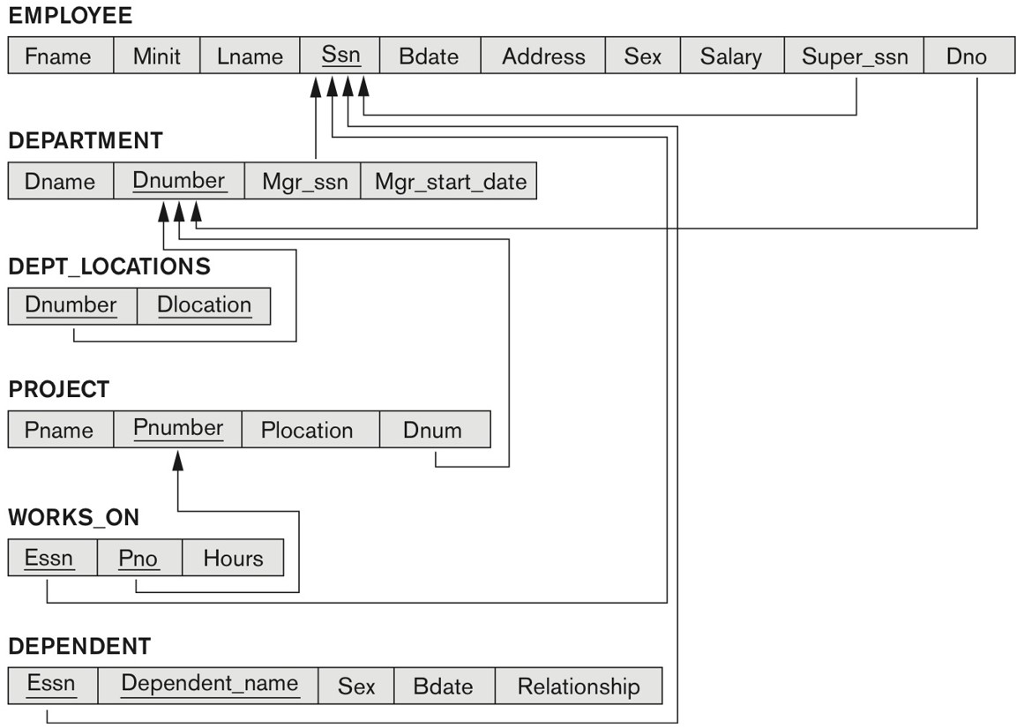
2. Write a PL/SQL procedure updateSupervisorAll for the COMPANY database that will take both old and new values of the supervisor ssn for the Employee table and change the old supervisor ssn to the new one (i.e., suppose that the supervisor with old superssn is no longer a supervisor and a new one, which must be from the existing employees, is assigned to all of the employees who have been supervised by the old supervisor.
To test: First, display employee last names and their old supervisor last name. Apply the stored procedure updateSupervisorAll to update supervisor. Then display employee last names and their new supervisor last name. Then rollback.
3. Write a PL/SQL procedure for the COMPANY database that will find the highest salaried employee (his/her last, first name, ssn#, dno) and his/her department name. Display the result by calling this procedure appropriately.
EMPLOYEE Fname Minit Lname Ssn BdateAddress Sex Salary Super_ssn Dno DEPARTMENT Dname Dnumber Mgr_ssn Mgr_start_date DEPT LOCATIONS numberDlocation PROJECT Pname Pnumbe Plocaion Dnum WORKS_ON Essn Pno Hours DEPENDENT Essn Dependent_name SexBdate Relationship
Step by Step Solution
There are 3 Steps involved in it

Get step-by-step solutions from verified subject matter experts
 Study Help