







Question: [R] I need help with the following R Programs: The files used are: #unemployment_men.txt # U.S. unemployment, men # Unit : thousand # Row 1
[R] I need help with the following R Programs:
![[R] I need help with the following R Programs: The files used](https://dsd5zvtm8ll6.cloudfront.net/si.experts.images/questions/2024/09/66f2eafe114bf_90166f2eafda9bf0.jpg)
The files used are:
#unemployment_men.txt
# U.S. unemployment, men
# Unit : thousand
# Row 1 : years
# Row 2 : Married, spouse present
# Row 3 : Widowed, divorced or separated
# Row 4 : Never married
2003 2004 2005 2006 2007 2008 2009 2010 2011 2012
1751 1466 1287 1142 1206 1590 3115 3138 2671 2274
699 608 563 545 544 739 1326 1352 1186 1005
2457 2381 2209 2067 2132 2705 4011 4135 3827 3492
##########################################################
#unemployment_women.txt
# U.S. unemployment, women
# Unit : thousand
# Row 1 : years
# Row 2 : Married, spouse present
# Row 3 : Widowed, divorced or separated
# Row 4 : Never married
2003 2004 2005 2006 2007 2008 2009 2010 2011 2012
1352 1244 1168 1042 1049 1325 2057 2160 2031 1915
842 828 768 709 724 849 1330 1397 1420 1286
1674 1621 1595 1496 1422 1717 2424 2642 2612 2533
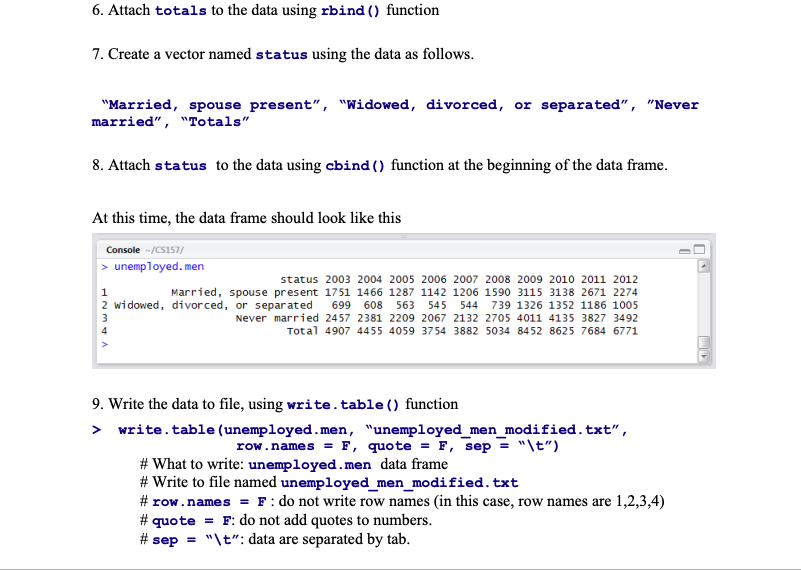
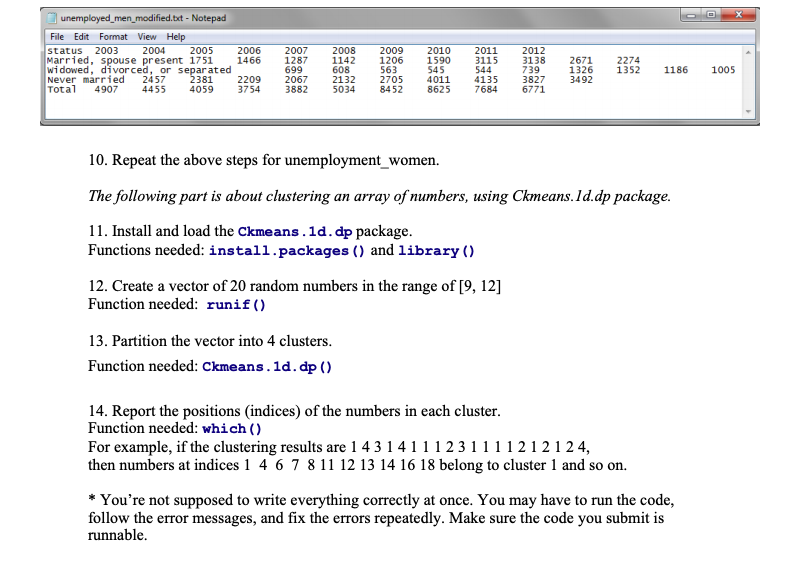
3. Load data using read.table ) function unemployed.men totals totals 2003 2004 2005 2006 2007 2008 2009 2010 2011 2012 4907 4455 4059 3754 3882 5034 8452 8625 7684 6771 6. Attach totals to the data using rbind ) function 7. Create a vector named status using the data as follows. "Married, spouse present", "Widowed, divorced, or separated", "Never married", "Totals" 8. Attach status to the data using cbind ) function at the beginning of the data frame At this time, the data frame should look like this Console-/CS157/ >unemployed. men status 2003 2004 2005 2006 2007 2008 2009 2010 2011 2012 Married, spouse present 1751 1466 1287 1142 1206 1590 3115 3138 2671 2274 2 widowed, divorced, or separated 699 608 563 545 544 739 1326 1352 1186 1005 Never married 2457 2381 2209 2067 2132 2705 4011 4135 3827 3492 Total 4907 4455 4059 3754 3882 5034 8452 8625 7684 6771 9. Write the data to file, using write.table ) function > write.table (unemployed.men, "unemployed men modified.txt", row.names = F, quote-F, sep-"\t") # What to write: unemployed. men data frame # Write to file named unemployed men modified. txt # row.names-F : do not write row names (in this case, row names are 1,2,3,4) # quote-F: do not add quotes to numbers. # sep-"\t": data are separated by tab. unemployed_men_modified.tt-Notepad File Edit Format View Help status 2003 2012 3138 2671 2274 739 3827 3492 2005 Married, spouse present 1751 1466 1287 1142 2004 2006 2007 699 3882 2008 608 5034 2009 1206 563 2010 1590 545 2011 3115 544 eerdarrieorce or se23sed22092076 220325 0314135 23527 1125 13521186100-5 1326 1352 1186 1005 Never married 2457 Total 4907 4455 4059 3754 381 2209 2067 2132 2705 4011 4135 8452 8625 76846771 10. Repeat the above steps for unemployment women. The following part is about clustering an array of numbers, using Ckmeans.Id.dp package 11. Install and load the Ckmeans.1d.dp package Functions needed: install.packages () and library () 12. Create a vector of 20 random numbers in the range of [9, 12] Function needed: runif() 13. Partition the vector into 4 clusters Function needed: Ckmeans.1d. dp () 14. Report the positions (indices) of the numbers in each cluster Function needed: which() For example, if the clustering results are 1 4314111231111212124, then numbers at indices 1 4 6 7 81112 13 14 16 18 belong to cluster 1 and so on. * You're not supposed to write everything correctly at once. You may have to run the code, follow the error messages, and fix the errors repeatedly. Make sure the code you submit is runnable
Step by Step Solution
There are 3 Steps involved in it

Get step-by-step solutions from verified subject matter experts
 Study Help