







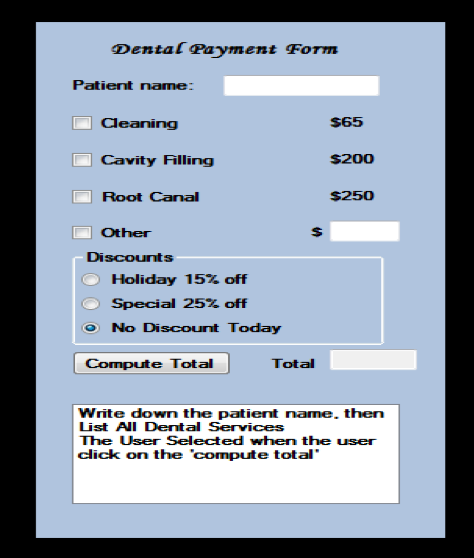
Question: Radio Buttons and Check Box Create a java Application and add the following control layout: Dental Payment form. Add code to the Compute Total button.
Radio Buttons and Check Box
Create a java Application and add the following control layout: Dental Payment form. Add code to the Compute Total button.
The code should compute total cost based on the type of services selected and based on the Discount selected.
Display the name of the patient as well as the total cost.
Note: if you select other, you need to provide the cost related to other services. You can create a border around a panel by adding the following code panel.setBorder(BorderFactory.createTitledBorder(name));
You can try different border lines
Dental Payment Form Patient name: Cleaning S65 Cavity Filling $200 Root Canal $250 Other Discounts Holiday 15% off Special 25% off No Discount Today Compute Total Total Write down the patient name. then The User Selected when the user click on the compute total
Step by Step Solution
There are 3 Steps involved in it

Get step-by-step solutions from verified subject matter experts
 Study Help