







Question: RAMerrors.txt: ABCDEFABC 1A00D0000 7A0EDF301 3CDAEFFAD program # 2 pgm25dCGS 37670S This assignment is worth 6 points total, partial credit will be given, 1Worth 6 points
RAMerrors.txt:
ABCDEFABC 1A00D0000 7A0EDF301 3CDAEFFAD
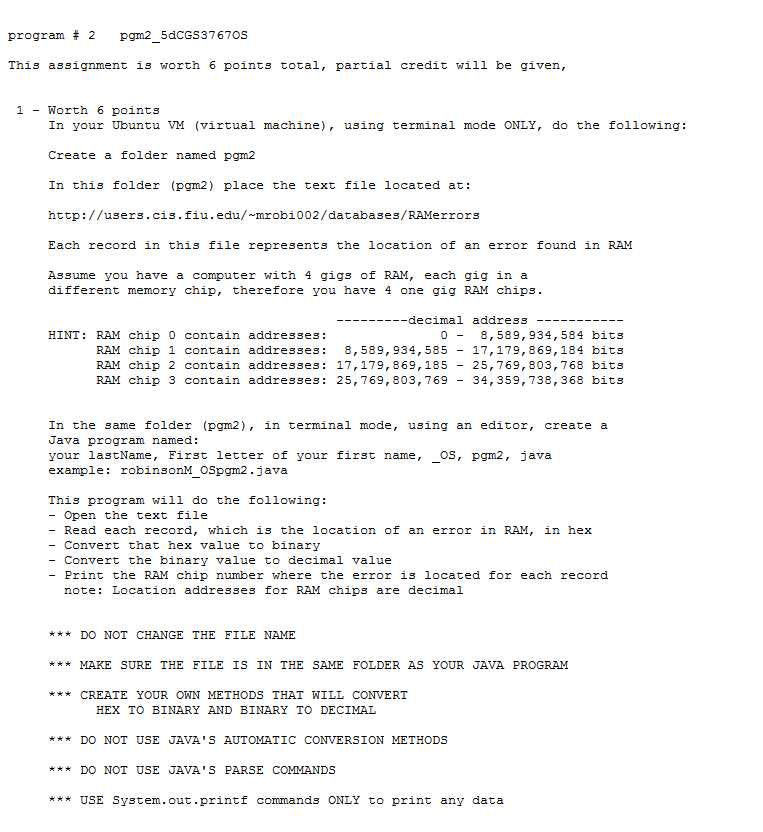
program # 2 pgm25dCGS 37670S This assignment is worth 6 points total, partial credit will be given, 1Worth 6 points In your Ubuntu VM (virtual machine), using terminal mode ONLY, do the following: Create a folder named pgm2 In this folder (pgm2) place the text file located at: http://users.cis.fiu.edu/ mrobi002/databases/RAMerrors Each record in this file represents the location of an error found in RAM Assume you have a computer with 4 gigs of RAM, each gig in a different memory chip, therefore you have 4 one gig RAM chips decimal address HINT: RAM chip 0 contain addresses: 0-8,589,934,584 bits RAM chip 1 contain addresses: 8,589,934, 58517,179,869,184 bits RAM chip 2 contain addresses: 17,179,869,185 - 25,769, 803,768 bits RAM chip 3 contain addresses: 25,769, 803, 769 - 34,359,738,368 bits In the same folder (pgm2), in terminal mode, using an editor, create a Java program named: your lastName, First letter of your first name, OS, pgm2, java example robinsonM OSpgm2.java This program will do the following - Open the text file - Read each record, which is the location of an error in RAM, in hex - Convert that hex value to binary - Convert the binary value to decimal value - Print the RAM chip number where the error is located for each record note: Location addresses for RAM chips are decimal *DO NOT CHANGE THE FILE NAME *MAKE SURE THE FILE IS IN THE SAMEFOLDER AS YOUR JAVA PROGRAM *CREATE YOUR OWN METHODS THAT WILL CONVERT HEX TO BINARY AND BINARY TO DECIMAL *DO NOT USE JAVA'S AUTOMATIC CONVERSION METHODS *DO NOT USE JAVA'S PARSE COMMANDS *USE System.out.printf commands ONLY to print any data program # 2 pgm25dCGS 37670S This assignment is worth 6 points total, partial credit will be given, 1Worth 6 points In your Ubuntu VM (virtual machine), using terminal mode ONLY, do the following: Create a folder named pgm2 In this folder (pgm2) place the text file located at: http://users.cis.fiu.edu/ mrobi002/databases/RAMerrors Each record in this file represents the location of an error found in RAM Assume you have a computer with 4 gigs of RAM, each gig in a different memory chip, therefore you have 4 one gig RAM chips decimal address HINT: RAM chip 0 contain addresses: 0-8,589,934,584 bits RAM chip 1 contain addresses: 8,589,934, 58517,179,869,184 bits RAM chip 2 contain addresses: 17,179,869,185 - 25,769, 803,768 bits RAM chip 3 contain addresses: 25,769, 803, 769 - 34,359,738,368 bits In the same folder (pgm2), in terminal mode, using an editor, create a Java program named: your lastName, First letter of your first name, OS, pgm2, java example robinsonM OSpgm2.java This program will do the following - Open the text file - Read each record, which is the location of an error in RAM, in hex - Convert that hex value to binary - Convert the binary value to decimal value - Print the RAM chip number where the error is located for each record note: Location addresses for RAM chips are decimal *DO NOT CHANGE THE FILE NAME *MAKE SURE THE FILE IS IN THE SAMEFOLDER AS YOUR JAVA PROGRAM *CREATE YOUR OWN METHODS THAT WILL CONVERT HEX TO BINARY AND BINARY TO DECIMAL *DO NOT USE JAVA'S AUTOMATIC CONVERSION METHODS *DO NOT USE JAVA'S PARSE COMMANDS *USE System.out.printf commands ONLY to print any data
Step by Step Solution
There are 3 Steps involved in it

Get step-by-step solutions from verified subject matter experts
 Study Help