



Question: rawah alsaadi RA - O X Comments Share AutoSave CH LOOKUPfunction - saved O Search File Home Insert Draw Page Layout Formulas Data Review View
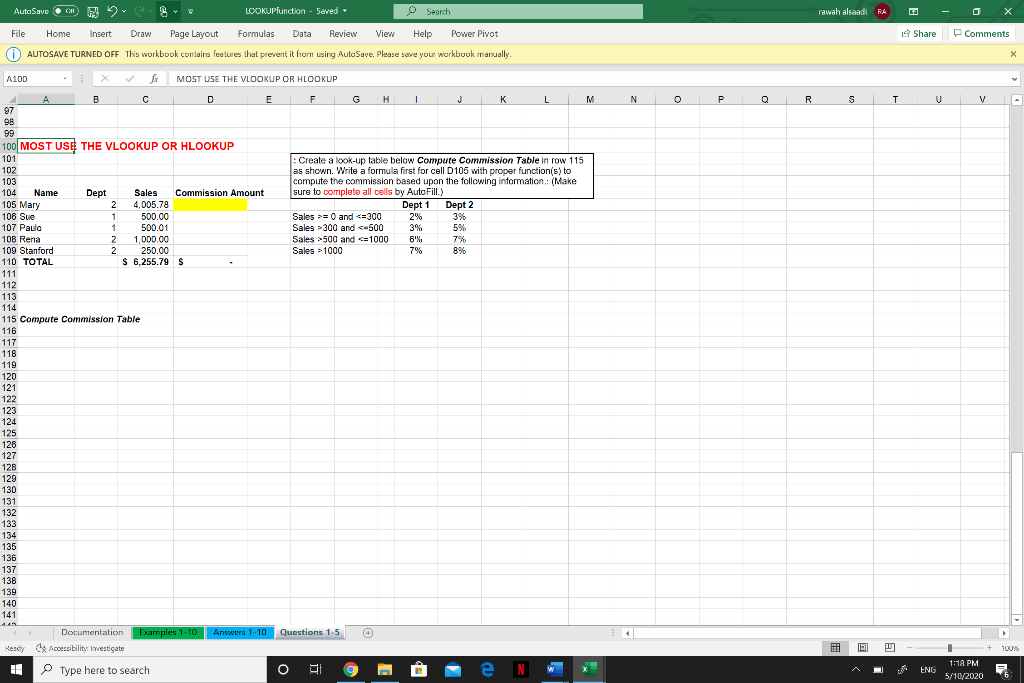
rawah alsaadi RA - O X Comments Share AutoSave CH LOOKUPfunction - saved O Search File Home Insert Draw Page Layout Formulas Data Review View Help Power Pivot AUTOSAVE TURNED OFF This workbook contains features that prevent it from using AutoSave. Please save your workbook manually. A100 . X MOST USE THE VLOOKUP OR HLOOKUP 4 A B C D E F G H I K L M N O P Q R S T U V 100 MOST USE THE VLOOKUP OR HLOOKUP 101 102 103 : Create a look-up table below Compute Commission Table in row 115 as shown. Write a formula first for cell D105 with proper function(s) to compute the commission based upon the following information.: Make sure to complete all cells by Auto Fill.) Dept 1 Dept 2 Sales >= 0 and =300 2% 3% Sales >300 and 500 and C=1000 Sales > 1000 7% 89% 5% B'X, 76 104 Name Dept Sales Commission Amount 105 Mary 2 4.005.78 106 Sue 500.00 107 Paulo 500.01 108 Rena 1,000.00 109 Stanford 250.00 110 TOTAL $ 6,255.79 $ 111 112 113 114 115 Compute Commission Table 116 117 118 119 120 121 122 123 124 125 128 127 128 129 130 131 132 133 134 135 136 137 138 139 140 141 Answers 1-10 Questions 1-5 Ready | Documentation Examples 1-10 y Accessibility Investigate Type here to search 0 + 100% - & & A A 1 1:18 PM 5/10/2020 E ENG 6
Step by Step Solution
There are 3 Steps involved in it

Get step-by-step solutions from verified subject matter experts