







Question: Read a 2 - character string from input into variable inputString. Declare a Boolean variable isValid and assign isValid with true if the following conditions
Read a character string from input into variable inputString. Declare a Boolean variable isValid and assign isValid with true if the following conditions are met:
inputString does not contain two of the same character.
For alphabetic characters, inputString does not contain two of the same letter regardless of case
Otherwise, assign isValid with false.
Ex: If the input is p@ then isValid is assigned with true, so the output is:
Valid string
Ex: If the input is Yy then isValid is assigned with false, so the output is:
Invalid string
Note: Use inputString scnrnextLine to read the entire line from input into inputString. when completing the code, please only change the section where it says "your code goes here". Do not change any of the given code.Read a character string from input into variable inputString. Declare a Boolean variable isValid and assign isValid with true if the
following conditions are met:
inputString does not contain two of the same character.
For alphabetic characters, inputString does not contain two of the same letter regardless of case
Otherwise, assign isValid with false.
Ex: If the input is pe then isValid is assigned with true, so the output is:
Valid string
Ex: If the input is then isValid is assigned with false, so the output is:
Invalid string
Note: Use inputstring scnrnextLine to read the entire line from input into inputString.
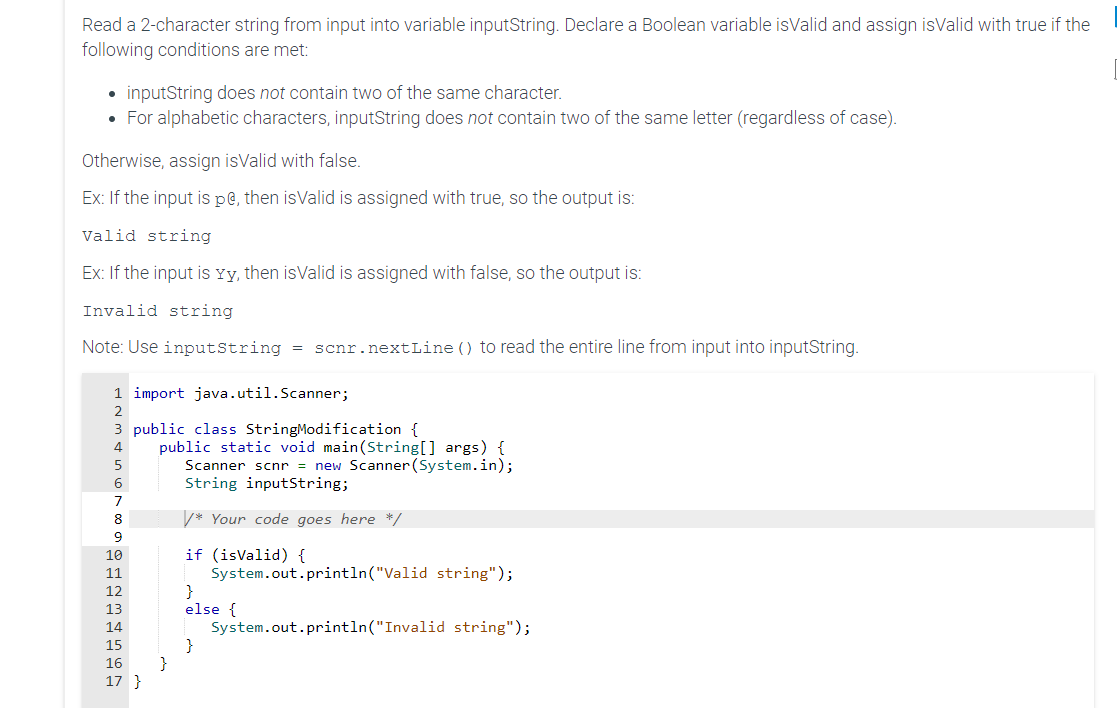
import java.util.Scanner;
public class StringModification
public static void mainString args
Scanner scnr new Scanner
System.in;
String inputString;
Your code goes here
if isvalid
System.out.printlnValid string";
else
System.out.printlnInvalid string";
Step by Step Solution
There are 3 Steps involved in it
1 Expert Approved Answer
Step: 1 Unlock

Question Has Been Solved by an Expert!
Get step-by-step solutions from verified subject matter experts
Step: 2 Unlock
Step: 3 Unlock
 Study Help