







Question: Read all the materials below and answer the questions: (Please do not attempt to solve if you can not answer all!!!!) 3-1: Chapter 8: Language
Read all the materials below and answer the questions: (Please do not attempt to solve if you can not answer all!!!!)
3-1: Chapter 8:
Language Barriers and Translation Precautions
This chapter starts out by talking about the different markets available to marketers. I think most of this material is straightforward enough since it's likely you've been exposed to most of it already in your prior coursework. However, I do want to zero in on a couple of things...
Your textbook makes some interesting points about the language barrier with respect to global e-marketing. While the most popular language is still English (33%), if you're a global business, you need to think about how you're going to handle this problem.
At past employers, we created separate websites for different languages, and it was simply a nightmare to manage. If you make one change, you need to make it in 10 other places. Keeping everything straight can be a real nuisance.

In this fashion, we can have one site to manage that just pulls in different language data based on the preferences of the user.
Another consideration is getting translations of your site done. Unfortunately, this isn't as straightforward as it sounds. Certain figures of speech in English do not translate well at all into other languages. Further, there isn't always a one-to-one correlation between an English word and a word in another language.

For example, in English, we put adjectives in front of nouns. This isn't the case in Spanish - the adjective goes after the noun. So, instead of saying "red car", they say "coche rojo", or "car red".
This can lead to translations such as the one in the image below:
First of all, I am not quite sure if this is an ad for coffee or hot dogs, but look at that translation - it's horrendous if English is your primary language! But, it may be "grammatically correct" per the rules of another language. But, if English isn't your primary language, you'd have no idea of just how awful that translation is. And so it is with translations you get done - on the sites I've worked on, I have had to pretty much accept on blind faith that the translator did a good job.
The point is that you need to find a good translator who understands all of the nuances of a language when you need to create a version of your site in another language. And, it's a good idea to consult with more than one translator for a given site translation. Even though this can be very costly at times, be reminded that unless you are fluent in another language, you are pretty much accepting on blind faith that the translator has faithfully translated your message.
This can be really tricky for things like privacy policies or acceptable use statements, which often have to be reviewed by lawyers before they are posted on a site (the court system has held that these are, technically speaking, contracts and therefore subject to contract law). Bottom line: be careful!
The Young and The Internet
We are going to cover some of the legal things you need to watch out for when conducting e-marketing activity on the Internet with respect to marketing to underage children in Week 10 of the course. However, I do want to spend some time talking about some current issues that young people face on the Internet.
If the title of this section of the lecture sounds like a soap opera, know that I did this on purpose. Those of you who have kids probably have some idea of what I'm talking about, but suffice it to say there are a lot of issues here. Here are a few examples:
Social Networking sites like Facebook, Twitter, and Tumblr are a great way for youngsters to connect with friends and family, but in recent years, child predators are using these sites to lure underage victims.
Sites like YouTube and Instagram (and others) allow children to post videos/pictures of themselves for the world to see. Sometimes, kids do really stupid and embarrassing things that are caught on camera and it gets around school.
Since your textbook mentions Webkinz and how they work later in your book, let me share some issues that can occur there. My brother used to teach at an elementary school, and he has all kinds of stories about kids being tricked into giving up their "KinzCash" and other kids stealing other kids' 8 digit Webkinz codes and activating them before the real owner has a chance to. Thus, the virtual experience of playing with the animal is "stolen". This isn't to pick on WebKinz exclusively, this obviously can happen with any game that does similar things.
A few years ago there was a pornography site that had worked to get its keyword ratings on the word "Barbie" very high up in the search engine rankings. Thus, when kids searched for the word "Barbie", they were presented with incredibly inappropriate material.
These problems logically lead to a discussion in your textbook about content filtering. From a parental, technical, and security perspective, I find the discussion of the following "solutions" to the content filtering problem laughable (particularly in an age where access to cell phones is so prevalent):
 | Educating children not to pursue offensive material (have they heard how young people talk these days?) Banning offensive material legislatively (that might work in this country, but what if the content is being served from a country where it's legal?) Putting up age warnings (yeah, right) Requiring an age verification (most of the ones I've seen allow users to simply input their age, which youngsters can just lie about) Asking content providers to rate their own content (this is too subjective, and most people are not likely to bother) Asking the Internet Service Provider to block the content (first amendment issues) Using search engines that filter results (the setting that filters can often easily be changed by the user, and they are not 100% effective) |
Content Filtering Software and Other Options
That leaves parents with only one realistic option (well, two - the other one isn't talked about in your book): installing content filtering software on your computer/mobile devices or on your network (which will not help with cell phones)
From experience, I can tell you that configuring this software is fairly straightforward. I will also state that it is far easier to block everything and create an "allowed sites" list than it is to try and block sites on an individual basis. There are millions of sites out there that have objectionable content on them and only a handful of sites you would actually want your kids to access on a regular basis. You do the math there!
 | Please note, though, that in order for these products to be effective, your kids need to have their own accounts on your PC/devices, and their accounts need to be configured to not allow your kids to install/uninstall the filtering software! To be honest, using content filtering software is really the easy part for parents. The problem is locking their home PC accounts enough so that they cannotcircumvent the filtering software. Truly, that is the hard part here - most parents are simply not technically savvy enough to know how to do this while still making the computer usable. If the prospect of your child circumventing the filtering software seems ridiculous to you, take it from someone who has been breaking into computers since the ninth grade - circumventing programs like this is easier than you think. Kids talk. Hacker programs get passed. Knowledge is shared. Software isn't as good as you might think it is. And, before I forget, make sure that you log out of your account when you're done every time, and protect it with a strong password! |

I mentioned that there are two methods to keep an eye on your kids online. Content filtering is a proactive approach, but there is another approach you can use that is more reactive in nature. That is, using special software to spy on your kids' activity. This kind of software is completely transparent to your kids, but records everything they view online and everything they type to friends.
The danger of using software like this is that it can only really work once - once your kids figure out that they are being spied on, they will generally either switch computers or try and find a way to circumvent the software (again, the same rules for protecting user accounts apply here).
Targeted Marketing
The rest of your readings for this chapter comprise a bunch of interesting facts and figures with respect to how you target your e-marketing towards various segments. One of the most important ways that this is done is through the use of banner ads, which we will discuss in the next lecture.
3-2: Banner Ads
I think you've all probably seen advertising images like the ones below if you've spent much time surfing the Internet - they are all over the place! Obviously banner ads are a very important and pervasive e-marketing technique.
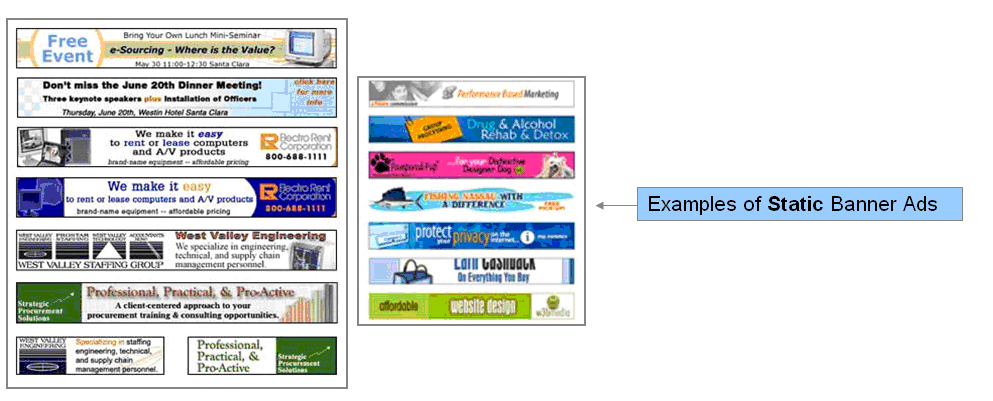
Generally, they are created in one of two ways:
In a graphics program like Adobe PhotoShop, which allows a graphic artist to create an appealing ad by bringing together various graphic elements
These are often called static banner ads.
In an interactive graphics program like Adobe Animate (formerly Flash) which brings graphic elements together with interactive elements such as sound, animation, video, etc.
These are often called dynamic or interactive banner ads.
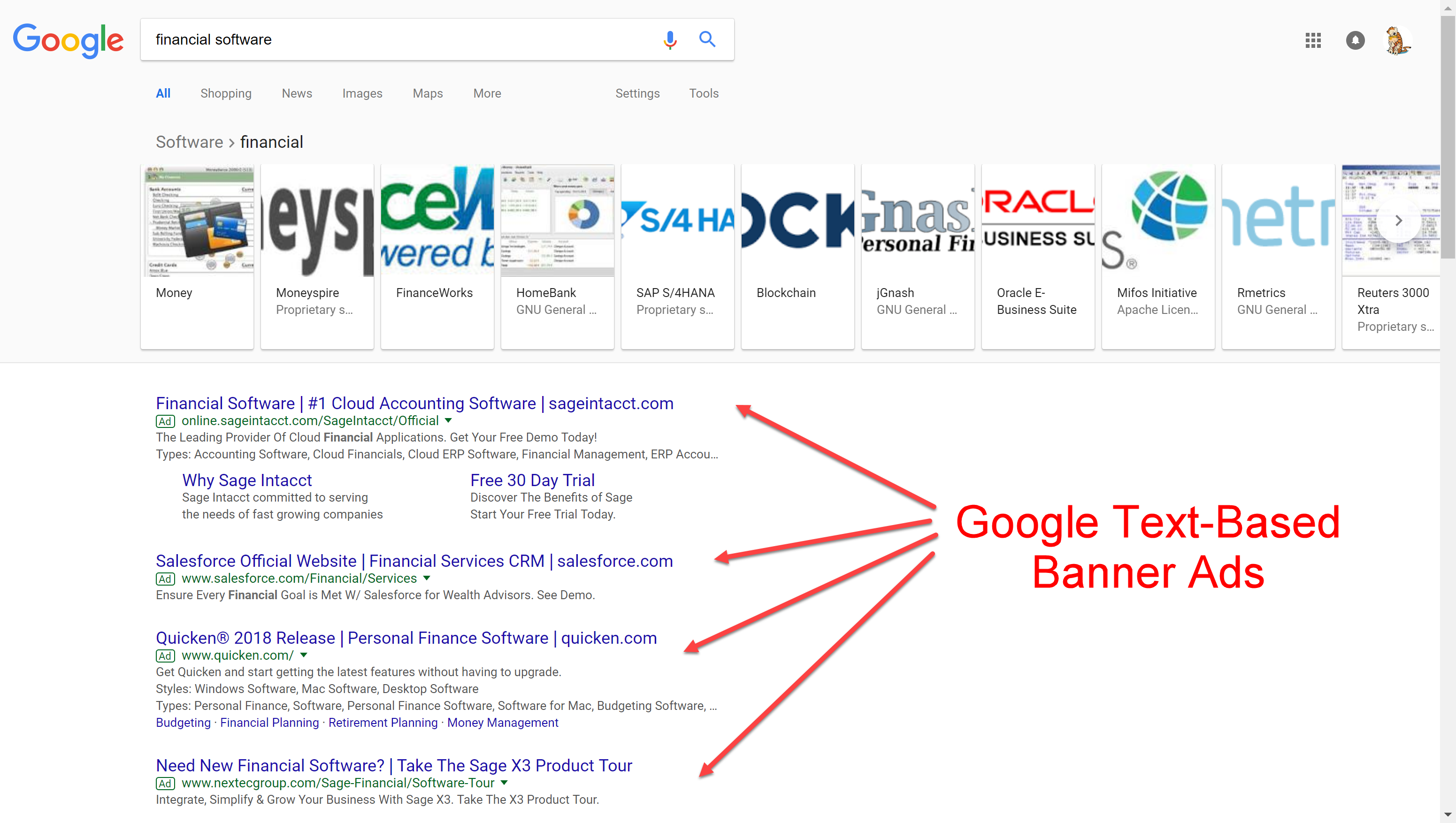
Google also has their own banner ads that are purely text based like in the image below:
Overview
We will talk more about Google's advertising system in just a minute, but I want to give a high level overview of banner ads first.
What many websites do is offer page real-estate on their site for advertising purposes, in much the same way that newspapers sell advertising on their pages. This helps them to defray the costs of hosting the site, and can even be an important source of revenue for a business. For example, think about those free websites you use every day (Hotmail, Fantasy Football, Instagram, etc.)...you may have wondered how they are able to offer such rich services free of charge to everyone. The answer is that they use advertising to pay for the services.
Now, there are a couple of other things you need to know about banner ads. First of all, unlike a newspaper, a website can use the same real estate for more than one ad. Often, a site will have an ad at the top of their page that rotates between several different banners (or be delivered based on what geographic location the user is coming from, a topic we'll cover later in the course). What they are doing is saying to potential advertisers, "For X dollars a month, you can be one of 5 banner ads in the rotation at the top of my website". Then, they have a mechanism built in so that all of the advertisers get equal time at the top of the page.
If this seems like a somewhat losing proposition, it's really not. Think about sites that get millions and millions of hits a day, and that you're 1 of 5 people in a rotation. Very inexpensively, your ads are reaching millions of people each day!
 | With that said, it's important that you pick websites to advertise on that have relevancy to your business. For example, if you work for one of the big three, you might choose to put banner ads up on Yahoo! Autos or Cars magazine. Alternately, you could choose to go after a site whose users fit a certain age demographic such as Social Networking Sites, WebKinz, etc. This might seem obvious to you, but I have seen businesses take a "shotgun" approach to their banner advertising and it's not a very good use of resources unless you're out there to just figure out what works and what doesn't. Performance metrics, which we discussed last week, play a critical role here. Remember how we talked about being able to measure where people were coming from? Software is used to specifically parse out the site traffic that comes to us from banner ads. In this fashion, we can better refine our banner advertising strategy. |
Now, there are a couple of different ways that sites can get advertisers to pay for banner ads, and each has its own relative strengths and weaknesses:
 | Flat fee banner advertising is like the example I used above where you pay a flat fee to "own some real estate" on another website. The advantage here is that your costs are fixed. In other words, no matter how many times your ad is displayed or how many times your ad is clicked on, you pay the same rate. However, this may not be an optimal solution for your business. Wouldn't it be nice to just pay when users actually clicked on your ads? It turns out that this is an option! Pay-Per-Click banner advertising is where you pay a flat fee only if someone clicks on your ad. So, in other words, you pay nothing (or very little) for the page real estate, but only for how effective the banner ad is at driving traffic to your site. The disadvantage here is that your costs are a lot more variable, but hey, you're paying for success right? |
In general, I am seeing more and more advertising of the "pay-per-click" variety because it just makes too much sense. There's a lot less risk involved for a business, and the worst that can happen is that you get more traffic to your site (though this isn't necessarily true, as you'll find out when we talk about robots later in the lecture).
Google AdWords and AdSense
No discussion of banner advertising would be complete without a discussion of Google's AdWords (discussed last week) and AdSense technologies, since they are a very important part of banner advertising today. Earlier in the lecture, I placed a screenshot of a Google search, and pointed out the places where their banner ad advertising is. This is Google AdWords in action.
As you should recall, Google AdWords is technology that allows advertisers to associate their advertising with certain keywords that a user would type into Google. So, you are targeting your ads to people based on the things they are interested in. In the example above, I search for the word "toys", and I received a bunch of advertising for sites that sell toys before I saw my search results (but, note that they look like search results). It would be the same idea if you searched for "food" or "electronics" - you would always see different advertising based on the word you searched on. Google also allows you to do more refined targeting with your keywords. For example, if you wanted to target users within 30 miles of Troy, Michigan who are searching for the keywords you've identified, you can certainly do that! We'll talk a little more about how that works later in the course!
Since Google AdWords is a pay-per-click service too, so you only pay if people click on your site. You should also know that, just like in search engine optimization, "being first" on the list is important. But, how do you become first? It's not like search engine optimization where you use a variety of techniques to get yourself noticed. Again, Google does something very clever - they set the ad positioning up to a bidding process with the highest bidder getting the highest position. In this fashion, Google lets the "free market" determine one's positioning in the list of ads. This is yet another way that Google can make money on banner advertising.
Moving on to Google AdSense, it is important to note that Google AdWords will only show up on Google's site and no where else. However, Google has created an opportunity for website owners to take advantage of their AdWords technology by creating AdSense. What AdSense does is allow Google to show AdWords banner advertising on other people's sites. Google will crawl through the content of your site and send you ads that are most relevant to your users. AdSense will also display AdWords advertising on your site if you decide to use Google's search engine for searching through your site's content. Best of all, you get paid when someone clicks on the ads. This is truly a win-win for both parties - Google gets more exposure for their ads and the people who run a particular site get "free money" for doing things they were already doing. It also helps to explain why Google owns the popular blogging platform, Blogger - anywhere they can stick their ads, they are going to try!
Obviously, however, one has to be careful about using AdSense on a website - the last thing you'd want to do is have ads on your site that would link to a competitor of yours. Towards that end, Google is pretty helpful - they have some nice tools to suggest ads for your site that would be appropriate for you. Because Google makes this process virtually painless, it is not all that hard to convince consumers to give it a shot.
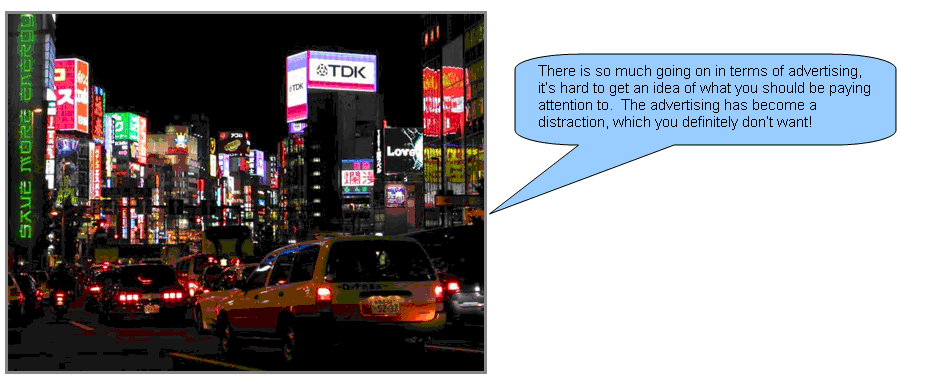
One thing to just watch out for, though, is that you need to be careful that your site doesn't become "Tokyo at night". Looking at the picture below, I think you can get an idea of what I mean.
3-3: Dynamic Banner Ads
In the last lecture, I talked about the difference between static and dynamic banner ads, and showed some examples of static banner ads. Above, I have included some examples of dynamic banner ads.
As you can see, there is a big difference between the two types of ads. Dynamic ads allow for a lot more interactivity. For example, you can make snow fall, animate graphics, roll text across an image, dynamically load content and data from a remote site, search a website, play videos, and do a host of other things.
Adding interactivity to your banner ads can make them a lot more noticeable since they draw attention to themselves through movement or sound. I have even seen ads that have a little fly buzzing around and incite you to click on them with the lure of "killing the fly". This is again a very clever way to get you to click on an ad!
In the last lecture, I stated that dynamic or interactive ads are usually created using a software program called Adobe Animate. What this software does is allow you to bring together animation, sound, video, and graphics into one interface that is (somewhat) easy to use and very powerful. It also takes some of the headaches out of trying to make sure that your ads are "write once, play anywhere" - Adobe handles a lot of the cross-browser types of issues we discussed earlier in the course. Animate also produces HTML5-compliant animations that replace Flash-based technologies that have been around for the past 20 years or so.
Animate itself is "somewhat" easy to use - getting the basics down is fairly straightforward, but getting really good in it takes a lot of time and practice. Further, creating content that's truly interesting and engaging with takes someone who's really good with graphics, which is also quite difficult. It is not uncommon to find someone who's really good with the programming elements of Animate, but lousy with the graphic elements and vice-versa. Each "side" of Animate programming uses a different side of the brain.
I am not going to make any of you work in Animate or anything crazy like that, but it is a tool I want you all to have an awareness level of. Just the basics are all you are likely ever going to need in your careers!
3-4: Chapter 10
Chapter 10 talks about how the Internet affects pricing and the authors are pretty straightforward in their coverage of all of the relevant factors affecting pricing strategies. I do, however, want to spend a little time pointing out a couple of things that also play a role...
Early in the chapter, your authors talk about several cost savings that are possible with online shopping. To this list, I want to add two more things that affect cost:
|
| The Internet allows consumers to "cut out the middle man". Companies like Orbitz.com and Priceline.com allow you to eliminate the need to have a travel agent plan a trip for you. Banks like ING Direct are completely online, and thus save costs by not having to have physical locations where people do their banking. Insurance companies like ESurance.com and Progressive.com save costs by selling insurance direct to consumers, thus eliminating unnecessary overhead. Understand that these "middle men" were placed "in the middle" originally for a reason - navigating through the myriad of travel, banking, insurance, etc. options used to be a lot more difficult. Access to information just wasn't what it is today, and buyers needed help wading through all of their options. That's where the middle men came in - they are a convenient and friendly face to help us figure it all out. But, with price transparency and online helps of every sort, it is becoming apparent that we don't need nearly as many of these folks as we used to. Further, Internet technology is helping "middle men" to become more efficient, thus enabling them to handle more customers than they used to. While this is bad for the "middle man" job market, it is allowing firms to offer much lower prices than they used to. |

|
| The Internet allows consumers to "skip the sales pitch". Perhaps one of the biggest benefits (and biggest drawbacks) of the Internet is that is very impersonal. We can go online and see what other people have to say about a given product. Because of transparency, we can find the item we want at the price we want it at. Buyer's guides can tell us what to look for in a good we want (such as a new HDTV). And, all of this can be done without talking to a soul. How many times have you walked into a store, only to have a sales person start giving you advice about the various products the store has for sale? Sure, that's their job, but where else in life are you expected to just take advice from someone on blind faith after knowing them for 15 seconds? What's more, near the end of the transaction, there is almost always some pressure to add a warranty (that you know they are making a huge profit on) or some other overpriced add-on that you don't need. Who needs that aggravation? I think people's natural inclination is to try and be nice, but salespeople have a way of not taking no for an answer (they are trained this way) until you have to rudely say no. I, like most others, find this to be very uncomfortable. Being uncomfortable during a sales transaction is an emotion that sticks with people long-term - even if you are happy with the transaction, your feelings about how the transaction was carried out may keep you from entering the store again. |

Also consider the sales person's motives. Perhaps they are on commission, and get a greater "piece of the pie" by steering you to a certain product. Or, maybe there's a kick-back the manufacturer will give to an employee (like a free trip) who sells the most units. Having done retail sales for a number of years, I can tell you that these things happen all the time. It is for this reason that I make it a point to avoid traditional retail transactions at all costs. And, when I do have shop at a retail store, I generally make it a point to have all of my homework done first. That way, I know I'm not going to pay too much or get steered into buying something I don't need.
To illustrate the second bullet point, let me just tell a quick story about an experience I had when needing to buy a new TV.
From Experience
A few years ago, my precious 10 year old TV had finally bought it. My kids had ruined the front input jacks on the TV, the TV remote was destroyed (again, by the kids), and the screen kept flickering in and out. It was time for a new one. Being a sort of snobbish about TV, I wanted to get a new HDTV set, and being male, I wanted to get the biggest TV that would fit into my TV cabinet (I got this to within a quarter inch). I realized that there wasn't any way I was going to be sure about "fit" by buying on the Internet - I was going to need to go to a store with a tape measure.
However, before I went, I had a set list of TVs I wanted to measure that fit my specific criteria. I also had a list of the best prices for each set. While I had no intention of buying a TV in the store, I would have been perfectly willing to buy one at the store provided the TV fit and the price was right.
With my information in hand, I headed off to the store where I have promptly directed away from what I was originally looking for and into what the sales person wanted to sell. However, I was able to redirect the conversation back to the TVs I wanted to see. I measured them all up, found the one I liked best, and the salesperson wanted to talk price. I told her that she didn't need to waste her time, because the price in the store was way more than I wanted to pay, and I brought out my price sheets. Very annoyed, the salesperson told me that the store doesn't match Internet prices and told me "good luck rolling the dice online". All she ended up doing was reaffirming my decision not to buy anything from that store.
My point in telling you all of this is that by having all of the information I needed well-researched and with me at the time, I was able to control the entire exchange at the store, skipping the sales pitch and getting me to what I really wanted (a measurement and nothing else). This brings us back to something I talked about in the first week of class when I talked about fundamental themes for why people use technology. Recall that one of them was control. To take things back to your textbook for a minute, they do spend some time talking about how the power in a sales transaction has shifted a bit more to buyers.
And, for what it's worth, I couldn't be happier with the TV I purchased online - apparently, it wasn't the roll of the dice my sales person said it was...
Price Elasticity
 | Your textbook spends a little time talking about how Internet prices are often highly elastic. I have noticed this trend a great deal. Believe it or not, Amazon.com does this all the time. One day a soccer ball will be $19.99, and the next it'll be $12.99 - good to know when you're doing birthday or holiday shopping, right? The problem is that customers are starting to get smarter and smarter about this, and are thus sometimes disinclined to do business again with an online company if they feel that they got ripped off. Consider this example: One of my relatives was recently on a flight where they had gotten a great deal on their plane tickets from an online site. The passenger next to them had paid over 4 times the price my relative had paid from the same site! While this demonstrates high price elasticity, the person sitting next to my relative was livid and swore never to buy from that site again. This has led to some sites, such as Orbitz.com, to offer price guarantees that refund the difference between the price paid and a lower price. Note, too, that this strategy helps Orbitz.com out - people are more inclined to buy early and feel safe in their transaction, and that's a good thing too. |
Payment Sites
Your textbook spends some time discussing electronic payment options. This is a very important topic in this field because they pretty much enable people to feel confident with sites like eBay where both parties in the transaction may not be exactly trustworthy. Today, many e-commerce sites also take forms of electronic payment instead of credit cards, which is a convenience for many users. Indeed millions of users use sites like PayPal and e-payments every day.
Unfortunately, this convenience has caused hackers to take notice. What hackers do is a technique called "phishing" to try and fool consumers to enter their username and password into a fake website that looks like the real thing.
How this works is that hackers will send you an email that looks something like the following:
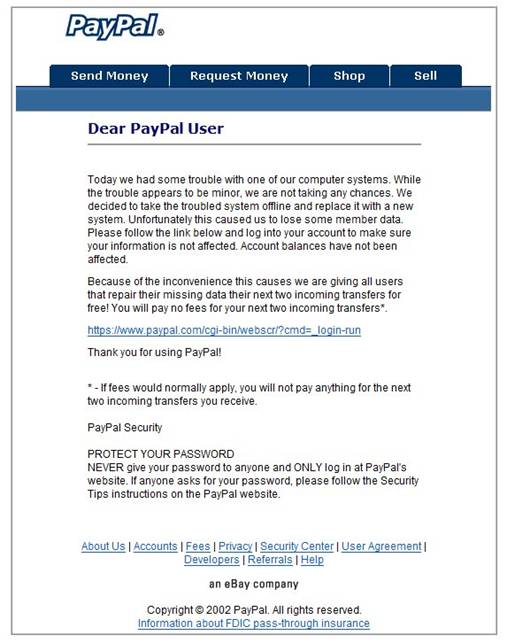
 | The branding on the email looks legitimate, and the link provided looks legitimate (though, we know from studying HTML that there is a difference between the "HREF" in a link tag [], and how you title a link). You can see how users would be fooled into thinking that there was a legitimate security issue, and that they need to log in so that they can get it corrected. The problem is that all customers are doing is logging into a fake website where their authentication credentials are being stolen. It can be very difficult for people to tell the difference between a real message and fake ones like the one above, so my recommendation is to always askwhen you are not sure. Many times, the company will be aware of the scam and may ask you to forward them the suspicious email so that their security team can look into it. The thing to know here is that these types of things are very possible (and we'll talk about this a little more next week), and I've seen this happen with banks, utility companies, credit cards, etc. |
3-5: Bots
Last week, we talked about bots (or spiders, or crawlers) in the context of search engine optimization. This week, we'll talk a little bit more about what they are and how they work. Short for "robots", bots are automated programs that crawl through the Internet looking for things.
In the context of search engines, bots crawl through a site and automatically catalog its contents like we discussed last week. Each major search engine writes its own proprietary bot that handles this and ranks pages according to its own algorithm. But, what if you are still working on your site and don't want it cataloged? Or, what if you have certain directories you don't want the bots to traverse? Well, there is a way to do this too.
What you do is place a file on your server called "robots.txt" that tells bots where they cannot go through your site (by the way, there is a "Sitemaps" standard which tells robots what sites it should crawl through). Here are a couple of sample robots.txt files so that you can see how this works:
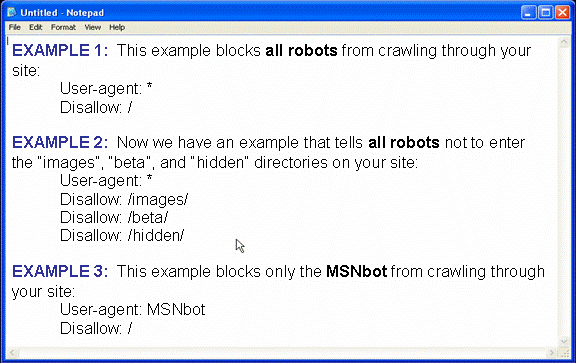
I think this is enough for you to get the idea for how this works.
| The robots.txt file is only a recommendation - robots do not have to "follow the rules" so to speak. There are a number of rogue bots out there that will crawl through your site whether you like it or not. In those cases, other means of protecting your content, such as blocking those bots entirely through your firewall, need to be pursued. |
Price Aggregators
Now that we've discussed bots a little in the context of search engines, let's talk about them in the context of pricing aggregators. Obviously, there are not people who click through the whole Internet looking for the best deals out there so that they can be placed up on a website - robots can take care of this automatically. They crawl through sites just like search engine bots do only they are looking for specific price/shipping information, as well as product reviews.
They are also looking out for great deals such as free items, marked down items, or store coupons. This is where you need to be very careful. If one of those bots picks up your site and posts it on one of the pricing aggregators, you can run out of inventory in a hurry. Consider this example:
A business I know of, in order to build brand awareness, created a free T-Shirt campaign where customers and friends of the company could go to a site and order a free shirt with the company logo on it. The business was not very large, so they figured that even if someone stumbled on the site and ordered a shirt it wouldn't be a big deal. Here's the problem - they put their promotion on the homepage of their website and a bot found it. Next thing you know, 11,000 orders had been placed for the free shirts! Now the company had a big problem - they could either blow the entire advertising budget paying for the shirts or just not honor the offer. Either way, what was supposed to be a fun marketing opportunity turned into a bit of a headache!
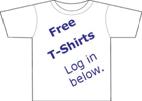 | Before I close this topic, note that one way the company could have gotten around this issue would have been to place the content for the promotion into an image - bots often have a hard time reading text that is placed on images (this is why image ALT attributes exist)! So, keep that in mind as you move on in your careers - things that you place on an image cannot be indexed on your site. |
3-7: Building Trust
| All of the segmentation, targeting, and pricing in the world isn't going to do a lick of good unless your customers know you're trustworthy. Look at what happened to traditional companies like Target as a result of lax security - millions in lost sales, customer angst, and scrutiny from the government. Rumor has it that there's no such thing as bad publicity, but this is a lot of bad publicity. Companies that are careless with security and their customer's data are not going to last long. Without belaboring this topic, I want to present to you some things that you need to think about with respect to building "e-trust" in your business. This list came from selfseo website, and in some cases, I have offered commentary on what's being stated. |
| 40 Simple Ways to Build Trust in Your Website Visitors | |
| 1. Your website design is the first impression. Make sure it is professional and relevant to the subject matter. I can't believe how often people miss this one. Too often, I hear "just get something up" or "it doesn't matter what it looks like as long as the content is there". Ask yourself this: would you want to walk into a store that had garbage all over the front of the store, looked dirty from the outside, and had graffiti all over the exterior? Bottom line: if you're not going to take care of your public face, how are you going to take care of your customers? | |
| 2. Navigation must be intuitive. If visitors can't find what they are looking for easily, they will question your competence in providing what they want. | |
| 3. Make the website personal by giving it its own tone and voice. People buy people. | |
| 4. Follow the HEART rule of creating online content. (Reminder: HEART stands for Honest, Exclusive, Accurate, Relevant and Timely.) | |
| 5. Use language that is appropriate to the audience. It will build empathy. | |
| 6. Regularly add new content to your site. It shows that the business is alive and kicking. A site that is stale is a site where nothing is going on. You have to give your customers a reason to view your site on a regular basis. | |
| 7. Review all links. Doubts will quickly form in your visitors' minds if links don't work or, worse still, take them to error pages. This is related to point #6. Bad links usually signify old information, which isn't a good idea. | |
| 8. Good grammar and spelling matter. Errors give the impression of sloppiness and carelessness. This is why we spend so much time harping on this in school... ;) | |
| 9. Don't make outrageous and unbelievable claims, like "Read this blog and you'll be a millionaire by the end of the week." People are used to scams, get-rich-quick schemes and rip-offs. | |
| 10. Publish REAL testimonials and third-party endorsements. Try to always use real names and link to websites where possible. Some sites show images of letters sent by happy customers. You have to be very careful about using real names on the Internet so that those people do not get spammed or harassed. I recommend getting permission to use a testimonial before you post it as well. After all, the customer is paying you a compliment, and you want to show your appreciation. | |
| 11. Publish case studies about customers you have helped, who use your product, etc. Build yourself a portfolio of people who like you. This helps with the selling process as well! | |
| 12. Don't put down, curse or insult competitors. It's unprofessional. It is better to offer an objective comparison of competitive services or products. | |
| 13. Focus on building your long-term reputation, not on making quick sales. | |
| 14. Write articles for humans, not search engines. I see where they are going with this, but I think you can have your cake and eat it too with this one. | |
| 15. Make your 'About Us' page personal and comprehensive. It plays an important part in making visitors feel comfortable that real people are behind the site. | |
| 16. Publish your photo or the photos of the key people involved with the site. Again, this reinforces the fact that there are real people behind the screenshots. | |
| 17. Clearly identify who is behind the site. Nothing creates more suspicion than a site that tries to hide the identity of its publishers. | |
| 18. On the 'Contact Us' page, provide an email form, telephone number, fax and address of the company. In Europe, it is a legal requirement for sites taking funds, but even sites driven by advertising will benefit from openness. It drives me crazy when sites don't do this. I want to know, as a consumer, that I can call someone to take care of my problems. | |
| 19. Provide a telephone number that people can call and talk to a person. This is redundant with #18... | |
| 20. Provide Web addresses linked to the website domain, not addresses from free webmail services such as Hotmail and Google mail. Using one of the freeware websites to conduct business is extremely unprofessional, and raises security concerns. How do your customers know you are who you say you are? | |
| 21. Think carefully about reciprocal links. If your site is about organic food and you have links to Party Poker, people are going to question your integrity. | |
| 22. Think carefully about the adverts you display on your site. Ensure that they are relevant to your subject and audience. | |
| 23. Write and publish your privacy policy. Be clear about what you will and will not do with any personal data you collect. State that you adhere to all data protection laws. Make it easy to read and don't use legal gobbledygook. This is absolutely essential, as it is essentially a contract with your customers (and is enforced as such under the law). There are a number of templates out there that can help you create your policy and make sure it's reviewed by your company lawyers. I'd also add that you need to establish an acceptable use policy, stating what behaviors you will and will not tolerate. | |
| 24. Write and publish a security policy. State what measures you take to ensure that all transactions are secure as well as how well you handle customers' data. Note that a security policy is not an acceptable use policy, nor is it a privacy policy. They are three separate policies with three separate purposes. | |
| 25. Ensure that you have a security and privacy policy which is linked from the footer on every page. Make the link more prominent on all the order pages. | |
| 26. Clearly publish your guarantee. I would recommend making it a 100% money-back guarantee if possible. In other words, how do people feel about some companies' "15% restocking fee" policy? | |
| 27. Clearly state your refund and returns policy. | |
| 27. If you use PayPal, put the PayPal logo on your site. If you have a merchant services account with a major bank like Citibank or HSBC, put its logo on your site. | |
| 29. Use Google search on your site for two reasons. First, it is a great search solution which will help your visitors find what they are looking for. Second, having the Google name on your site instills trust. | |
| 30. If there are well-known industry associations for your subject, join up and put their logos on your site. | |
| 31. Have a forum on your site and respond quickly to questions. Have the attitude that you are happy to help others without receiving an immediate reward. As the old saying goes, 'Givers always gain.' There is a lot of value in building a community of your users. It shows that there are other people out there who trust you... | |
| 32. Allow people to comment on articles. Interactivity and an exchange of views build community and a sense of involvement. | |
| 33. If people provide constructive criticism or comments in the forum, don't delete them, but respond with your point of view. The exception I have to this rule is if the commentary is slanderous, harmful to someone else, or contains a lot of vulgar languages. This is where your "acceptable use" policy comes into play... | |
| 34. Use the words 'secure website' whenever you try to get any information from visitors, including newsletter sign-ups, forum input, and payment. You also need to make sure that this is true. Keep your SSL website certificate up to date and provide your users with the best security possible. Consider using an "Extended Validation" security certificate that tells customers that you've taken extra steps to make sure your users can trust you. | |
| 35. On every page, state, "We take your privacy and security very seriously." Link the statement to the security and privacy policy. | |
| 36. If you are selling a subscription, offer a low-cost, entry-level option. This could be a one-day taster, 'a week before billing starts' or a monthly trial. ...and make it so customers have to opt-in to longer-term service. Automatically enrolling customers after a trial period have expired often annoys customers - if your services are that beneficial, you shouldn't need to trick people into using them. | |
| 37. Only ask for information from customers that you really need. For example, for an email newsletter sign-up, the only information you REALLY need is an email address, so that is all you should ask for. On the other hand, having a lot of customer data helps us achieve marketing objectives. You are going to have to make some business decisions here... | |
| 38. If you have pricing on your website, make it transparent. I recently went to buy a book which was advertised for $10. When I checked out, they added tax, post and packaging, and the final bill was $19.50. I didn't buy it as I felt they had deliberately tried to mislead me. This comment reminds me of this commercial from Southwest Airlines youtube By the same token, sites that say you can't see the price until you add the item to your shopping cart are ridiculous. | |
| 39. Start a small newsletter of your company/services & circulate it among your clients/employees. Also, publish it on your website regularly. | |
| 40. Allow people to "unsubscribe" from your mailing list. This may sound very obvious, but I have found that many websites still don't follow it. This is also required by law in the form of the CAN-SPAM Act, which will be discussed later in the term. |
After reviewing the materials above answer the following questions:
1) Summarize thoughts and ideas on the material. (note that this is different than summarizing the material itself!)
2) Relate relevant experiences and current trends to the material.
3) Examine relationships between what you learned and the business world.
4) Describe how you would apply learning experiences in the real world.
5) Provide additional information related to the material to your knowledge base.
Step by Step Solution
There are 3 Steps involved in it

Get step-by-step solutions from verified subject matter experts
 Study Help