







Question: Read https://msdn.microsoft.com/en-us/library/7977ey2c(v=vs.110).aspx to learn Queue class. Based on StackTest Example, convert Stack to Queue. 1. Use Queue method Enqueue() to add items to Queue 2.
Read https://msdn.microsoft.com/en-us/library/7977ey2c(v=vs.110).aspx to learn Queue class.
Based on "StackTest" Example, convert Stack to Queue.
1. Use Queue method Enqueue() to add items to Queue
2. Dequeue to remove items.
3. Peek to peek itmes.
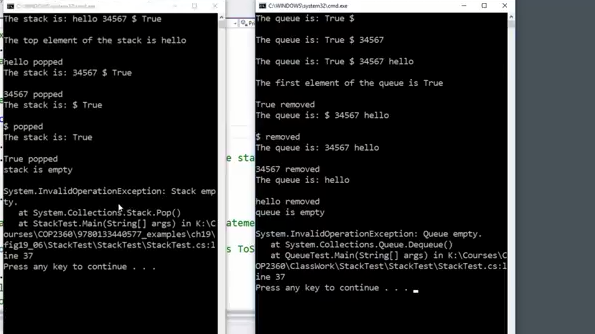
Output >>>>>> C# Program
he stack is: hello 34567 $ True The top element of the stack is hello hello popped he queue is: True $ The queue is: True 34567 he queue is: True34567 hello The first element of the queue is rue removed The stack is: 34567 True is True 4567 popped The stack is: $ True he queue is: 34567 hello popped The stack is: True renoved The queue is: 34567 hello 34567 removed The ello removed queue is empty ystem. InvalidoperationException: Queue empty st rue popped tack is empty queue is: hello ystem. InvalidoperationException: Stack emp at System . Collection Stack-Pop() at StackTest.Main (String] args) in K:\C urses\cOP236819788133448577_examples\ch19 g19 861StackTest StackTest StackTest.cs:1 ne 37 ress any key to continue . . atem To at System.Collections.Queue. Dequeue) at QueueTest.Main(String[] args) in K:\Courses P2368 Classwork StackTest StackTest\StackTest.cs: ne 37 ress any key to continue
Step by Step Solution
There are 3 Steps involved in it

Get step-by-step solutions from verified subject matter experts
 Study Help