Question: Read instructiona on first picture for process map. Thanks! Process Mapping Case Study Create a detailed process map with most of the shapes ( at
Read instructiona on first picture for process map. Thanks!
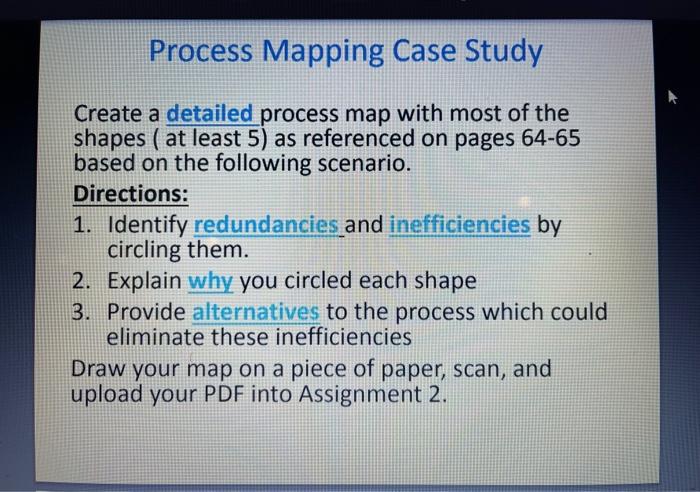
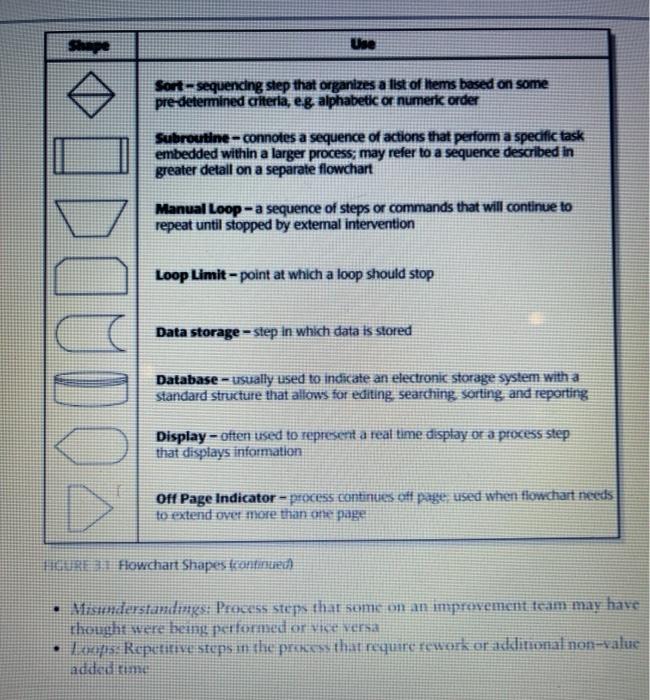
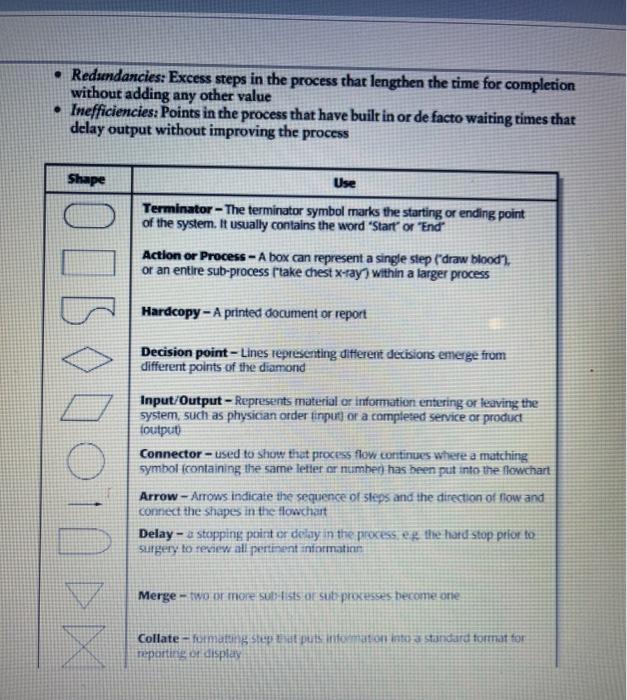
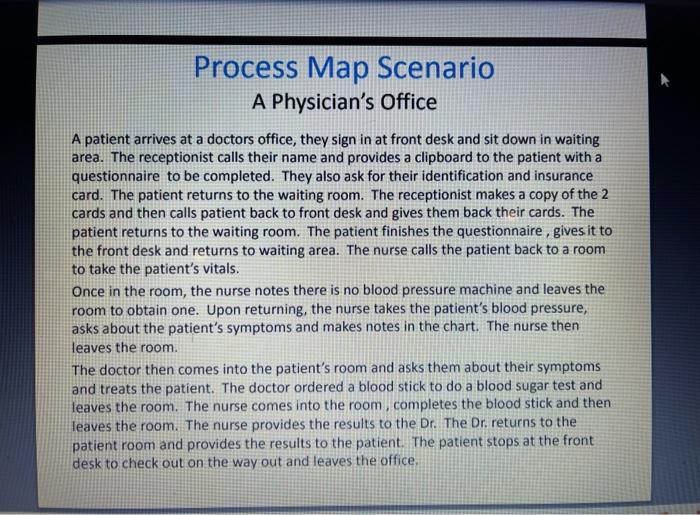
Process Mapping Case Study Create a detailed process map with most of the shapes ( at least 5) as referenced on pages 64-65 based on the following scenario. Directions: 1. Identify redundancies and inefficiencies by circling them. 2. Explain why you circled each shape 3. Provide alternatives to the process which could eliminate these inefficiencies Draw your map on a piece of paper, scan, and upload your PDF into Assignment 2. Shape Use Sort - sequencing step that organizes a list of Items based on some pre determined criteria, e.g. alphabetic or numeric order Subroutine - connotes a sequence of actions that perform a specific task embedded within a larger process; may refer to a sequence described in greater detall on a separate flowchart Manual Loop - a sequence of steps or commands that will continue to repeat until stopped by external intervention HODOUDO Loop Limit-point at which a loop should stop Data storage - step in which data is stored Database - usually used to indicate an electronic storage system with a standard structure that allows for editing searching, sorting and reporting Display-often used to represent a real time display or a process step that displays information Off Page Indicator - process continues off page used when tiowchart needs to extend over more than the page HRE 1 Flowchart Shapes continued Vrstanderstandings: Process steps that some on an improvement team may have thought were being performed or vice versa 5. Repetitive steps at the process that require rework or additional non-value added time Redundancies: Excess steps in the process that lengthen the time for completion without adding any other value Inefficiencies: Points in the process that have built in or de facto waiting times that delay output without improving the process Shape Use Terminator - The terminator symbol marks the starting or ending point of the system. It usually contains the word "Start" or "End Action or Process - A box can represent a single step ("draw blood or an entire sub-process take chest x-ray) within a larger process Hardcopy - A printed document or report Decision point-Lines representing different decisions emerge from different points of the diamond OIBODO10D Input/Output - Represents material or information entering or leaving the system, such as physician order finput or a completed service or product toutput) Connector - used to show that process flow continues where a matching symbol containing the same letter or number) has been put into the flowchart Arrow - Arrows indicate the sequence of steps and the direction of now and connect the shapes in the flowchart Delay - stepping point or delay in the processed the hard stop ptior to surgery to review all pertinent information Merge - two or more sotsists or su processes become one Collate - fumating step at puts information into a standard formattor reporting or display Process Map Scenario A Physician's Office A patient arrives at a doctors office, they sign in at front desk and sit down in waiting area. The receptionist calls their name and provides a clipboard to the patient with a questionnaire to be completed. They also ask for their identification and insurance card. The patient returns to the waiting room. The receptionist makes a copy of the 2 cards and then calls patient back to front desk and gives them back their cards. The patient returns to the waiting room. The patient finishes the questionnaire, gives it to the front desk and returns to waiting area. The nurse calls the patient back to a room to take the patient's vitals. Once in the room, the nurse notes there is no blood pressure machine and leaves the room to obtain one. Upon returning, the nurse takes the patient's blood pressure, asks about the patient's symptoms and makes notes in the chart. The nurse then leaves the room. The doctor then comes into the patient's room and asks them about their symptoms and treats the patient. The doctor ordered a blood stick to do a blood sugar test and leaves the room. The nurse comes into the room, completes the blood stick and then leaves the room. The nurse provides the results to the Dr. The Dr returns to the patient room and provides the results to the patient. The patient stops at the front desk to check out on the way out and leaves the office, Process Mapping Case Study Create a detailed process map with most of the shapes ( at least 5) as referenced on pages 64-65 based on the following scenario. Directions: 1. Identify redundancies and inefficiencies by circling them. 2. Explain why you circled each shape 3. Provide alternatives to the process which could eliminate these inefficiencies Draw your map on a piece of paper, scan, and upload your PDF into Assignment 2. Shape Use Sort - sequencing step that organizes a list of Items based on some pre determined criteria, e.g. alphabetic or numeric order Subroutine - connotes a sequence of actions that perform a specific task embedded within a larger process; may refer to a sequence described in greater detall on a separate flowchart Manual Loop - a sequence of steps or commands that will continue to repeat until stopped by external intervention HODOUDO Loop Limit-point at which a loop should stop Data storage - step in which data is stored Database - usually used to indicate an electronic storage system with a standard structure that allows for editing searching, sorting and reporting Display-often used to represent a real time display or a process step that displays information Off Page Indicator - process continues off page used when tiowchart needs to extend over more than the page HRE 1 Flowchart Shapes continued Vrstanderstandings: Process steps that some on an improvement team may have thought were being performed or vice versa 5. Repetitive steps at the process that require rework or additional non-value added time Redundancies: Excess steps in the process that lengthen the time for completion without adding any other value Inefficiencies: Points in the process that have built in or de facto waiting times that delay output without improving the process Shape Use Terminator - The terminator symbol marks the starting or ending point of the system. It usually contains the word "Start" or "End Action or Process - A box can represent a single step ("draw blood or an entire sub-process take chest x-ray) within a larger process Hardcopy - A printed document or report Decision point-Lines representing different decisions emerge from different points of the diamond OIBODO10D Input/Output - Represents material or information entering or leaving the system, such as physician order finput or a completed service or product toutput) Connector - used to show that process flow continues where a matching symbol containing the same letter or number) has been put into the flowchart Arrow - Arrows indicate the sequence of steps and the direction of now and connect the shapes in the flowchart Delay - stepping point or delay in the processed the hard stop ptior to surgery to review all pertinent information Merge - two or more sotsists or su processes become one Collate - fumating step at puts information into a standard formattor reporting or display Process Map Scenario A Physician's Office A patient arrives at a doctors office, they sign in at front desk and sit down in waiting area. The receptionist calls their name and provides a clipboard to the patient with a questionnaire to be completed. They also ask for their identification and insurance card. The patient returns to the waiting room. The receptionist makes a copy of the 2 cards and then calls patient back to front desk and gives them back their cards. The patient returns to the waiting room. The patient finishes the questionnaire, gives it to the front desk and returns to waiting area. The nurse calls the patient back to a room to take the patient's vitals. Once in the room, the nurse notes there is no blood pressure machine and leaves the room to obtain one. Upon returning, the nurse takes the patient's blood pressure, asks about the patient's symptoms and makes notes in the chart. The nurse then leaves the room. The doctor then comes into the patient's room and asks them about their symptoms and treats the patient. The doctor ordered a blood stick to do a blood sugar test and leaves the room. The nurse comes into the room, completes the blood stick and then leaves the room. The nurse provides the results to the Dr. The Dr returns to the patient room and provides the results to the patient. The patient stops at the front desk to check out on the way out and leaves the office









 Study Help