Question: Read the document How to set up your e-commerce warehouse provided in the Student Resources folder. Critically analyze the decisions made regarding the warehouse layout.
- Read the document How to set up your e-commerce warehouse provided in the Student Resources folder. Critically analyze the decisions made regarding the warehouse layout. List three advantages of Canada Post warehouse. (15 marks)
 Read the document How to set up your e-commerce warehouse provided in the Student Resources folder. Critically analyze the decisions made regarding the warehouse layout. List three advantages of Canada Post warehouse. (15 marks)
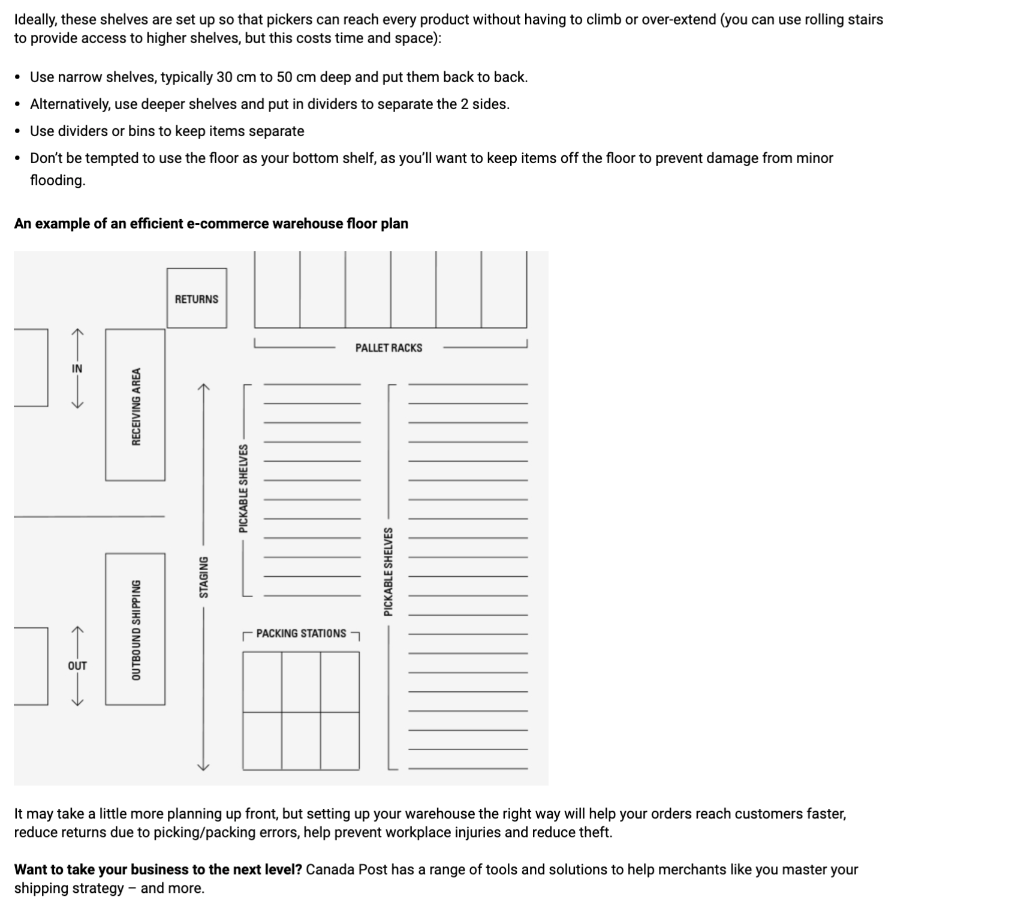
Aaron Rubin founded and was the CEO of a mid-size ecommerce company for 14 years. After struggling to find a warehouse management solution (WMS) that provided the efficiency, accountability and ease of use needed at a reasonable cost, he founded Ship Hero, a robust WMS for ecommerce small-to-mid-size businesses. Ship Hero is a Canada Post partner Your e-commerce business is booming with the orders rolling in. It's the right time to open your first warehouse - or expand an existing one into a larger space. You can fuel future success by setting up your new warehouse for the smoothest flow possible. READ ALSO: An exclusive snapshot of Canadian e-commerce by the numbers Here are some common questions we get asked at ShipHero and my tips on how to set up a warehouse and shipping space for the demands of a growing online store. First, some definitions Receiving station: Where new products are checked in before being stocked on the shelves. If you don't have a dedicated returns station, this is also where returns are checked in. Packing station: Where the customer's order items are packed into a shipping box or poly-bag and the shipping label is applied. Staging station: The section where packed items are put on skids or carts, awaiting a move to the outbound shipping station. Tip. Plan on using about 20 per cent of your square footage for the staging area and dividing the other 80 per cent between shipping, receiving and product storage. Planning out your warehouse First, factor in support poles and any other obstructions into your planning. Fit them into your setup so that your staff won't lose time walking around them dozens of times each day. In and out Now look at the space where products arrive and go out. Ideally, you have a loading dock, but if you don't, create a plan wherever products will come in and out. Create separate sections for inbound and outbound products - you don't want to confuse them! A simple way to do this is to put a sign on a support pole or the wall. You can also use tape on the floor to indicate inbound and outbound sections. Tip. The doors are where products come in and go out, and that's also where theft happens. If an entrance will ever be left open, don't put anything that can be stolen with 10 feet of it. Video cameras and an alarm can help, but it's amazing how quickly products can "disappear." It also helps to orient your shipping and receiving stations so that people working there can see the entrances. The staging area Leave approximately 20 per cent of your total warehouse space as the staging area. It should be adjacent to the shipping station. The staging area contains your inbound and outbound sections, along with garbage (going out) and packing supplies (coming in). On busy days, you will be glad to have that space. Which way should my shelves go? Once your shelves go up and your warehouse is running, it will be tough to find time to change them. So you want them to provide the best possible combo of storage and access from the start. Keep your shelving running in one direction - don't put shelving at one end that runs the other way. If shelving goes in two directions, you end up with less usable space. Orient the aisles so that you can see down the aisles from the packing stations. The ability to monitor pickers is more important than small improvements in walk times. If you have a choice, the aisles should go down the longer dimension, creating fewer, longer rows. When aisles are aligned this way, you can fit in more shelving. Pallet-sized and pickable shelving tips Most e-commerce warehouses have both pallet-sized storage and pickable shelving. Pallet-sized racking is meant for bulk storage, while pickable shelves are sized for human arms to select one item at a time to fulfill an online shopper's order. Pallet racks Pallet-sized shelving is used for: Bulk stock Overstock Packing supplies Getting items out of the way quickly when shipments arrive at inconvenient times. Ideally, these shelves are set up so that pickers can reach every product without having to climb or over-extend (you can use rolling stairs to provide access to higher shelves, but this costs time and space): Use narrow shelves, typically 30 cm to 50 cm deep and put them back to back. Alternatively, use deeper shelves and put in dividers to separate the 2 sides. Use dividers or bins to keep items separate Don't be tempted to use the floor as your bottom shelf, as you'll want to keep items off the floor to prevent damage from minor flooding An example of an efficient e-commerce warehouse floor plan RETURNS PALLET RACKS 2-> RECEIVING AREA PICKABLE SHELVES STAGING PICKABLE SHELVES OUTBOUND SHIPPING PACKING STATIONS OUT > It may take a little more planning up front, but setting up your warehouse the right way will help your orders reach customers faster, reduce returns due to picking/packing errors, help prevent workplace injuries and reduce theft. Want to take your business to the next level? Canada Post has a range of tools and solutions to help merchants like you master your shipping strategy - and more









 Study Help