







Question: Read the following code and complete the program. /l Test12.java import javafx.application.Application import javafx.event.ActionEvent import javafx.event. EventHandler; import javafx.geometry.Pos import javafx.scene.Scene; import javafx.scene.control.Button import javafx.scene.1ayout.
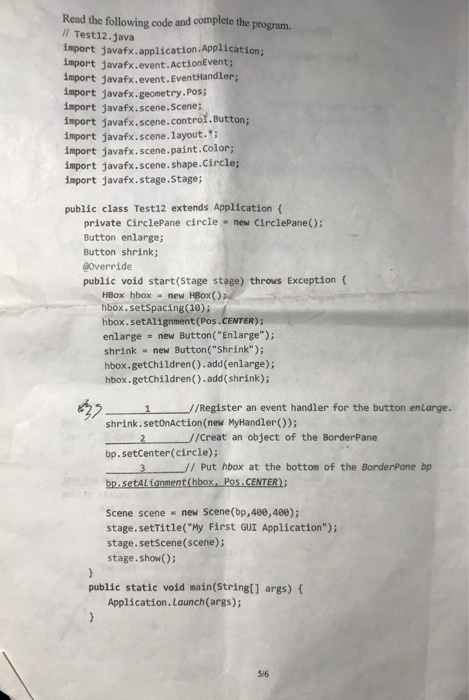
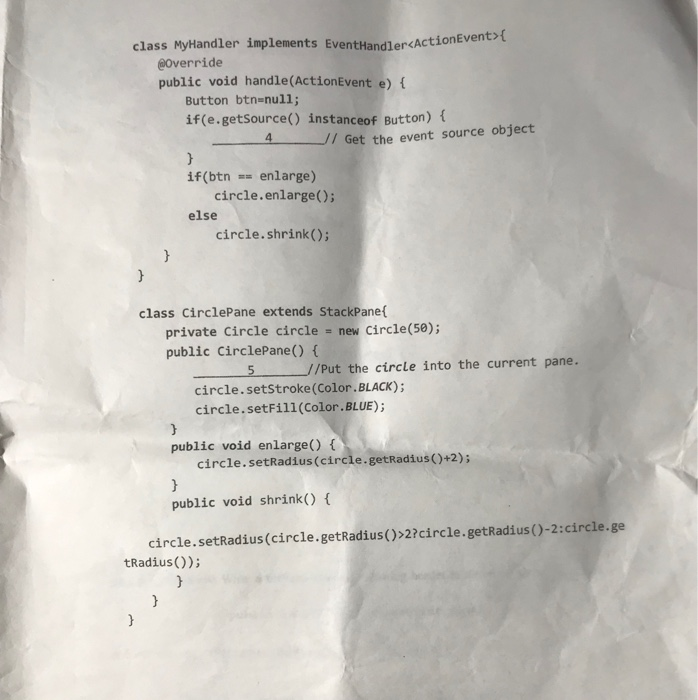
Read the following code and complete the program. /l Test12.java import javafx.application.Application import javafx.event.ActionEvent import javafx.event. EventHandler; import javafx.geometry.Pos import javafx.scene.Scene; import javafx.scene.control.Button import javafx.scene.1ayout. import javafx.scene.paint.Color; import javafx.scene. shape.Circle; import javafx.stage.Stage; public class Test12 extends Application f private CirclePane circle - new CirclePane(); Button enlarge; Button shrink; Override public void start(Stage stage) throws Exception ( HBox hbox new HBox() hbox.setspacing (10); hbox.setAlignment (Pos enlarge new Button("Enlarge"); shrink new Button("Shrink"); hbox.getchildren().add(enlarge); hbox.getChildren().add (shrink); 1/Register an event handler for the button enLarge. shrink. setonAction(new MyHandler)); 1 //creat an object of the BorderPane bp. setCenter(circle); 3Put hbox at the bottom of the BorderPane bp Scene scene new Scene(bp,480,400); stage.setTitle("My First GUI Application"); stage.setscene(scene); stage. show) public static void main(Stringt] args) ( Application.Launch(args); 5/6 class MyHandler implements EventHandlercActionEvent @Override public void handle(ActionEvent e) t Button btn-null; t(e.getSource() instanceof Button) { 4 /7 Get the event source object if(btn E-enlarge) circle.enlarge(); else circle.shrink(); class CirclePane extends StackPane private Circle circle - new Circle(58); public CirclePane() ( 5/Put the circle into the current pane. circle.setstroke (Color.BLACK); circle.setFill (Color.BLUE) public void enlarge) circle.setRadius (circle.getRadius )+2); public void shrink() circle.setRadius(circle.getRadius()>2?circle. getRadius()-2:circle.ge tRadius())
Step by Step Solution
There are 3 Steps involved in it

Get step-by-step solutions from verified subject matter experts
 Study Help