







Question: Read the instructions carefully and provide the code with it corresponding with the comments for this C + + program Our third program will look
Read the instructions carefully and provide the code with it corresponding with the comments for this C program Our third program will look the same to the user as the first program. That is it will write your header information, and then asks the user to enter filename information for the four files. The returns from all of the filereading and writing are checked and if there are any problems, they are reported to the user. Otherwise, the results are shown to the screen and written to a file. A goodbye message is shown when the program is finished.
This program will be constructed differently than the first. In this program you are going to write a ColorSwap class.
class ColorSwap
private:
int numSwappedSIZE; number of colors swapped in a sentence
vector vColors;
string sentencesSIZE;
vector vPhrases;
int totalSentences; number of sentences read
int sentencesSwapped; number of sentences that had their colors swapped
string origResults, finalResults;
You may use a struct again that contains the variables above. Make the struct in Functions.h and create a SentenceData data; object in the class instead.
filenames
string colorFileColorstxt;
string sentenceFileSentencestxt;
string swapPhrasesFileSwapPhrasestxt;
string outputFileOuttxt;
bool bRead;
Read the three text files and assign their data to the class variables
void ReadColors;
void ReadSentences;
void ReadPhrases;
Creates a string with the original information.
void WriteOriginals;
Creates a string with the final information.
void WriteResults;
Checks the sentences for the colors, and performs the swaps
void SwapColors;
public:
Default constructor
ColorSwap default;
Calls the three Read methods, checks that they were successful, assigns the correct filename into the class variables and if all went well, calls WriteOriginals SwapColors and WriteResults
bool ReadFilesstring colorFile, string sentenceFile string swapPhrasesFile;
Creates the output filestream, opens the output file, checks that it's ok If no returns false. If yes, writes the origResults and finalResults into the file. Closes the file. Returns true.
bool WriteFilestring outputFile;
string GetResults return origResults finalResults;
;
There are NO cout or cin statements in the ColorSwap.h or cpp All data is passed into the class in the ReadFile or WriteFile methods or returned via the Get method.
Since your Program had a Functions.h and cpp file set that may contain your Ask functions that obtain the filename information, use this code again. Also, your Header function and GoodBye function can be used again. This means you will have files in this program: The Driver, ColorSwap.h and cpp and Functions.h and cpp Do not put interface functions or the Header or Goodbye into your class. They are not the responsibility of the class. Those all go into the Functions.h and cpp files.
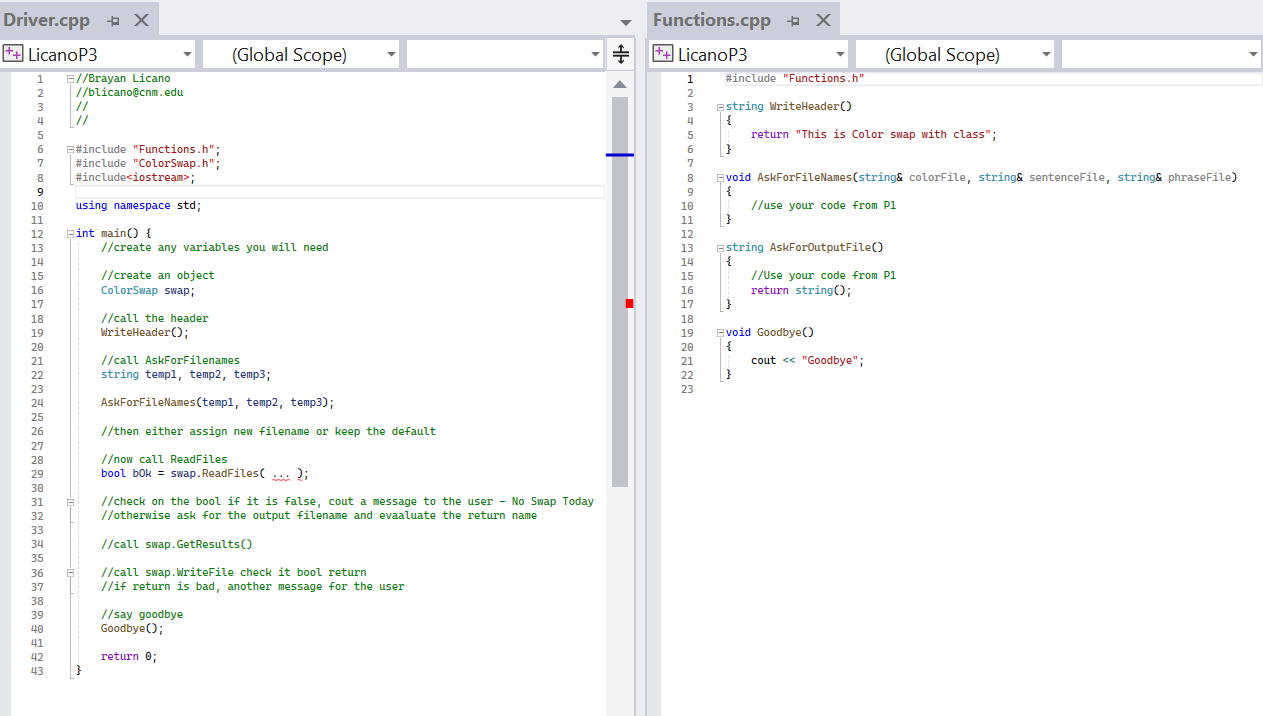
Your main should create one ColorSwap object. After the header is shown, call the functions to get the filenames. Call ReadFiles, passing the input filenames and, assuming that all of the files were successfully read, ask for the output filename. Then call WriteFile. Check the bool return and report back to the user. Display the results using GetResults
Display a Goodbye message to the screen. ColorSwap.cpp #include "ColorSwap.h
void ColorSwap::ReadColors
opens input stream, checks for good open, then read into colorvector
if all is good. If not good, assign bread false
otherwise assign true
void ColorSwap::ReadSentences
Do the same for sentences.txt
if all is good. If not good, assign bread false
otherwise assign true
void ColorSwap::ReadPhrases
do the same for phrases.txt
if all is good. If not good, assign bread false
otherwise assign true
void ColorSwap::WriteOriginals
create a string with the originals and assign it into origResults
void ColorSwap::WriteResults
creates a string with the swapped results and assign it into sswappedResults
void ColorSwap::SwapColors
use your code from P
ColorSwap::ColorSwap
bool ColorSwap::ReadFilesstring colorFile, string sentenceFile string swapPhrasesFile
This function calls all three ReadFile functions and reads into the class variables
Then call some other functions:
WriteOriginals;
SwapColors;
WriteResults;
return true;
bool ColorSwap::WriteFilestring outputFile
This write the original data and the swapped results into a file
In this case, open the file and write original results return false;
Step by Step Solution
There are 3 Steps involved in it
1 Expert Approved Answer
Step: 1 Unlock

Question Has Been Solved by an Expert!
Get step-by-step solutions from verified subject matter experts
Step: 2 Unlock
Step: 3 Unlock
 Study Help