







Question: Recall that the valueless multiple attribute of select elements allows multiple options in a select element to be selected. Recall also that the valueless selected
Recall that the valueless multiple attribute of select elements allows multiple options in a select element to be selected. Recall also that the valueless selected attribute of an option element makes that option initially selected within a select element. Consider the following select element, whose initial rendering is shown at right.

Values "spring" and "fall" are selected. An additional option (say, "summer") can be selected by depressing the Ctrl key while clicking the option. All selections can in effect be cleared by clicking an option without hold down the Ctrl key; then all currently selected options are deselected, and the option clicked becomes the sole selected one. JavaScript code can access the values of the selected options by accessing the options collection of the select object. We can access this collection for the select element shown above with var opts = document.forms[0].season.options; Each element of opts corresponds to one of the option elements in the select element. Each of these elements has a Boolean selected property (true if the corresponding option element is selected) and a value property (the value of the value attribute in the option element). Thus, for example, if the HTML has a div element we can assign the selected seasons as content of this div as follows. var rs = document.getElementById("res"); for ( var i in opts ) if ( opts[i].selected ) rs.innerHTML += " " + opts[i].value; For the selections shown above, this will result in a rendering that shows spring fall When you implement documents where certain select options are initially selected, you must be aware of the fact that what is selected persists through reloading the page even when changes have been made to what is initially selected. For example, if I load the page containing the select element shown above, I get the rendering as shown. If I click on Summer, then the two selected seasons are de-selected and "summer" is selected. If I then reload the page, it remains the case that only "summer" is selected. If you change the initial selections and want to see the result, then close the browser window rendering the HTML document in question, and re-run it. For this assignment, you are provided at the assignment site the HTML document prob3.html with a large gap. This document references the JavaScript file prob3.js (which you write) and calls function go() when the body finishes loading. File prob3.js contains only the definition of go(). The following is file prob3.html with the contents of the form element removed. The initial rendering is shown on the right.
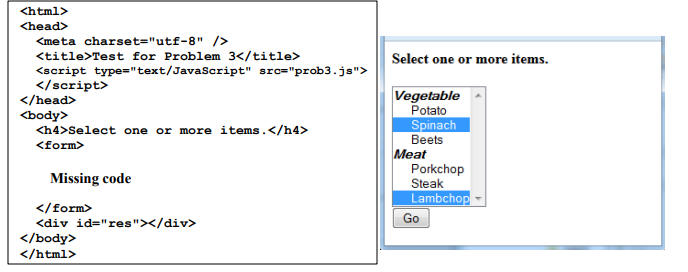
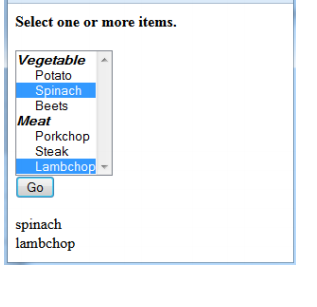
Clicking the button at the bottom invokes function go(). The select element, with name foodCh, has a multiple attribute and a size large enough so that the two optgroup labels and six option contents can be displayed at the same time. The value of the value attribute of each option is the same as its content except that it begins with a lowercase letter. Options "spinach" and "lambchop" are initially selected. Function go() assigns to rs a reference to the div element with id "res". It copies the options collection of foodCh to variable opts then loops over the elements of opts. If a given element is selected, it concatenates onto to the innerHTML property of rs the value of this element followed by a . The result, when the selections are as shown above, is shown in the screenshot at right.
Step by Step Solution
There are 3 Steps involved in it

Get step-by-step solutions from verified subject matter experts
 Study Help