







Question: Recurring theme alert: Nothing in the PSP is difficult in itself, but it takes time and effort to complete. Do not procrastinate on this assignment!
Recurring theme alert: Nothing in the PSP is "difficult" in itself, but it takes time and effort to complete. Do not procrastinate on this assignment!
How to Start?
So how are you going to start developing your PSP? Well, the first thing to do is to review the information provided on threat modeling because I go into more detail on the process of developing your asset attribute table. In addition, take a look at the asset attribute table template and the associated video where I walk through the different cell definitions. The thrust of the asset attribute form is to provide a mechanism for you to not only document or list your important information resources, it will help you with the subjective risk analysis process to get to the point that you not only decide what you want to protect, you will have an better understanding of how much effort you are willing to take.
Then you are going to generally follow these steps:
Make a quick, comprehensive list of important information and technology assets.
For each asset, identify and articulate the likely threats for that resource
Describe the consequences on how bad it would be if you failed to protect that asset.
Guess the likelihood you will need to protect the asset (scale of 110, 1 being no worries and 10 being guaranteed it is a target and needs to be protected!!).
Subjectively choose a level of effort (scale of 110, 1 being whatever and 10 being whatever it takes) you would take to protect that asset; this will be how you prioritize your assets.
Identify the technologies or processes you will use to protect each asset.
Update over time; review regularly.
I attached example photo how to create table for this:
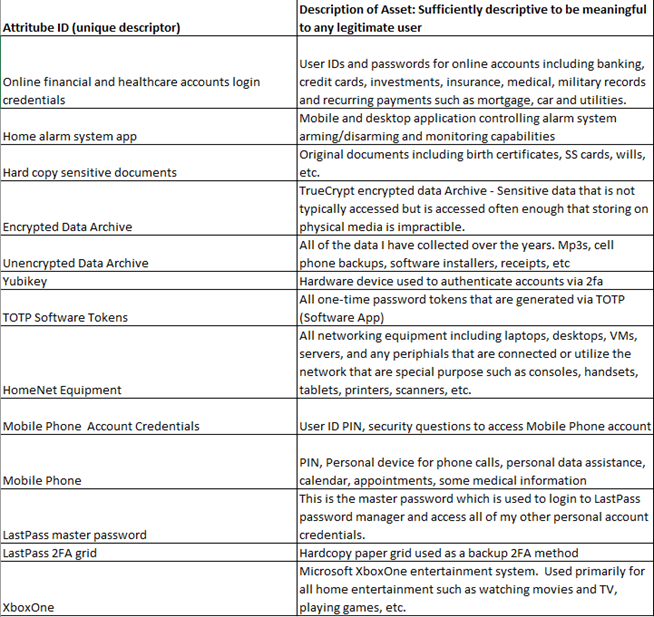
Description of Asset: Sufficiently descriptive to be meaningful Attritube ID (unique descriptor) to any legitimate user User IDs and passwords for online accounts including banking, Online financial and healthcare accounts login credit cards, investments, insurance, medical, military records credentials and recurring payments such as mortgage, car and utilities. Mobile and desktop application controlling alarm system Home alarm system app arming/disarming and monitoring capabilities Original documents including birth certificates, SS cards, wills, Hard copy sensitive documents etc. TrueCrypt encrypted data Archive - Sensitive data that is not typically accessed but is accessed often enough that storing on physical media is impractible. All of the data I have collected over the years. Mp3s, cell phone backups, software installers, receipts, etc Unencrypted Data Archive Hardware device used to authenticate accounts via 2fa All one-time password tokens that are generated via TOTP (Software App) All networking equipment including laptops, desktops, VMs, servers, and any periphials that are connected or utilize the network that are special purpose such as consoles, handsets, tablets, printers, scanners, etc. Mobile Phone Account Credentials User ID PIN, security questions to access Mobile Phone account PIN, Personal device for phone calls, personal data assistance, Mobile Phone calendar, appointments, some medical information This is the master password which is used to login to LastPass password manager and access all of my other personal account LastPass master password credentials. LastPass 2FA grid Hardcopy paper grid used as a backup 2FA method Microsoft XboxOne entertainment system. Used primarily for all home entertainment such as watching movies and TV, XboxOne playing games, etc
Step by Step Solution
There are 3 Steps involved in it

Get step-by-step solutions from verified subject matter experts
 Study Help