







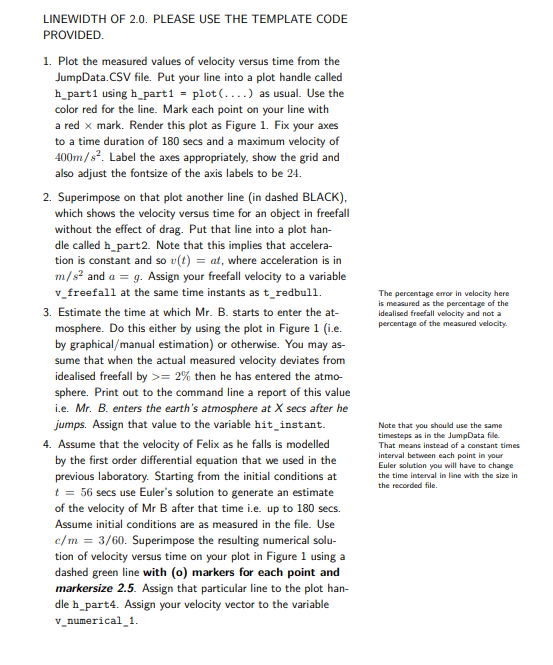
Question: % Red Bull Data plotted. close all clear % Read data from file % First column is time in secs % Second column is velocity
Red Bull Data plotted.
close all
clear
Read data from file
First column is time in secs
Second column is velocity
Third column is theoretical terminal velocity at that time
jumpdata csvreadRedBullJumpDatacsv;
tredbull jumpdata:;
vredbull jumpdata:;
terminalvelocity jumpdata:; You need to use this in the last question
Ntimestamps lengthtredbull;
Calculate freefall velocity vector here
g ;
vfreefall g tredbull;
randsizetredbull;
Part
We are giving you this answer for free
figure;
hpart plottredbull, vredbull, rx 'linewidth', ;
shg;
hold on;
Part
This plot does not have the right linewidth. You fix it
hpart plottredbull, vfreefall, b;
shg;
This is how to put on a grid
grid on;
This is how to fix an axis to a desired size
axissomething goes in here;
axis;
Set the fontsize and label the graph here!!
Calculate when he hits the atmosphere
Part
Need some stuff here or read it off from the graph
verr vredbull vfreefall;
hitinstant ; This is wrong
fprintfMr B hits the earth's atmoshpere at f secs after he jumps
hitinstant;
Part
Now starting from the velocity and time secs
let's update and calculate v
g ;
vnumerical zeros Ntimestamps;
dragconstant ;
start findtredbull ;
Starting from this time instant, calculate the velocity required
vnumerical vredbull ; This is wrong for you to fix
Plot using the dashed green line with markers
hpart plottredbull, vnumericalg'linewidth',;shg
Part
Calculate the percentage error as required
pererror rand; This is just some random number which is wrong
fprintfThe percentage error at and secs is f and
pererror;
fprintff respectively
pererror;
Part
You'll need to modify your euler loop here to do heun instead
Also update the drag constant at every timestamp and change the update
calculation to allow for the new vt term
A hint here that now you have to calculate the velocity using the new
differental equation
constant put it in vnumerical
vnumerical randsizetredbull:end;
This is the handle plot for part You have to plot the right stuff not
this stuff.
Note that the plot linewidth and colour are wrong. Fix it
hpart plottredbull:end vnumericalc;
shg
esterror ;
fprintfThe error at t secs using my estimated drag information is f
esterror;
DO NOT EDIT BELOW THIS LINE THIS IS TO MAKE SURE YOU HAVE USED THE
VARIABLES THAT WE ASKED FOR
Check for existence of variables
if ~existvfreefall', 'var'
errorThe variable vfreefall does not exist.
end;
if ~existhitinstant', 'var'
errorThe variable hitinstant does not exist.
end;
if ~existpererror', 'var'
errorThe variable pererror does not exist.
end;
if existpererror', 'var'
l sizepererror;
if suml ~
errorpererror is not a element vector. Please make it so
end;
end;
if ~existvnumerical 'var'
errorThe variable vnumerical does not exist.
end;
if ~existesterror', 'var'
errorThe variable esterror does not exist.
end;
if ~existhpart 'var'
errorThe plot handle hpart is missing. Please create it as instructed.
end;
if ~existhpart 'var'
errorThe plot handle hpart is missing. Please create it as instructed.
end;
if ~existhpart 'var'
errorThe plot handle hpart is missing. Please create it as instructed.
end;
if ~existhpart 'var'
errorThe plot handle hpart is missing. Please create it as instructed.
end;
Step by Step Solution
There are 3 Steps involved in it
1 Expert Approved Answer
Step: 1 Unlock

Question Has Been Solved by an Expert!
Get step-by-step solutions from verified subject matter experts
Step: 2 Unlock
Step: 3 Unlock
 Study Help