



Question: Reference Larman Figure 10.3 in the text book (Larman, C. (2004). Applying UML and Parttens: An Introduction to Object Oriented Analysis and Design and Iterative
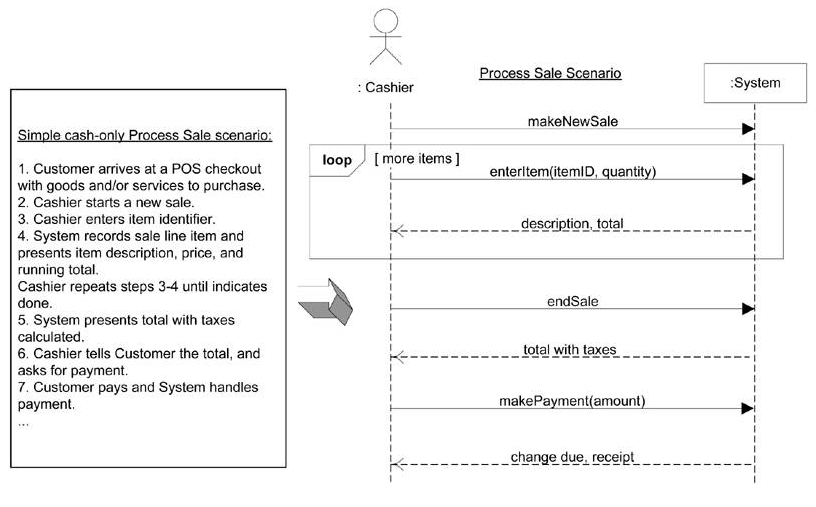
Reference Larman Figure 10.3 in the text book (Larman, C. (2004). Applying UML and Parttens: An Introduction to Object Oriented Analysis and Design and Iterative Development)
Imagine that you are a Software Designer on the NexGen POS project for a major retail store, and your team is following the UP as presented by Larman. A new Senior Developer named Joe joins the team, and makes several changes to the Process Sale SSD (System Sequence Diagrams).
1) Joe removes the "Loop" interaction frame from the scenario, saying it only makes the SSD confusing.
2) Joe expands the SSD to include the cases when makePayment happens via cash and when makePayment happens using credit or debit card.
3) Joe renames the endSale operation to be more specific. It is now called "pressEndSaleButton". He claims it's more clear and therefore better.
4) Joe changes enterItem to scanItem, saying that we know it's a scanner so using the vague word "enter" is not a good idea.
5) Joe writes Operation Contracts for each incoming Operation, with a pre- and post-condition for each. His Operation Contracts are each more than a page long. They are detailed narratives describing the state of the system before and after the operation.
6) Joe states that once his new version of the SSD and Operation Contracts are complete, the Use Cases themselves are no longer important and can be thrown away.
Write a draft email to Joe in MS Word explaining the potential issues and risks involved with each of his changes. Write your thoughts in complete, thorough sentences, and number each response to match the six numbered changes he made.
: Cashier System makeNewSale loop [more items ] 1. Customer arrives at a POS checkout with goods and/or services to purchasee 2. Cashier starts a new sale 3. Cashier enters item identifier 4. System records sale line item and presents item description, price, and running total Cashier repeats steps 3-4 until indicates done 5. System presents total with taxes calculated 6. Cashier tells Customer the total, and asks for payment. 7. Customer pays and System handles payment enterltem(itemID, quantit K description, total endSale --total with taxes makePayment(amount change due,receipt
Step by Step Solution
There are 3 Steps involved in it

Get step-by-step solutions from verified subject matter experts