







Question: Relational Database Schema in 3NF Convert your conceptual model into a relational database schema. Please include all table names, necessary columns, any primary, foreign and
Relational Database Schema in 3NF
Convert your conceptual model into a relational database schema. Please include all table names, necessary columns, any primary, foreign and composite keys and all data types. Use standard UML notation for your tables. Data types should be notated within your table as:
columnName : dataType
Carefully review all tables to make sure each one is in third normal form (3NF). If it is not, modify the schema so that it is. This means your schema may be different from your conceptual model. Do not modify your original conceptual model.
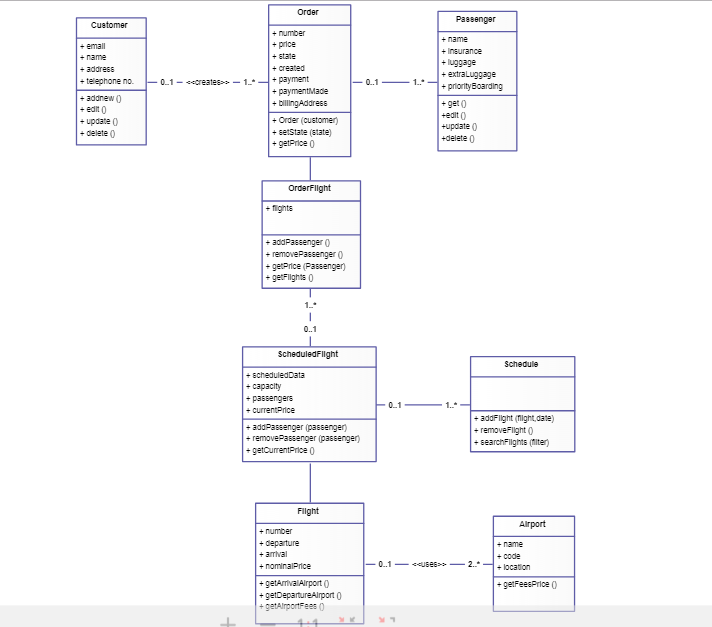
Order Paesenger Customer +number + price +etate + created +emall name + addreE6 + telephone no. + addnew0 + edit 0 +update 0 +delete 0 +Inaurance + luggage +extraLuggage -0.1-wcreates-1-*-+ payment 11rtyScarding + bilingAddres +Order (cuetomer +eetState (state) +getPrice 0 +get0 tedlt0 -update 0 +delete o OrderFlight + addPaeeenger + removePassenger 0 +gerce (Passenger getFlights 0 0..1 ScheduledFlight Schedule + capacity +passengers 01 + addPassenger (paseenger) +removePassenger (paseenger addFlight (might,date) + removeFlight 0 +searchFllghts hiter) Flight Alirport +number + departure +name + code getfeesPrice 0 + getDepartureAlrport 0 +getAirportFees0 Order Paesenger Customer +number + price +etate + created +emall name + addreE6 + telephone no. + addnew0 + edit 0 +update 0 +delete 0 +Inaurance + luggage +extraLuggage -0.1-wcreates-1-*-+ payment 11rtyScarding + bilingAddres +Order (cuetomer +eetState (state) +getPrice 0 +get0 tedlt0 -update 0 +delete o OrderFlight + addPaeeenger + removePassenger 0 +gerce (Passenger getFlights 0 0..1 ScheduledFlight Schedule + capacity +passengers 01 + addPassenger (paseenger) +removePassenger (paseenger addFlight (might,date) + removeFlight 0 +searchFllghts hiter) Flight Alirport +number + departure +name + code getfeesPrice 0 + getDepartureAlrport 0 +getAirportFees0
Step by Step Solution
There are 3 Steps involved in it

Get step-by-step solutions from verified subject matter experts
 Study Help