







Question: Relationship between Pointers and Arrays Background Information - Consider an array defined by double myarray(100); The compiler carves out (8 bytes/double)*(100 array values) = 800
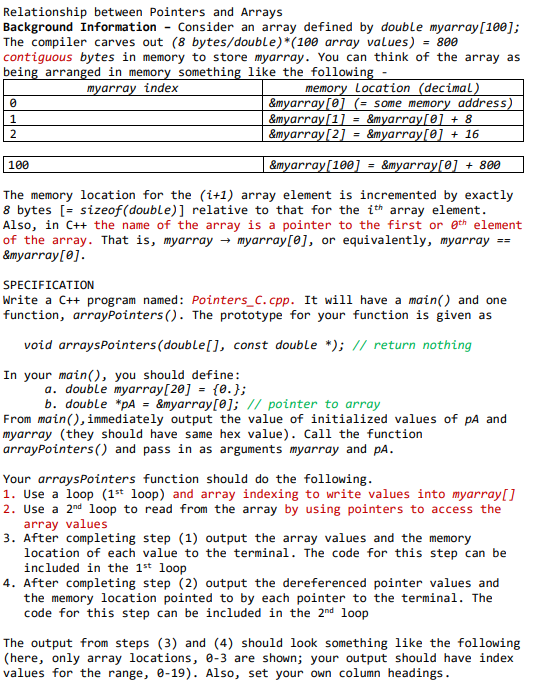
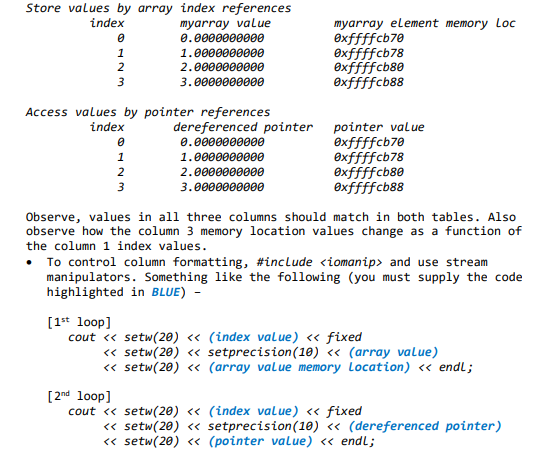
Relationship between Pointers and Arrays Background Information - Consider an array defined by double myarray(100); The compiler carves out (8 bytes/double)*(100 array values) = 800 contiguous bytes in memory to store myarray. You can think of the array as being arranged in memory something like the following myarray index memory Location (decimal) &myarray[O] (= some memory address) &myarray[1] = {myarray[@] + 8 &myarray[2] = {myarray[@] + 16 1 2 100 &myarray[100] = {myarray[0] + 800 The memory location for the (i+1) array element is incremented by exactly 8 bytes [= sizeof(double)] relative to that for the ith array element. Also, in C++ the name of the array is a pointer to the first or gth element of the array. That is, myarray - myarray[@], or equivalently, myarray == &myarray[@]. SPECIFICATION Write a C++ program named: Pointers_c.cpp. It will have a main() and one function, arraypointers (). The prototype for your function is given as void arraysPointers (double[], const double *); // return nothing In your main(), you should define: a. double myarray[20] = {0. }; b. double *pA = {myarray[@]; // pointer to array From main(), immediately output the value of initialized values of pA and myarray (they should have same hex value). Call the function arraypointers() and pass in as arguments myarray and pa. Your arraysPointers function should do the following. 1. Use a loop (1st loop) and array indexing to write values into myarray[] 2. Use a 2nd loop to read from the array by using pointers to access the array values 3. After completing step (1) output the array values and the memory location of each value to the terminal. The code for this step can be included in the 1st loop 4. After completing step (2) output the dereferenced pointer values and the memory location pointed to by each pointer to the terminal. The code for this step can be included in the 2nd loop The output from steps (3) and (4) should look something like the following (here, only array locations, 0-3 are shown; your output should have index values for the range, 0-19). Also, set your own column headings
Step by Step Solution
There are 3 Steps involved in it

Get step-by-step solutions from verified subject matter experts
 Study Help