







Question: Report Journal Entries by using Sage 50 software 5. Issue a single payroll check dated Oct 15, 2024 (for Oct 1- Oct 15, 2024) using
Report Journal Entries by using Sage 50 software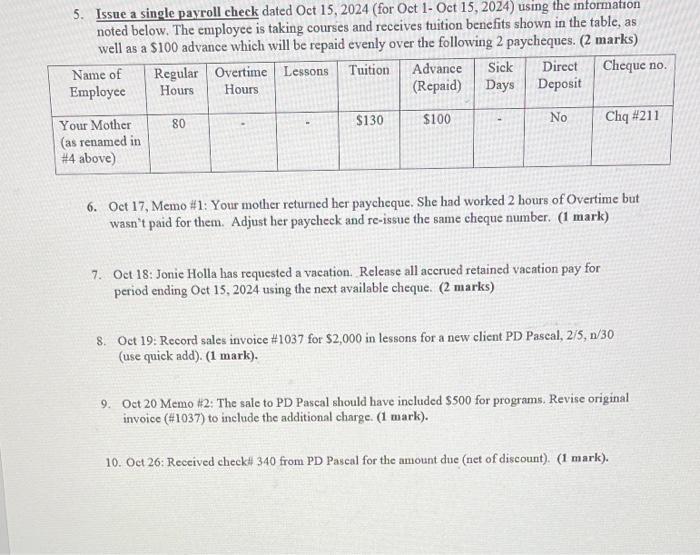
5. Issue a single payroll check dated Oct 15, 2024 (for Oct 1- Oct 15, 2024) using the information noted below. The employee is taking courses and receives tuition benefits shown in the table, as well as a $100 advance which will be repaid evenly over the following 2 paycheques. (2 marks) Advance Sick Direct Cheque no. (Repaid) Days Deposit $100 No Name of Employee Your Mother (as renamed in #4 above) Regular Overtime Lessons Tuition Hours Hours 80 $130 Chq #211 6. Oct 17, Memo #1: Your mother returned her paycheque. She had worked 2 hours of Overtime but wasn't paid for them. Adjust her paycheck and re-issue the same cheque number. (1 mark) 7. Oct 18: Jonic Holla has requested a vacation. Release all accrued retained vacation pay for period ending Oct 15, 2024 using the next available cheque. (2 marks) 8. Oct 19: Record sales invoice # 1037 for $2,000 in lessons for a new client PD Pascal, 2/5, n/30 (use quick add). (1 mark). 9. Oct 20 Memo #2: The sale to PD Pascal should have included $500 for programs. Revise original invoice (#1037) to include the additional charge. (1 mark). 10. Oct 26: Received check# 340 from PD Pascal for the amount due (net of discount). (1 mark).
Step by Step Solution
3.41 Rating (151 Votes )
There are 3 Steps involved in it
Here are the journal entries for the payroll and accounting tasks in the instructions Oct 15 2024 Payroll Journal Entry Dr Wages Expense 475 Dr Tuitio... View full answer

Get step-by-step solutions from verified subject matter experts
 Study Help