







Question: Req:1)You can use only JAVA, C++. 2)Provide a suitable GUI program that is easy to use to support the following features. 3)The Image format is
Req:1)You can use only JAVA, C++. 2)Provide a suitable GUI program that is easy to use to support the following features. 3)The Image format is .bmp. Problem statement: We want to hide secret text messages in a cover image (RGB colored). Interface and functionality requirements: Hiding secret messages.The interface has to be something similar to figure below The screen must be split into three areas. The first area for the original image which is the cover, the second is the place for adding text, the third is for showing the resulting image that hides the secret message. - Push button for loading the cover image and secret .txt file. The secret text can be loaded directly from a file, and you can edit it inside the box. - Push button Hide the result is shown in the result area. It uses the cover image to hide the secret text and the result is displayed in the dedicated area. There is an option to save the resulting image in a folder with a save push button. - The hiding process depends on the number of LSBs to use from the original cover image. First, we need to clear them, meaning to make them all zeros, Red, Green, and Blue respectively. Then, you take the secret image byte by byte and add them to the cleared places in the colors accordingly and in the same order. The result will be displayed after that. o Provide a mechanism to select the number of bits to use. (options 1,2 or 3) o Push button Restore, the reverse process on the Hide push button. o Report your observation when using the three option 1,2,3 LSBs. Your program will be tested for images that have hidden messages. Assume the size of the RGB images is 600x400 pixels. o Note: each RGB pixel color is 3 bytes: one byte for each color. o You can search for images on google for images, nature, cars, people, or any suitable category you choose. Use the search text BMP category imagesize: 600x400 o Push button resize the cover image. Provide push buttons for Load, Save, and Clear to help to control the images. o Add what you think is suitable for the interface and functionality. 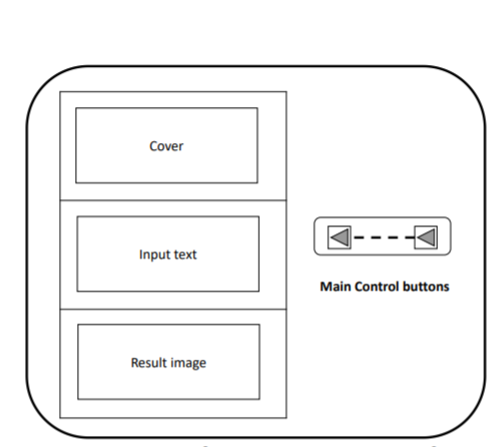
Cover Input text Main Control buttons Result image Cover Input text Main Control buttons Result image
Step by Step Solution
There are 3 Steps involved in it

Get step-by-step solutions from verified subject matter experts
 Study Help