







Question: requesting a solution for this thank you. X X Currency Converter Input $: Currency Converter Input $: Currency Type: : US Currency Type: US JMD
requesting a solution for this thank you.
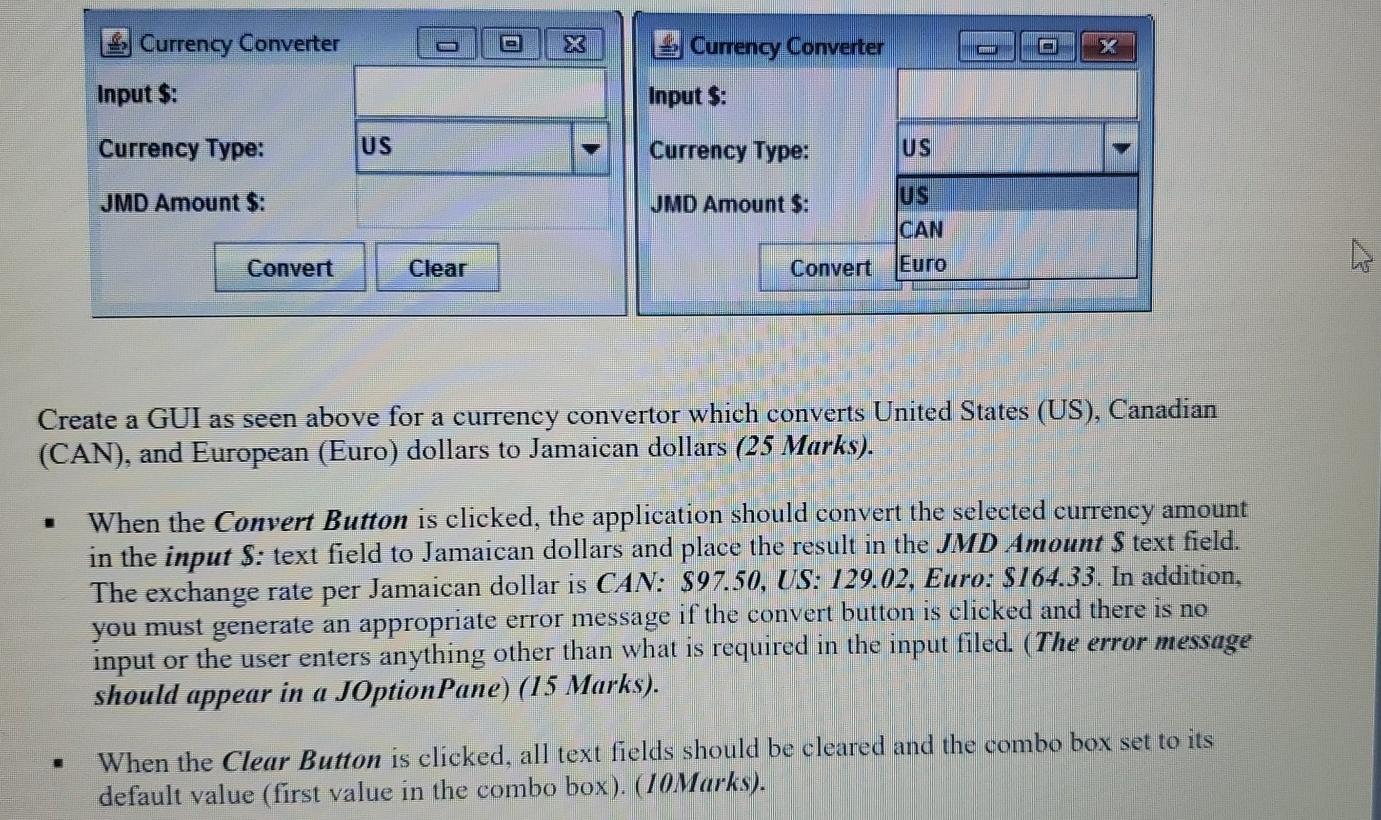
X X Currency Converter Input $: Currency Converter Input $: Currency Type: : US Currency Type: US JMD Amount $: JMD Amount $: US CAN Euro Convert Clear Convert Create a GUI as seen above for a currency convertor which converts United States (US), Canadian (CAN), and European (Euro) dollars to Jamaican dollars (25 Marks). When the Convert Button is clicked, the application should convert the selected currency amount in the input $: text field to Jamaican dollars and place the result in the JMD Amount S text field. The exchange rate per Jamaican dollar is CAN: $97.50, US: 129.02, Euro: $164.33. In addition, you must generate an appropriate error message if the convert button is clicked and there is no input or the user enters anything other than what is required in the input filed. (The error message should appear in a JOption Pane) (15 Marks). When the Clear Button is clicked, all text fields should be cleared and the combo box set to its default value (first value in the combo box). (10Marks)
Step by Step Solution
There are 3 Steps involved in it

Get step-by-step solutions from verified subject matter experts
 Study Help