







Question: Requesting assistance - I need assistance with a python pandas script enabling me to move elements from the software_package_column into the software version and Release
Requesting assistance - I need assistance with a python pandas script enabling me to move elements from the software_package_column into the software version and Release column.
For example I copied the emboldened data from the spread sheet and pasted below
xcb-util-image-0.4.0-2.el7
I need to move any characters residing in between the dashes - - so for this it would be 0.4.0 and move 0.4.0 into the software version column
Lastly I need to all characters starting from last dash until the end so for this it would be 2.el7 and move 2.el7 into the release column.
Requesting this be completed in python pandas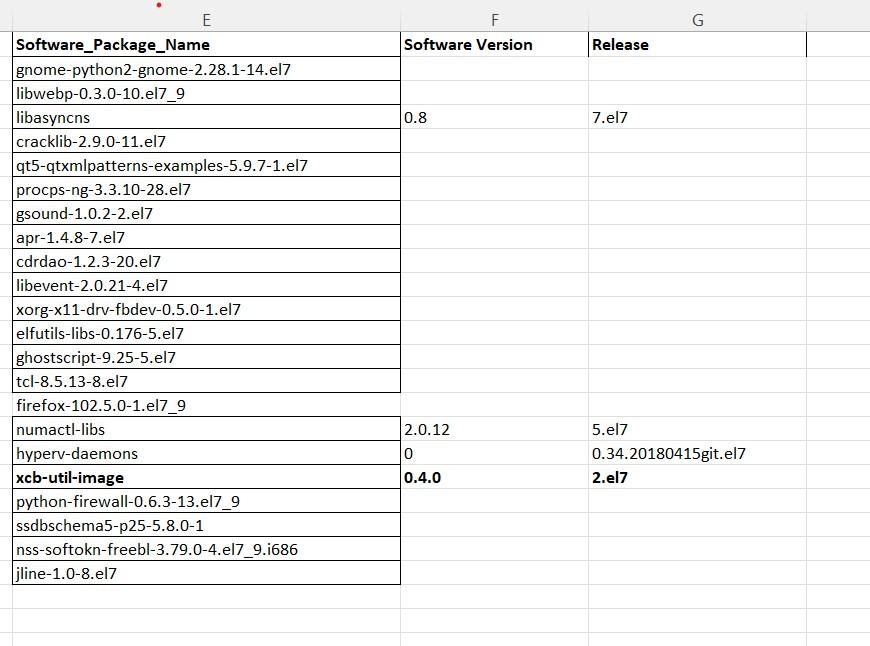
\begin{tabular}{|l|l|l|l|} \hline Software_Package_Name & & \multicolumn{1}{c}{ Software Version } & Release \\ \hline gnome-python2-gnome-2.28.1-14.el7 & & \\ \hline libwebp-0.3.0-10.el7_9 & & \\ \hline libasyncns & & \\ \hline cracklib-2.9.0-11.el7 & & \\ \hline qt5-qtxmlpatterns-examples-5.9.7-1.el7 & & \\ \hline procps-ng-3.3.10-28.el7 & & \\ \hline gsound-1.0.2-2.el7 & & \\ \hline apr-1.4.8-7.el7 & & \\ \hline cdrdao-1.2.3-20.el7 & & \\ \hline libevent-2.0.21-4.el7 & & \\ \hline xorg-x11-drv-fbdev-0.5.0-1.el7 & & \\ \hline elfutils-libs-0.176-5.el7 & & \\ \hline ghostscript-9.25-5.el7 & & \\ \hline tcl-8.5.13-8.el7 & & \\ \hline firefox-102.5.0-1.el7_9 & & \\ \hline numactl-libs & & \\ \hline hyperv-daemons & & \\ \hline xcb-util-image & & \\ \hline python-firewall-0.6.3-13.el7_9 & & \\ \hline ssdbschema5-p25-5.8.0-1 & & \\ \hline nss-softokn-freebl-3.79.0-4.el7_9.i686 & & \\ \hline jline-1.0-8.el7 & & \\ \hline \end{tabular}
Step by Step Solution
There are 3 Steps involved in it

Get step-by-step solutions from verified subject matter experts
 Study Help