







Question: Required arduino code and schematic / circuit diagram : 1. Design a traffic light that follows the above sequence. 2. When a pedestrian presses a
Required arduino code and schematic / circuit diagram :
1. Design a traffic light that follows the above sequence.
2. When a pedestrian presses a pushbutton, and there is no motion detected on the road, it should quickly go to the red state after a few microseconds
a) The processor should be configured to stop whatever it is doing to respond to the pushbutton.
b) You should give the pedestrian enough time to cross the road.
c) Use the Millis() function wherever possible
3. If the push button has not been pressed and the time for pedestrian to cross the road has lapsed and motion is detected on the road, quickly cycle to the green state.
4. Add sound to give audible status to pedestrian with visual impairment
5. Put a vibration motor on the floor to use different cues for pedestrians with visual impairment
6. Use an RGB on the pedestrian side to show the status of the LED lights on the roadside
7. Use LCD display to show the status of the lights:
a) Use multiple LCDs (make use of animated Characters wherever possible)
i) 1 or 2 for status of lights including time remaining before next state
ii) 1 for ad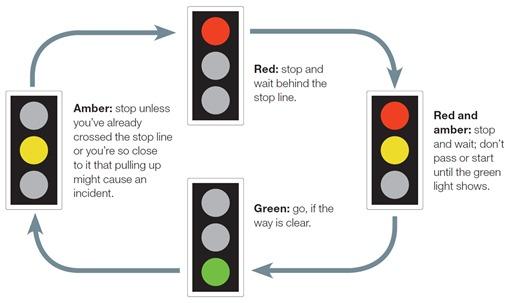 vertisements
Red: stop and wait behind the stop line. Amber: stop unless you've already crossed the stop line or you're so close to it that pulling up might cause an incident. Red and amber: stop and wait; don't pass or start until the green light shows. Green:go, if the way is clear
Step by Step Solution
There are 3 Steps involved in it

Get step-by-step solutions from verified subject matter experts
 Study Help