







Question: REQUIRED: ASSEMBLY CODE, ONLY POST ANSWER IF YOUR CODE IS IN ASSEMBLY. Create a maze game program in assembly language with the following steps given
REQUIRED: ASSEMBLY CODE, ONLY POST ANSWER IF YOUR CODE IS IN ASSEMBLY. Create a maze game program in assembly language with the following steps given below: First you need to draw the maze as given: INIT DB 0000000B, 0000000B, 0000000B, 0000000B, 0000000B, 1110111B, 1000001B, 1111001B, 1111011B, 1000001B, 1011111B, 1011111B, 1010001B, 1010101B, 1000101B, 1111101B, 1000101B, 1010001B, 1010101B, 1010101B, 1100011B, 1000001B, 1011101B, 1011101B, 1011101B, 1001001B, 1000101B, 1011101B, 1100001B, 1101111B, 1000001B, 1010101B, 1010101B, 1010101B, 1111101b, 0000000B, 0000000B, 0000000B, 0000000B, 0000000B 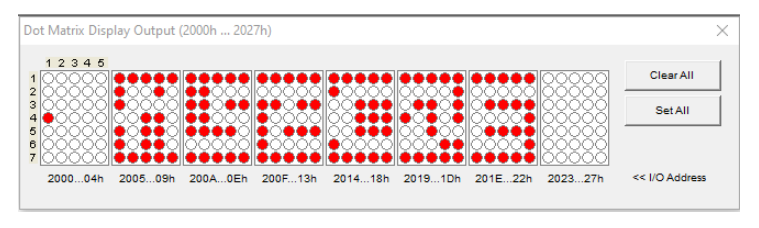 A dot must begin from a starting point and it can move by keyboard instructions The dot moves constrained by following rules: o The dot can move upwards, downwards, left, and right by corresponding keyboard keys. For instance, if user presses the up key (), the dot must move upwards. o The dot can move only on unswitched leds. o If the dot encounters with an obstacle, it cannot pass. o The dot cannot exceed the borders of the dot matrix display output. Demo of your project is given in the attachment. The dot must be able to pass through the maze as in the demo.
Dot Matrix Display Output (2000h ... 2027h) Clear All 1 2 3 4 5 1 2 3 4 5 NMON Set All :: 7 2000...04h 2005...09h 200A...En 200F... 13h 2014...18h 2019...10h 201E...22h 2023...27h
Step by Step Solution
There are 3 Steps involved in it

Get step-by-step solutions from verified subject matter experts
 Study Help