







Question: Required Information PR 7.41 (Static) CVP Graph; Cost Structure; Operating Leverage (LO 7.2, 7.3, 7.4, 7.8) [The following Information applies to the questions displayed below.]
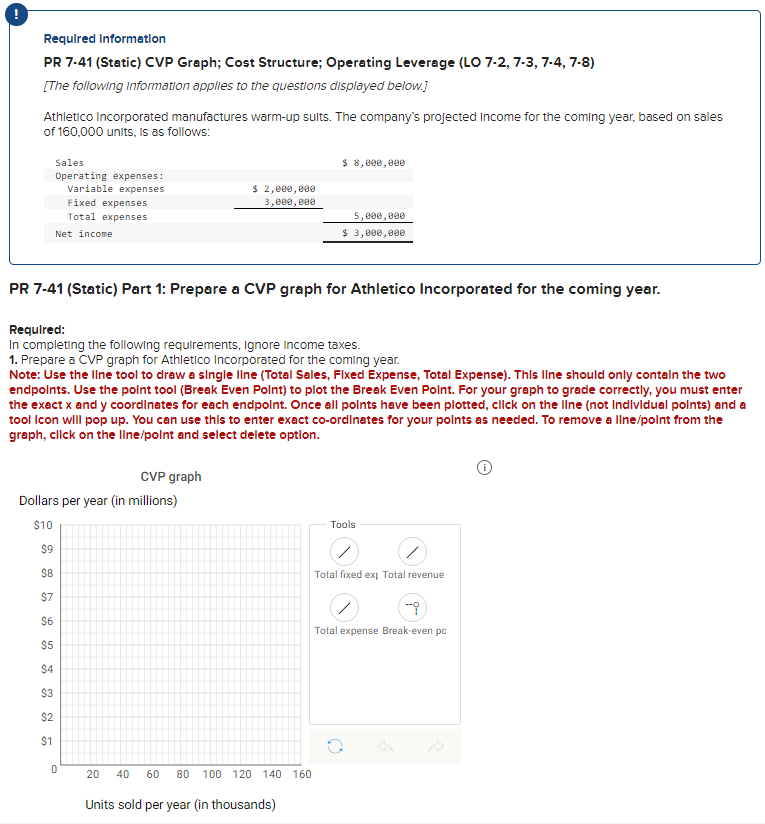
Required Information PR 7.41 (Static) CVP Graph; Cost Structure; Operating Leverage (LO 7.2, 7.3, 7.4, 7.8) [The following Information applies to the questions displayed below.] Athletico Incorporated manufactures warm-up sults. The company's projected Income for the coming year, based on sales of 160,000 units, is as follows: PR 7-41 (Static) Part 1: Prepare a CVP graph for Athletico Incorporated for the coming year. Requlred: In completing the following requirements, Ignore income taxes. 1. Prepare a CVP graph for Athletico Incorporated for the coming year. Note: Use the Ilne tool to draw a single Ilne (Total Sales, Flxed Expense, Total Expense). Thls Ilne should only contaln the two endpolnts. Use the polnt tool (Break Even Polnt) to plot the Break Even Polnt. For your graph to grade correctly, you must enter the exact x and y coordlnates for each endpolnt. Once all points have been plotted, cllck on the line (not Indlvidual polnts) and tool Icon will pop up. You can use thls to enter exact co-ordlnates for your polnts as needed. To remove a llne/point from the graph, cllck on the line/point and select delete option. Required Information PR 7.41 (Static) CVP Graph; Cost Structure; Operating Leverage (LO 7.2, 7.3, 7.4, 7.8) [The following Information applies to the questions displayed below.] Athletico Incorporated manufactures warm-up sults. The company's projected Income for the coming year, based on sales of 160,000 units, is as follows: PR 7-41 (Static) Part 1: Prepare a CVP graph for Athletico Incorporated for the coming year. Requlred: In completing the following requirements, Ignore income taxes. 1. Prepare a CVP graph for Athletico Incorporated for the coming year. Note: Use the Ilne tool to draw a single Ilne (Total Sales, Flxed Expense, Total Expense). Thls Ilne should only contaln the two endpolnts. Use the polnt tool (Break Even Polnt) to plot the Break Even Polnt. For your graph to grade correctly, you must enter the exact x and y coordlnates for each endpolnt. Once all points have been plotted, cllck on the line (not Indlvidual polnts) and tool Icon will pop up. You can use thls to enter exact co-ordlnates for your polnts as needed. To remove a llne/point from the graph, cllck on the line/point and select delete option
Step by Step Solution
There are 3 Steps involved in it

Get step-by-step solutions from verified subject matter experts
 Study Help