







Question: Required Information Question Set 1 0 - 1 ( Static ) : Order - To - Cash ( LO 1 0 - 1 ) The
Required Information
Question Set Static: OrderToCash LO
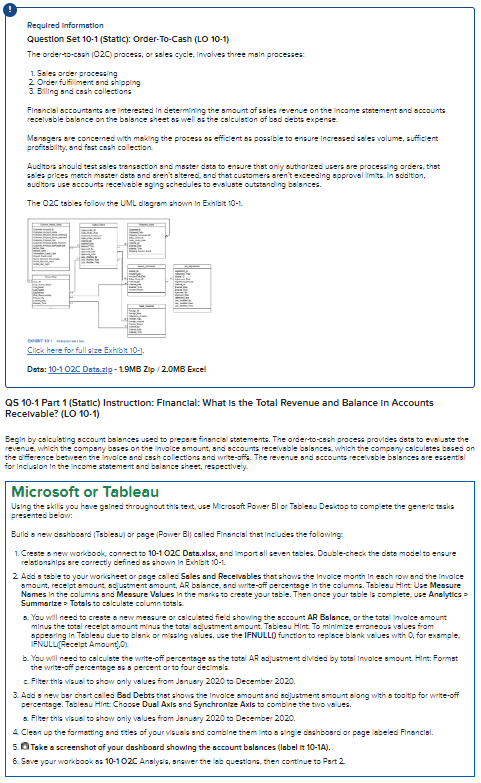
The ordertocsin OC process, or ssles cycle, Ifwolves three msin processes:
Soles order procesaing
Order fulfilment snd shipping
Billing snd cssh callections
Finsoncisl sccountsnts are interested in determining the smount of ssles revenue on the income statement ond sccounts
Msnsgers are concerned with moking the proces: s: efficlent s: possible to ensure incresied sales volume, sufficient
profitsbility, and fast cash colection.
Audhors should test ssles tronssction snd msster dists to ensure that only outhorized users are process:ing arders, that
sale: prises match master data and aren't sitered, snd that cuatamers aren't exceeding spprovel limta In sodilion,
ouditors use sccounts recelvable sging schedules to evoluste outstanding bolances.
The OC tsbles follow the UML disgrsm shown in Exhlait
Dato: C Dato.zi MB Zip MB Excel
QS Part Static Instruction: Financial: What is the Total Revenue and Balance In Accounts
Recelvable? LO
Begin by calculating sccount bolances used to prepore finenciol ststements. The ordertocssh process provides dets to evol uste the
revenue, which the compsny bsses on the involce smount, snd sccounts recelvable bslsncea, whilh the compsny calsulstes bosed on
the dfference between the invalce snd cssh colections and writeoffs. The revenue snd sccounts recelvable bsances are essentisl
for inclualon In the income ststement end bolence sheet, respectively.
Microsoft or Tableau
Using the skils you hove gained throughout thls text, use Microsoft Power Bl or Tsb lesu De:itop to complete the generic tosks
presented be ow:
Butld a new dsshbosod Trblesu or poge Power Bl called Financisi that includes the following:
Creste a new workbook connect to OC Data.xlsx snd import sil seven tables. Doublecheck the data model to ensure
relationshlpa sre carrectly defined as shown in Evilbit t
Add tsble to your workaheet or poge caled Sales and Recelvables thest shows the invoice manth in esch row and the Inwalce
smount, recept smount, soljuatment smount, AR bolance, snd writeuff percentege in the columns. Toblesu Hint Use Messure
Nomes in the columns snd Measure Values in the marks to creste your tsble. Then ance your table la complete, use Analytics
Summarize Totals to calsulste column totsla.
You will need to creste o new messure or cslcu bated fied showing the sccount AR Balance, or the tatel invalce amount
minus the totsl recelpt amount minus the tatal sajuatment smount. Toblesu Hint. To minimize erroneous vslues from
sppearing in Tablesu due to blank or misaling values, use the IFNULL function to replose blank velues with for exsmple.
Sppesing in Tesies. dide to
the writeuff percentoge sis percent or to four decimsla.
c Filter thla visuel to shaw anly volues from Jsnuery to December
percentage. Tablesu Hint Choose Dual AxIs snd Synchronize AxIs to combine the two vo jes.
Filter thla vasuel to shaw only volues from Jsnuery to December
A Cleon up the farmatting and tries of your visuals and combine them into :ingle deakbosrd or pege labeled Finencisl.
W Take a screenshot of your dashbourd showing the account balances label it A
Sove your workbook as C Anslyals, srawer the lob questions, then continue to Part
Step by Step Solution
There are 3 Steps involved in it
1 Expert Approved Answer
Step: 1 Unlock

Question Has Been Solved by an Expert!
Get step-by-step solutions from verified subject matter experts
Step: 2 Unlock
Step: 3 Unlock
 Study Help