







Question: Required: Using the Cash table below, show the output for the following SQL query: (Using the dropdowns, identify which rows and columns would be included
Required:
Using the Cash table below, show the output for the following SQL query: (Using the dropdowns, identify which rows and columns would be included in the SQL query output shown below. Select "Not included" for rows and columns that would not be included in the output.)
SELECT Account#, Balance
FROM Cash
WHERE Balance 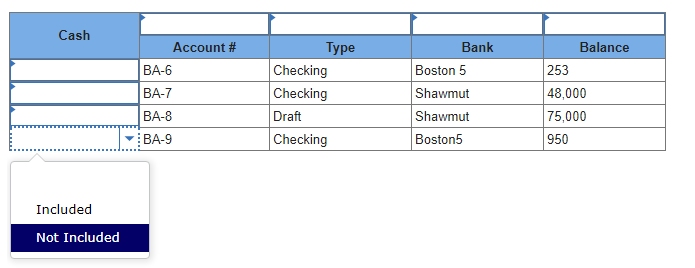 \begin{tabular}{|l|l|l|l|l|} \hline \multirow{2}{*}{ Cash } & \multicolumn{1}{|c|}{ Account \# } & \multicolumn{1}{c|}{ Type } & \multicolumn{1}{|c|}{ Bank } & \multicolumn{1}{|c|}{ Balance } \\ \cline { 2 - 5 } & BA-6 & Checking & Boston 5 & 253 \\ \hline & BA-7 & Checking & Shawmut & 48,000 \\ \hline & BA-8 & Draft & Shawmut & 75,000 \\ \hline & Checking & Boston5 & 950 \\ \hline \end{tabular} Included Not Included \begin{tabular}{|l|l|l|l|l|} \hline \multirow{2}{*}{ Cash } & \multicolumn{1}{|c|}{ Account \# } & \multicolumn{1}{c|}{ Type } & \multicolumn{1}{|c|}{ Bank } & \multicolumn{1}{|c|}{ Balance } \\ \cline { 2 - 5 } & BA-6 & Checking & Boston 5 & 253 \\ \hline & BA-7 & Checking & Shawmut & 48,000 \\ \hline & BA-8 & Draft & Shawmut & 75,000 \\ \hline & Checking & Boston5 & 950 \\ \hline \end{tabular} Included Not Included
Step by Step Solution
There are 3 Steps involved in it

Get step-by-step solutions from verified subject matter experts
 Study Help