







Question: Requirement 1 Modify showStats Show Names When Displaying Tournament Note that the starting code has a String[] names attribute. The ten names in this array
Requirement 1 Modify showStats Show Names When Displaying Tournament
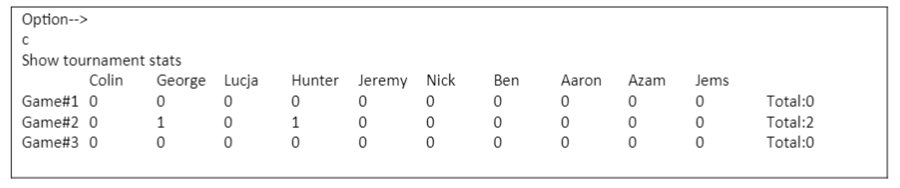
Note that the starting code has a String[] names attribute. The ten names in this array correspond to the ten players in the goalDetails array. The names are always less than six characters. Have the code show the names above the corresponding goal detail when showing the t tournament details. Remember we use \t to provide a tab in a String.
Starting code-
public void showStats() {
for (int rowCount = 0; rowCount
System.out.println(""); }
option D - Show Player / Game Details
Allow the user to enter a player number and game number. Have the application tell the user how many goals the player scored in the specified game
![starting code has a String[] names attribute. The ten names in this](https://dsd5zvtm8ll6.cloudfront.net/si.experts.images/questions/2024/09/66f3001d8038b_30966f3001d288a5.jpg)
public void showPlayerGameDetails(){
}
Option E Show a Game
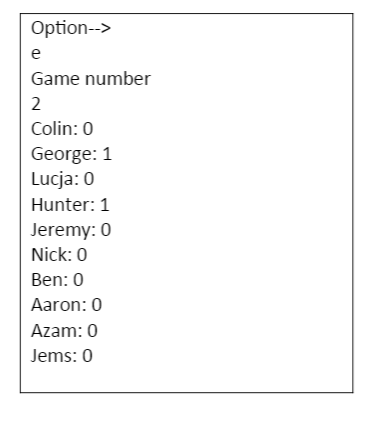
Have the user enter a game number and show each players name and goals in that game one name per line
public void showAGame(){
}
}
Language- Java
It's one question just in different parts. Starting codes are provided just need to know how the coding is done for the requirements. Should be done using Array method
Option--> Show tournament stats George Lucja Game#1 0 0 0 Game#20 1 0 Game#3 O 0 0 Colin Hunter Jeremy Nick 0 0 0 1 0 0 0 0 0 Ben 0 0 0 Aaron 0 0 0 Azam 0 0 0 Jems 0 0 0 Total:0 Total:2 Total:0 Option--> d Player number 2 Game number 2 George scored 1 goals in game#2 Option--> Game number 2 Colin: 0 George: 1 Lucja: 0 Hunter: 1 Jeremy: 0 Nick: 0 Ben: 0 Aaron: 0 Azam: 0 Jems: 0
Step by Step Solution
There are 3 Steps involved in it

Get step-by-step solutions from verified subject matter experts
 Study Help