







Question: Requirements 1. Start Excel. 2. In cell D22 , by using cell references, calculate the future value of the money market account at the end
 Requirements1.
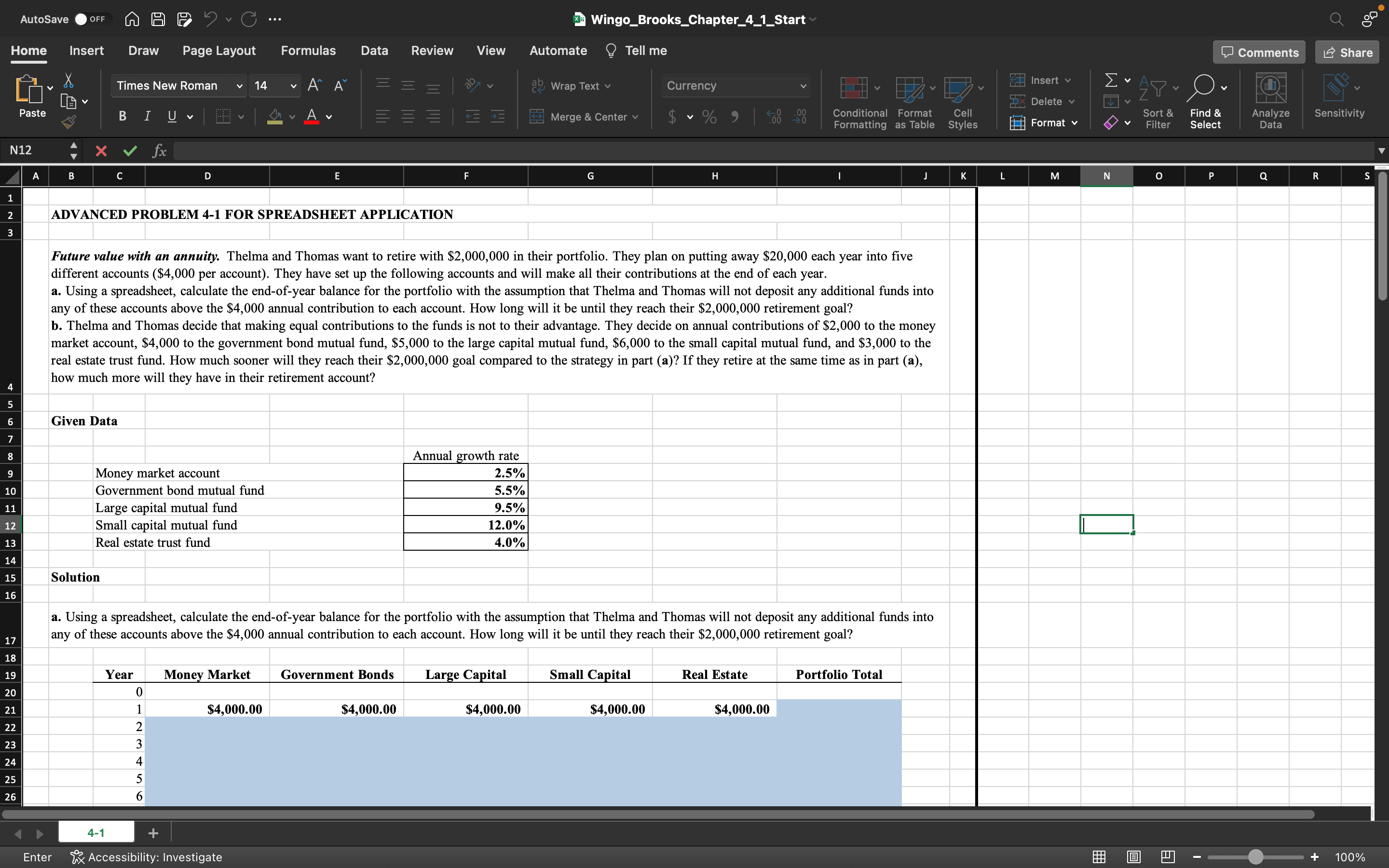
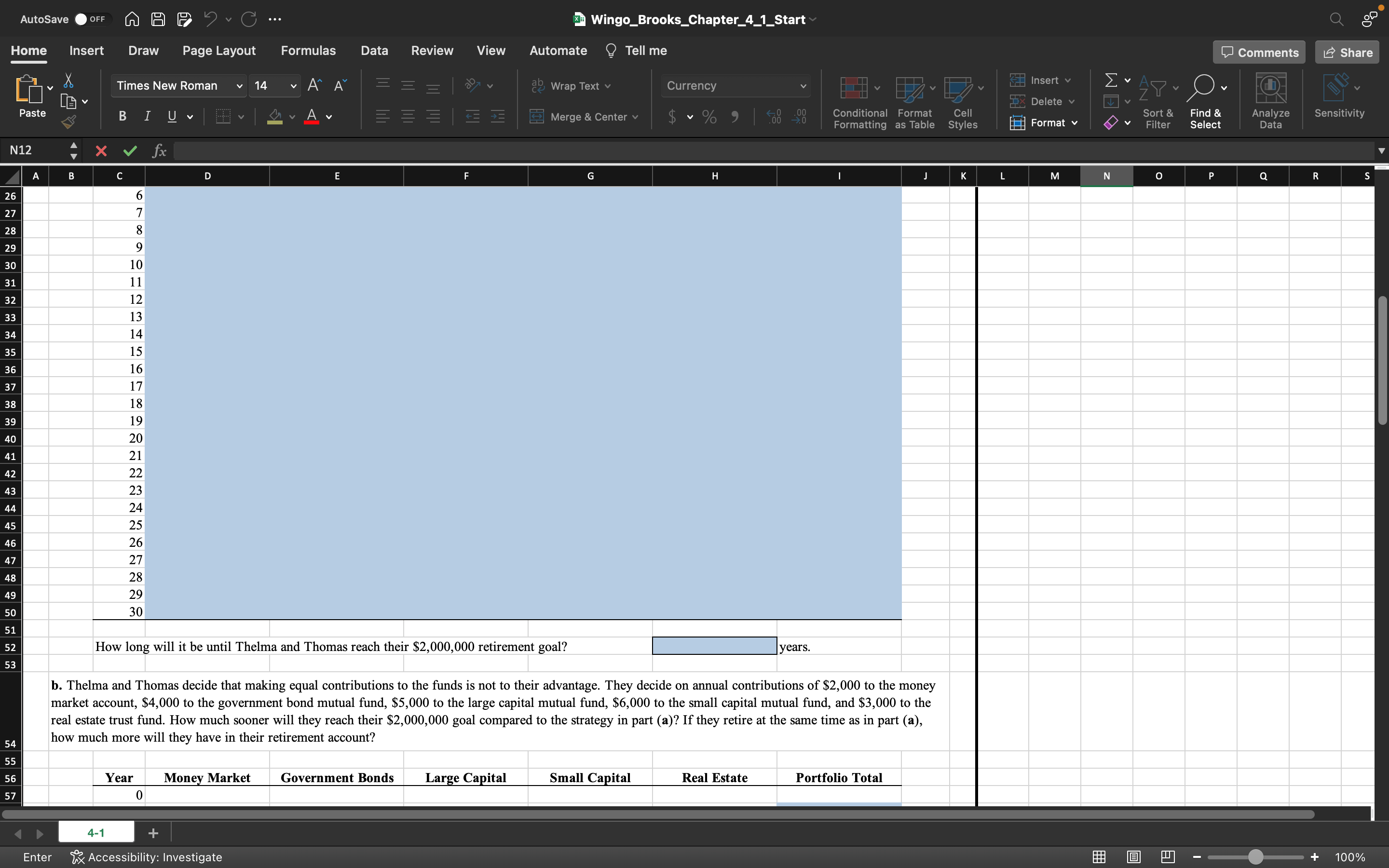
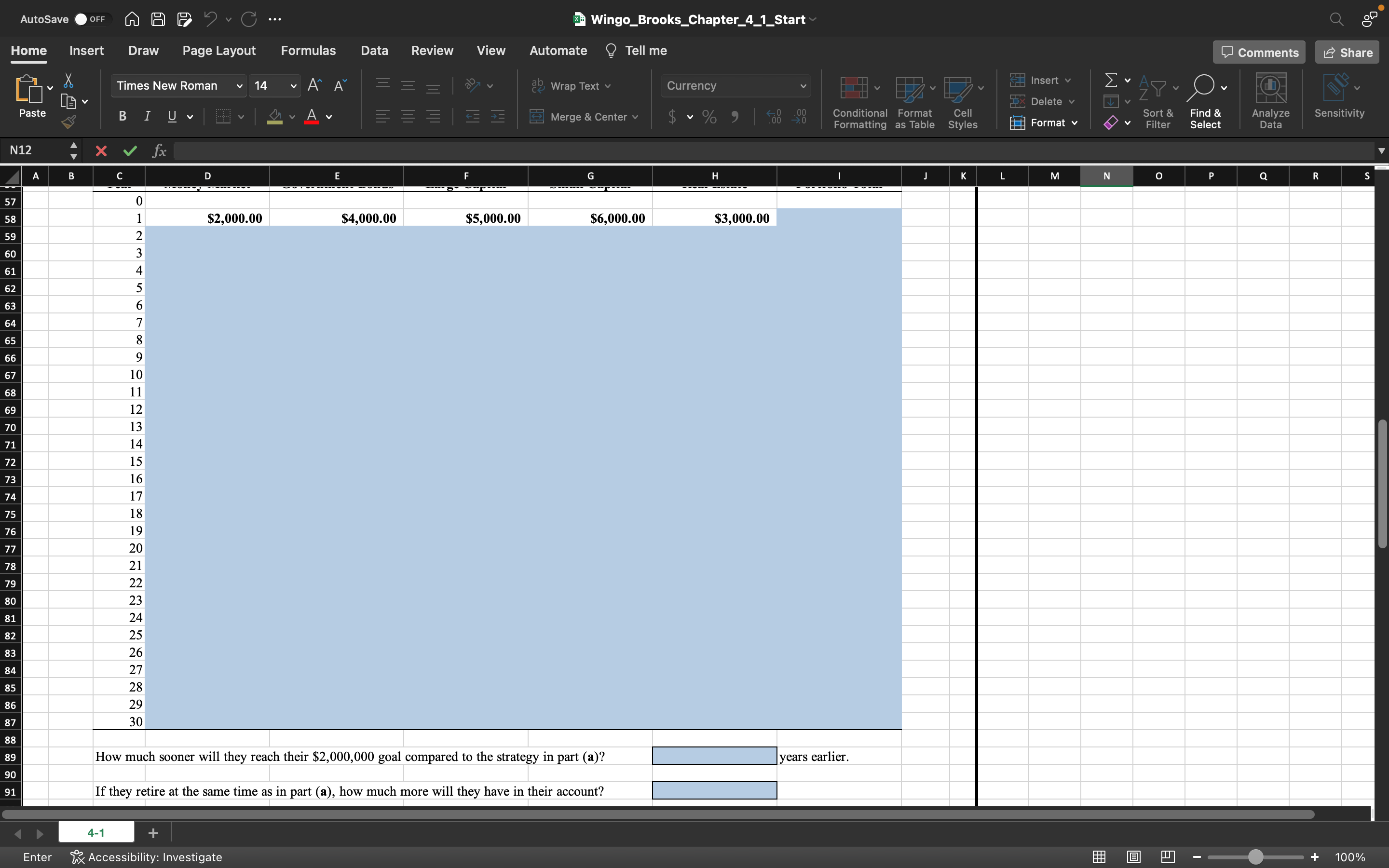
Start Excel.2.In cell D22, by using cell references, calculate the future value of the money market account at the end of year 2. Use the Excel FV function and assume that all savings are made at the end of the period. Use absolute references to the annual saving in cell D21 and the relevant cell from the Given Data section. Note: The output of the function you typed in this cell is expected as a positive number.3.In cell E22, by using cell references, calculate the future value of the government bond mutual fund at the end of year 2. Use the Excel FVfunction and assume that all savings are made at the end of the period. Use absolute references to the annual saving in cell E21 and the relevant cell from the Given Data section. Note: The output of the function you typed in this cell is expected as a positive number.4.In cell F22, by using cell references, calculate the future value of the large capital mutual fund at the end of year 2. Use the Excel FV function and assume that all savings are made at the end of the period. Use absolute references to the annual saving in cell F21 and the relevant cell from the Given Data section. Note: The output of the function you typed in this cell is expected as a positive number.5.In cell G22, by using cell references, calculate the future value of the small capital mutual fund at the end of year 2. Use the Excel FV function and assume that all savings are made at the end of the period. Use absolute references to the annual saving in cell G21 and the relevant cell from the Given Data section. Note: The output of the function you typed in this cell is expected as a positive number.6.In cell H22, by using cell references, calculate the future value of the real estate trust fund at the end of year 2. Use the Excel FV function and assume that all savings are made at the end of the period. Use absolute references to the annual saving in cell H21 and the relevant cell from the Given Data section. Note: The output of the function you typed in this cell is expected as a positive number.7.In cell range D23:H50, by using cell references, calculate the future values of each of the five accounts at the end of each year for years 3 through 30. Copy the contents from cell range D22:H22 down the columns to row 50.8.In cell I21, by using cell references, calculate the current value of the total portfolio at the end of year 1. Use the Excel SUM function.9.In cell range I22:I50, by using cell references, calculate the future values of the total portfolio at the end of each year for years 2 through 30. Copy the function cell I18 down the columns to row 50.10.In cell H52, enter the number of years it will take for Thelma and Thomas to reach their goal. Do not use the equal sign when entering a numeric value.11.In cell D59, by using cell references, calculate the future value of the money market account at the end of year 2. Use the Excel FV function and assume that all savings are made at the end of the period. Use absolute references to the annual saving in cell D58 and the relevant cell from the Given Data section. Note: The output of the function you typed in this cell is expected as a positive number.12.In cell E59, by using cell references, calculate the future value of the government bond mutual fund at the end of year 2. Use the Excel FVfunction and assume that all savings are made at the end of the period. Use absolute references to the annual saving in cell E58 and the relevant cell from the Given Data section. Note: The output of the function you typed in this cell is expected as a positive number.13.In cell F59, by using cell references, calculate the future value of the large capital mutual fund at the end of year 2. Use the Excel FV function and assume that all savings are made at the end of the period. Use absolute references to the annual saving in cell F58 and the relevant cell from the Given Data section. Note: The output of the function you typed in this cell is expected as a positive number.14.In cell G59, by using cell references, calculate the future value of the small capital mutual fund at the end of year 2. Use the Excel FV function and assume that all savings are made at the end of the period. Use absolute references to the annual saving in cell G58 and the relevant cell from the Given Data section. Note: The output of the function you typed in this cell is expected as a positive number.15.In cell H59, by using cell references, calculate the future value of the real estate trust fund at the end of year 2. Use the Excel FV function and assume that all savings are made at the end of the period. Use absolute references to the annual saving in cell H58 and the relevant cell from the Given Data section. Note: The output of the function you typed in this cell is expected as a positive number.16.In cell range D60:H87, by using cell references, calculate the future values of each of the five accounts at the end of each year for years 3 through 30. Copy the contents from cell range D59:H59 down the columns to row 50.17.In cell I58, by using cell references, calculate the current value of the total portfolio at the end of year 1. Use the Excel SUM function.18.In cell range I59:I87, by using cell references, calculate the future values of the total portfolio at the end of each year for years 2 through 30. Copy the function cell I58 down the columns to row 87.19.In cell H89, enter the number of years earlier Thelma and Thomas will reach their goal in part (b) than in (a). Do not use the equal sign when entering a numeric value.20.In cell H91, by using cell references, calculate the difference between the accounts in parts (a) and (b) if Thelma and Thomas retire at the same time as in part (a). Note: The output of the expression you typed in this cell is expected as a positive number.21.Save the workbook. Close the workbook and then exit Excel. Submit the workbook as directed. 4-1 Wingo_Brooks_Chapter_4_1_Start e Home Insert Draw Page Layout Formulas Data Review View Automate @ Tell me 4-1
Step by Step Solution
There are 3 Steps involved in it

Get step-by-step solutions from verified subject matter experts
 Study Help