







Question: Requirements Step 1 Remove the Reset button and its functionality. Step 2 Add the functionality which counts the number of clicks made to both the
Requirements
Step
Remove the Reset button and its functionality.
Step
Add the functionality which counts the number of clicks made to both the increment and decrement
buttons. This number should show on the page with a label.
Step
Add an input field where the user can input a number. Next to the input should be a button. When
the button is clicked, the original increment and decrement count should reset to the number that
was inputted and the number of clicks should reset to zero. The number should not add onto the
number that was created by clicking the increment and decrement buttons. The number listed
should show the exact number inputted.
Step
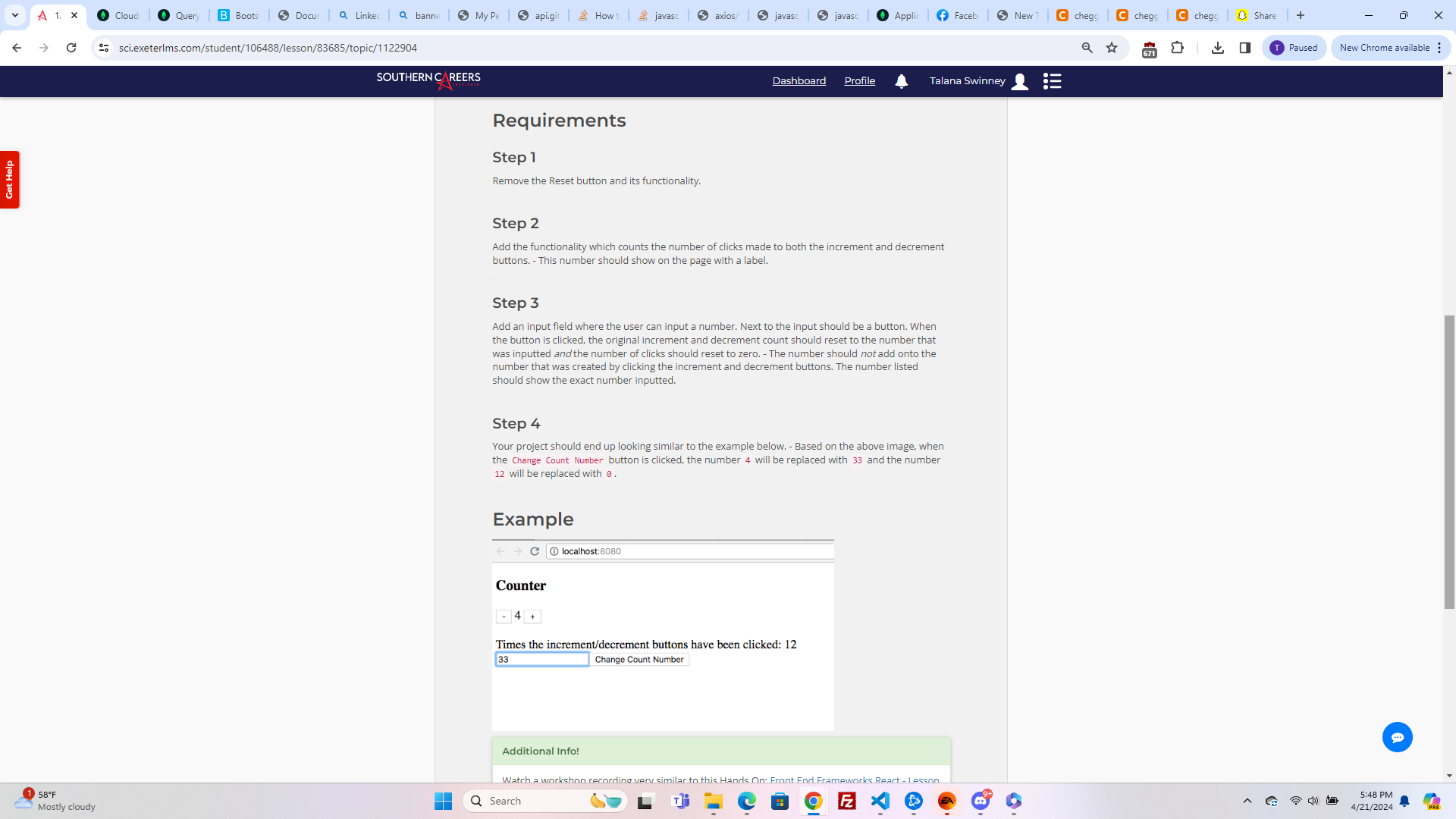
Your project should end up looking similar to the example below. Based on the above image, when
the Change Count Number button is clicked, the number will be replaced with and the number
will be replaced with
Example
localhost:
Counter
Times the incrementdecrement buttons have been clicked:
Change Count Number
Step by Step Solution
There are 3 Steps involved in it
1 Expert Approved Answer
Step: 1 Unlock

Question Has Been Solved by an Expert!
Get step-by-step solutions from verified subject matter experts
Step: 2 Unlock
Step: 3 Unlock
 Study Help