







Question: Requirements When the application starts, it will automatically populate the Student Roster list box, but nothing else works. Your task is to complete the following:
Requirements
When the application starts, it will automatically populate the "Student Roster" list box, but nothing else works. Your task is to complete the following:
Record Attendance Button
When the application starts, the "Record Attendance" button is disabled, as seen at the beginning of the video.
The button should only be enabled and therefore clickable when the text in "Student Email" exactly matches an email address from the roster. That is if the text in "Student Email" is not the same as one of the roster items, the button should stay disabled. This check should be performed using the ONCHANGE event of the "Student Email" input.
Clicking the button should record the attendance of the student whose email is written in the input, and update the counter.
You are free to make other UIUX User InterfaceUser Experience enhancements, if you wish.
Student Roster Listbox Filtering
A required UX enhancement is for the "Student Roster" list box to dynamically update its contents as the user types in the "Student Email" input.
The "Student Roster" list box should contain only those emails that begin with the same sequence of characters as what is typed in the "Student Email" input.
Example
Student Roster contents:
bryce@ucmerced.edu
alice@ucmerced.edu
bill@ucmerced.edu
jerry@ucmerced.edu
brian@ucmerced.edu
Case
Student Email contents: b then Student Roster is:
bryce@ucmerced.edu
bill@ucmerced.edu
brian@ucmerced.edu
because these are the only ones that start with b
Case
Student Email contents: br then Student Roster is:
bryce@ucmerced.edu
brian@ucmerced.edu
because these are the only ones that start with br
Case
Student Email input box in empty, then Student Roster is:
bryce@ucmerced.edu
alice@ucmerced.edu
bill@ucmerced.edu
jerry@ucmerced.edu
brian@ucmerced.edu
because there is no string to filter by so we include everything.
Record Attendance Duplication
As described above, once a matching email is found in the Student Roster, the "Record Attendance" button should be activated. The application must prevent the user from recording attendance for the same student more than once.
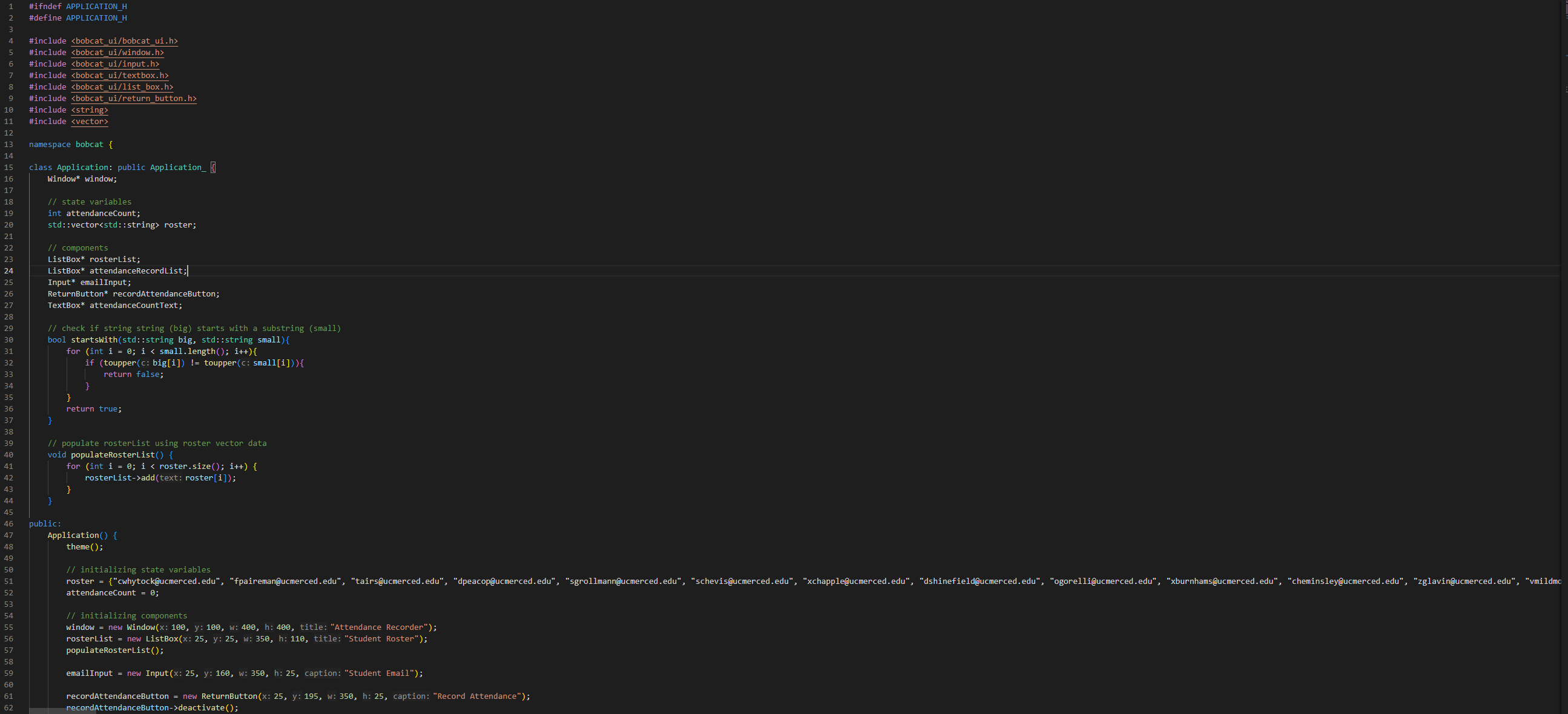
Hints :This program uses a container called a vector line A vector is a special type of variable in C that can be used to store more than value. The particular vector on line is a vector of string, meaning that it can store multiple string values, unlike a regular string variable that can hold only one.
A vector of string is similar to a ListBox component in Bobcat UI as they both store collections of string values. Consequently, the contents of a ListBox can be derived from a vector. Line in the code sets the values of the vector, and the populateRosterList function on lines uses the contents of the vector to populate the ListBox.
A ListBox can be cleared by calling a clear function on it If we then have a vector of string values, we can use code similar to the populateRosterList function to fill up the ListBox with content.
This is useful for filtering applications. Suppose we have a vector of strings, and it has hundreds of values. We can create another vector and make it start out empty. The C code for that is:
std::vector filteredList;
This creates an empty vector called filteredList. We can add values to this empty vector by saying:
filteredListpushback;
where the is some string value.
If we had a filteredList like that, we could make the contents of the "Student Roster" list box to be the filteredList, not the roster vector.
To create such a list, what we would need to do is go through the roster vector, and for every item inside it check if it starts with the text from the "Student Email" input box. If it does, then add it to the filteredList.
The way to check if a word starts with a given sequence of characters is to use the startsWith function, on lines
This is a function that takes in two string values big and small, and checks if big starts with the sequence of characters written in small.
Examples
startsWithbrianbr; truestartsWithhellobr; falsestartsWithhellohe; truestartsWithhelloel; false
std::vectorstd::string roster;
components
ListBox rosterList;
ListBox attendanceRecordList;
Input emailInput;
ReturnButton recordAttendanceButton;
TextBox attendanceCountText;
check if string string big starts with a substring small
bool startsWithstd::string big, std::string small
for int i ; i small.length; i
if toupperc: bigi toupperc: smalli
return false;
return true;
populate rosterList using roster vector data
void populateRosterList
for int i ; i roster.size; i
rosterListaddtext: rosteri;
public
Application
theme;
initializing state variables
attendanceCount ;
initializing components
window new Windowx: y: w: h: title: "Attendance Recorder
Attendance Recorder
Studen
Step by Step Solution
There are 3 Steps involved in it
1 Expert Approved Answer
Step: 1 Unlock

Question Has Been Solved by an Expert!
Get step-by-step solutions from verified subject matter experts
Step: 2 Unlock
Step: 3 Unlock
 Study Help