







Question: Requirements: Write a script that will determine which file in a directory has the maximum number of lines (this may be different than the file
Requirements:
Write a script that will determine which file in a directory has the maximum number of lines (this may be different than the file that has the maximum number of bytes). After determining the file with the maximum number of lines, the script will print out the name of the file and the number of lines. The script should only focus on files and ignore sub directories. Research the wc command options under the manual online documentation.
The maxlines.sh script is designed to handle zero (0) or one (1) argument(s).
o If zero arguments are specified, the script by default will examine the files in the current directory.
o If one argument is specified, the argument must be a valid directory name. The script will then examine the files in the specified directory.
The script should be able to handle the following error conditions:
o More than 1 argument is specified o The specified argument is not a directory.
The script file name must be: maxlines.sh
The script must be located in $HOME/itec400/homework
Make sure the permissions on the your itec400 directory are 705
Make sure the permissions on your script are 705
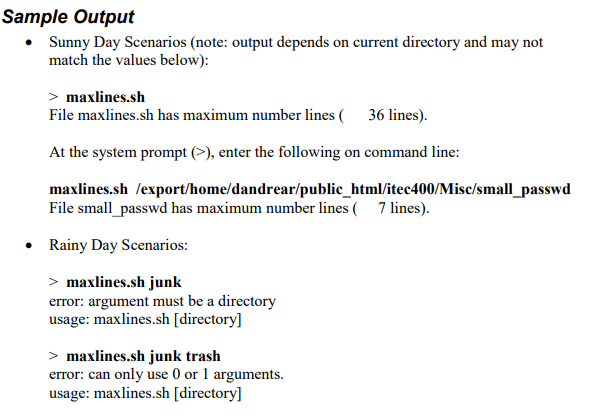
***Please use the template below - replace X***
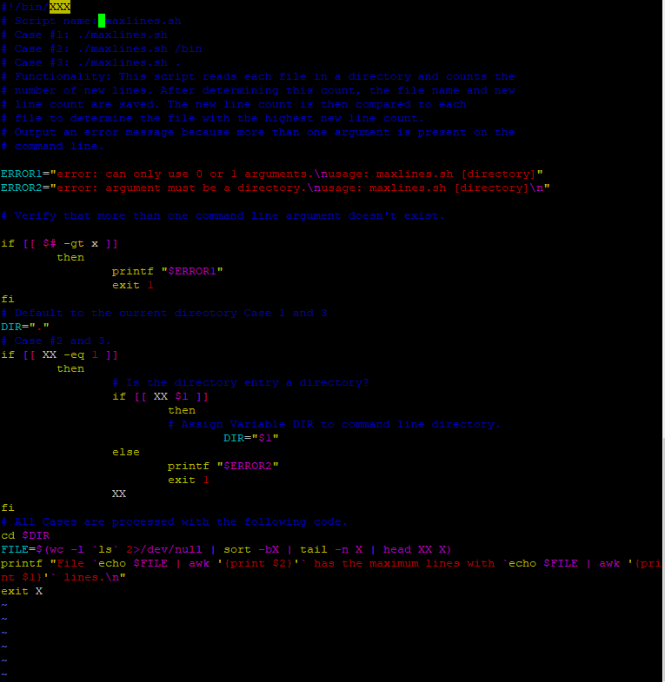
Sample Output Sunny Day Scenarios (note: output depends on current directory and may not match the values below): > maxlines.sh File maxlines.sh has maximum number lines 36 lines). At the system prompt (>), enter the following on command line: maxlines.sh /export/home/dandrear/public_html/itec400/Misc/small_passwd File small_passwd has maximum number lines ( 7 lines). Rainy Day Scenarios: > maxlines.sh junk error: argument must be a directory usage: maxlines.sh (directory] > maxlines.sh junk trash error: can only use 0 or 1 arguments. usage: maxlines.sh [directory] *Script name: maxlines.sh # Case #1: ./maxlines.sh # Case #2: ./maxlines.sh/bin # Case #3: ./maxlines.sh. # Functionality: This script reads each file in a directory and counts the # number of new lines. After determining this count, the file name and new # line count are saved. The new line count is then compared to each #file to determine the file with the highest new line count. #Output an error message because more than one argument is present on the #command line. ERRORI="error: can only use oor l arguments. usage: maxlines.sh [directory]" ERROR2="error: argument must be a directory. usage: maxlines.sh [directory] " * Verify that more than one command line argument doesn't exist. if [[ $# -ot x ]] then printf "SERRORI" exit 1 # Default to the current directory Case 1 and 3 DIR="" # Case #2 and 3. if [[ XX -eq 1 ]] then # Is the directory entry a directory? if [[ XX $1 1] then # Assign Variable DIR to command line directory. DIR="$ 1" else printf "SERROR2- exit 1 else printt "ERROR2" # All Cases are processed with the following code. cd $DIR FILE=$(WC -1 13'2>/devull | sort -bx tail -n X | head XX X) printf "File echo SFILE | awk '{print $21" has the maximum lines with 'echo $FILE | awk '{pri nt $11" lines. " exit X
Step by Step Solution
There are 3 Steps involved in it

Get step-by-step solutions from verified subject matter experts
 Study Help