







Question: Requirements You will extend the Lexer to process additional tokens and improve its output. Requirement 1 The current implementation of Lexer reads a hardcoded file.
Requirements
You will extend the Lexer to process additional tokens and improve its output.
Requirement
The current implementation of Lexer reads a hardcoded file. Lexer must be updated to take a path to a file as a command line argument:
java lexer.Lexer samplefilessimplex
If a filename is not supplied, a usage instruction should be displayed in this snippet, the character indicates the shell prompt and execution command; it is not a part of the required output:
java lexer.Lexer
usage: java lexer.Lexer filename.x
Requirement
Our compiler must be updated to be able to process additional tokens. The new tokens must be added to the tokens.txt file, and the CompilerTools run to regenerate the SymbolTable class and the TokenKind enumeration. Remember from the lecture that we do not want to must not use regular expressions.
Symbolic Constant Lexeme Description of Token
Greater
GreaterEqual
Number num This is the type keyword used to declare a variable of type num
NumberLit Any literal, which is one or more numbers followed by a decimal point, followed by one or more numbers:
Valid examples:
Invalid examples:
CharType character This is the type keyword used to declare a variable of type character
CharLit Any literal, which is a double quote, followed by any ASCIILinks to an external site. character, followed by a double quote:
Valid examples: at
Invalid examples: a bb
From from Keyword
To to Keyword
Step step Keyword
Requirement
The Token class must be updated to include the source file's line number where a token was found.
Requirement
Lexer output must be updated for readability; the line number of the Token and the type of token created must be included. The updated format for a token line is:
columns, left aligned, for the token's lexeme, followed by a space
"left:" followed by a space
columns, left aligned, for the left position, followed by a space
"right:" followed by a space
columns, left aligned, for the right position, followed by a space
"line:" followed by a space
columns, left aligned, for the line number, followed by a space
The symbol
Hint: Use String.format
Requirement
Lexer output must be updated to include a printout of each line, with its line number, read in from the source file. Line numbers should be printed in columns, rightaligned. Note that when an error is encountered, the error should be reported as usual, and the lines of the source file should be output, with line numbers up to and including the error line.
Appendix A
The complete output for the source file simple.x the indentation you see for the file output is to allow for threedigit line numbers:
java lexer.Lexer samplefilessimplex
program left: right: line: Program
left: right: line: LeftBrace
int left: right: line: IntType
i left: right: line: Identifier
int left: right: line: IntType
j left: right: line: Identifier
i left: right: line: Identifier
left: right: line: Assign
i left: right: line: Identifier
left: right: line: Plus
j left: right: line: Identifier
left: right: line: Plus
left: right: line: IntLit
j left: right: line: Identifier
left: right: line: Assign
write left: right: line: Identifier
left: right: line: LeftParen
i left: right: line: Identifier
left: right: line: RightParen
left: right: line: RightBrace
: program int i int j
: i i j
: j writei
:
Appendix B
The current output for our lexer looks like this:
java lexer.Lexer
L: R: program
L: R:
L: R: int
L: R: i
L: R: int
L: R: j
L: R: i
L: R:
L: R: i
L: R:
L: R: j
L: R:
L: R:
L: R: j
L: R:
L: R: write
L: R:
L: R: i
L: R:
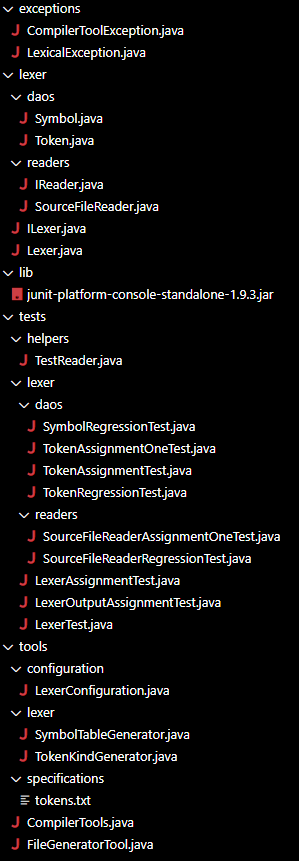
L: R: github
vscode
exceptions
lexer
daos
Symbol.java
Token.java
readers
IReader.java
SourceFileReader.java
IL
Step by Step Solution
There are 3 Steps involved in it
1 Expert Approved Answer
Step: 1 Unlock

Question Has Been Solved by an Expert!
Get step-by-step solutions from verified subject matter experts
Step: 2 Unlock
Step: 3 Unlock
 Study Help