







Question: rest APIs and GraphQL i have to use vs code and mongodb Part 2 1. Create an admin dashboard 2. Show all orders placed by
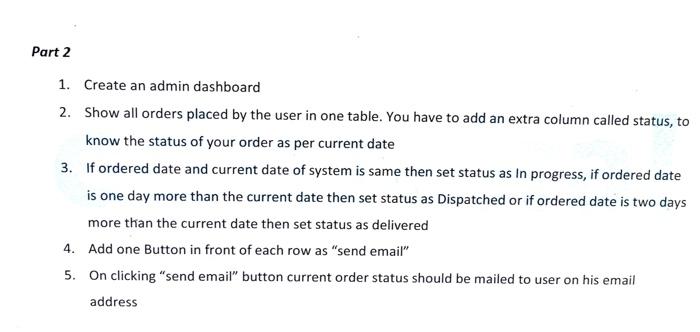
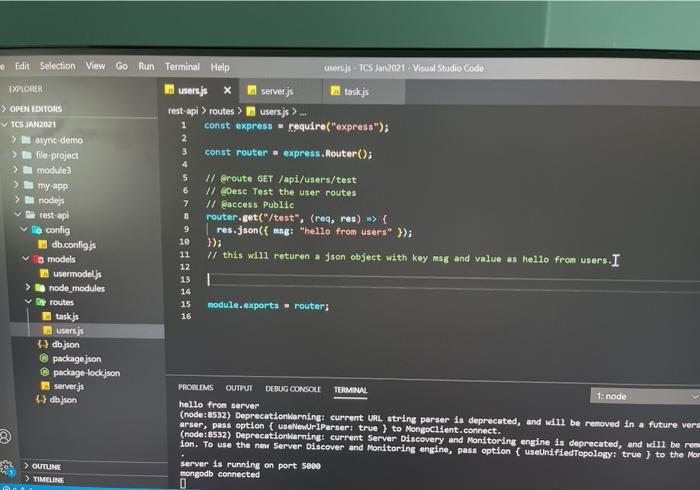
Part 2 1. Create an admin dashboard 2. Show all orders placed by the user in one table. You have to add an extra column called status, to know the status of your order as per current date 3. If ordered date and current date of system is same then set status as in progress, if ordered date is one day more than the current date then set status as Dispatched or if ordered date is two days more than the current date then set status as delivered 4. Add one Button in front of each row as "send email" 5. On clicking "send email" button current order status should be mailed to user on his email address Edit Selection View Go Run Terminal Help users.js - TCS Jan2021 Visual Studio Codo DEPLORER users.js x server.js taskjs > OPEN EDITORS rest-api > routes > usersjs). TOS JAN 2021 1 const express - require("express"); 2 > async demo 3 > file project const router express. Router(); 4 module3 5 // @route GET /api/users/test my app 6 // @Desc Test the user routes nodejs 7 // @access Public rest-ap 8 router.get("/test", (req, res) >> { To config 9 res.json({ msg: "hello from users" }); 10 db.config.js }); 11 models // this will returen a json object with key msg and value as hello from users. I 12 usermodelis 13 node_modules 14 I routes 15 module.exports - router; 16 users.js dbson package.json package-lock.json server.js PROBLEMS OUTPUT DEBUG CONSOLE TERMINAL 1: node db.json hello from server (node : 8532) Deprecationlarning: current URL string parser is deprecated, and will be removed in a future vers arser, pass option (useNewUrlParser: true } to MongoClient.connect. (node: 8532) DeprecationWarning: current Server Discovery and Monitoring engine is deprecated, and will be rem ion. To use the new Server Discover and Monitoring engine, pass option { useUnified Topology: true } to the Mor > OUTUNE server is running on port 5080 mongodb connected > TIMELINE 0 Part 2 1. Create an admin dashboard 2. Show all orders placed by the user in one table. You have to add an extra column called status, to know the status of your order as per current date 3. If ordered date and current date of system is same then set status as in progress, if ordered date is one day more than the current date then set status as Dispatched or if ordered date is two days more than the current date then set status as delivered 4. Add one Button in front of each row as "send email" 5. On clicking "send email" button current order status should be mailed to user on his email address Edit Selection View Go Run Terminal Help users.js - TCS Jan2021 Visual Studio Codo DEPLORER users.js x server.js taskjs > OPEN EDITORS rest-api > routes > usersjs). TOS JAN 2021 1 const express - require("express"); 2 > async demo 3 > file project const router express. Router(); 4 module3 5 // @route GET /api/users/test my app 6 // @Desc Test the user routes nodejs 7 // @access Public rest-ap 8 router.get("/test", (req, res) >> { To config 9 res.json({ msg: "hello from users" }); 10 db.config.js }); 11 models // this will returen a json object with key msg and value as hello from users. I 12 usermodelis 13 node_modules 14 I routes 15 module.exports - router; 16 users.js dbson package.json package-lock.json server.js PROBLEMS OUTPUT DEBUG CONSOLE TERMINAL 1: node db.json hello from server (node : 8532) Deprecationlarning: current URL string parser is deprecated, and will be removed in a future vers arser, pass option (useNewUrlParser: true } to MongoClient.connect. (node: 8532) DeprecationWarning: current Server Discovery and Monitoring engine is deprecated, and will be rem ion. To use the new Server Discover and Monitoring engine, pass option { useUnified Topology: true } to the Mor > OUTUNE server is running on port 5080 mongodb connected > TIMELINE 0
Step by Step Solution
There are 3 Steps involved in it

Get step-by-step solutions from verified subject matter experts
 Study Help