







Question: Return true if the given player has any move they can make. Cricket is player 1 and grasshopper is 2. public static boolean canMove(int[] board,
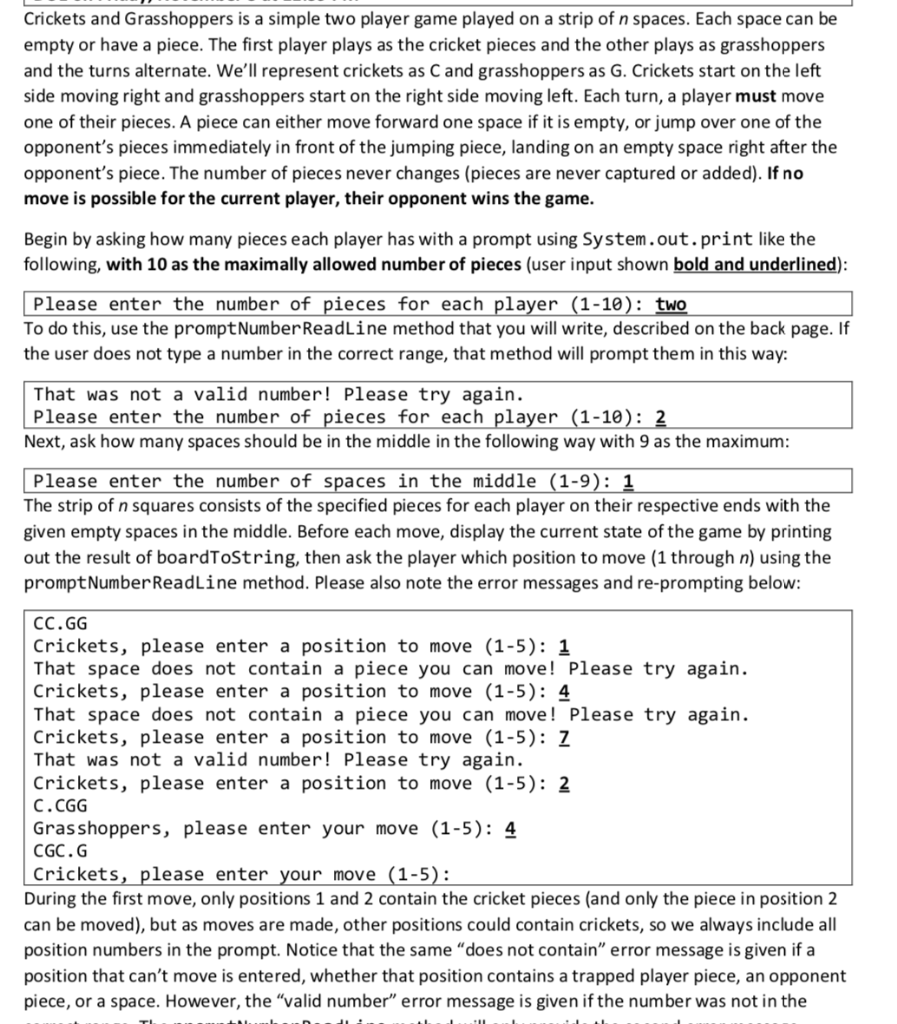
Return true if the given player has any move they can make. Cricket is player 1 and grasshopper is 2.
public static boolean canMove(int[] board, int player)
How can I code for this function?
Crickets and Grasshoppers is a simple two player game played on a strip of n spaces. Each space can be empty or have a piece. The first player plays as the cricket pieces and the other plays as grasshoppers and the turns alternate. We'll represent crickets as C and grasshoppers as G. Crickets start on the left side moving right and grasshoppers start on the right side moving left. Each turn, a player must move one of their pieces. A piece can either move forward one space if it is empty, or jump over one of the opponent's pieces immediately in front of the jumping piece, landing on an empty space right after the opponent's piece. The number of pieces never changes (pieces are never captured or added). If no move is possible for the current player, their opponent wins the game. Begin by asking how many pieces each player has with a prompt using System.out.print like the following, with 10 as the maximally allowed number of pieces (user input shown bold and underlined): Please enter the number of pieces for each player (1-10): two To do this, use the prompt Number ReadLine method that you will write, described on the back page. If the user does not type a number in the correct range, that method will prompt them in this way: That was not a valid number! Please try again. Please enter the number of pieces for each player (1-10): 2 Next, ask how many spaces should be in the middle in the following way with 9 as the maximum: Please enter the number of spaces in the middle (1-9): 1 The strip of n squares consists of the specified pieces for each player on their respective ends with the given empty spaces in the middle. Before each move, display the current state of the game by printing out the result of boardToString, then ask the player which position to move (1 through n) using the prompt Number ReadLine method. Please also note the error messages and re-prompting below: CC.GG Crickets, please enter a position to move (1-5): 1 That space does not contain a piece you can move! Please try again. Crickets, please enter a position to move (1-5): 4 That space does not contain a piece you can move! Please try again. Crickets, please enter a position to move (1-5): 7 That was not a valid number! Please try again. Crickets, please enter a position to move (1-5): 2 C.CGG Grasshoppers, please enter your move (1-5): 4 CGC.G Crickets, please enter your move (1-5): During the first move, only positions 1 and 2 contain the cricket pieces (and only the piece in position 2 can be moved), but as moves are made, other positions could contain crickets, so we always include all position numbers in the prompt. Notice that the same "does not contain" error message is given if a position that can't move is entered, whether that position contains a trapped player piece, an opponent piece, or a space. However, the "valid number" error message is given if the number was not in the Crickets and Grasshoppers is a simple two player game played on a strip of n spaces. Each space can be empty or have a piece. The first player plays as the cricket pieces and the other plays as grasshoppers and the turns alternate. We'll represent crickets as C and grasshoppers as G. Crickets start on the left side moving right and grasshoppers start on the right side moving left. Each turn, a player must move one of their pieces. A piece can either move forward one space if it is empty, or jump over one of the opponent's pieces immediately in front of the jumping piece, landing on an empty space right after the opponent's piece. The number of pieces never changes (pieces are never captured or added). If no move is possible for the current player, their opponent wins the game. Begin by asking how many pieces each player has with a prompt using System.out.print like the following, with 10 as the maximally allowed number of pieces (user input shown bold and underlined): Please enter the number of pieces for each player (1-10): two To do this, use the prompt Number ReadLine method that you will write, described on the back page. If the user does not type a number in the correct range, that method will prompt them in this way: That was not a valid number! Please try again. Please enter the number of pieces for each player (1-10): 2 Next, ask how many spaces should be in the middle in the following way with 9 as the maximum: Please enter the number of spaces in the middle (1-9): 1 The strip of n squares consists of the specified pieces for each player on their respective ends with the given empty spaces in the middle. Before each move, display the current state of the game by printing out the result of boardToString, then ask the player which position to move (1 through n) using the prompt Number ReadLine method. Please also note the error messages and re-prompting below: CC.GG Crickets, please enter a position to move (1-5): 1 That space does not contain a piece you can move! Please try again. Crickets, please enter a position to move (1-5): 4 That space does not contain a piece you can move! Please try again. Crickets, please enter a position to move (1-5): 7 That was not a valid number! Please try again. Crickets, please enter a position to move (1-5): 2 C.CGG Grasshoppers, please enter your move (1-5): 4 CGC.G Crickets, please enter your move (1-5): During the first move, only positions 1 and 2 contain the cricket pieces (and only the piece in position 2 can be moved), but as moves are made, other positions could contain crickets, so we always include all position numbers in the prompt. Notice that the same "does not contain" error message is given if a position that can't move is entered, whether that position contains a trapped player piece, an opponent piece, or a space. However, the "valid number" error message is given if the number was not in the
Step by Step Solution
There are 3 Steps involved in it

Get step-by-step solutions from verified subject matter experts
 Study Help