







Question: Review the completed VB.NET program below that is for the shown table and GUI. Then answer the questions that follow the program by filling in
Review the completed VB.NET program below that is for the shown table and GUI. Then answer the questions that follow the program by filling in the blanks.
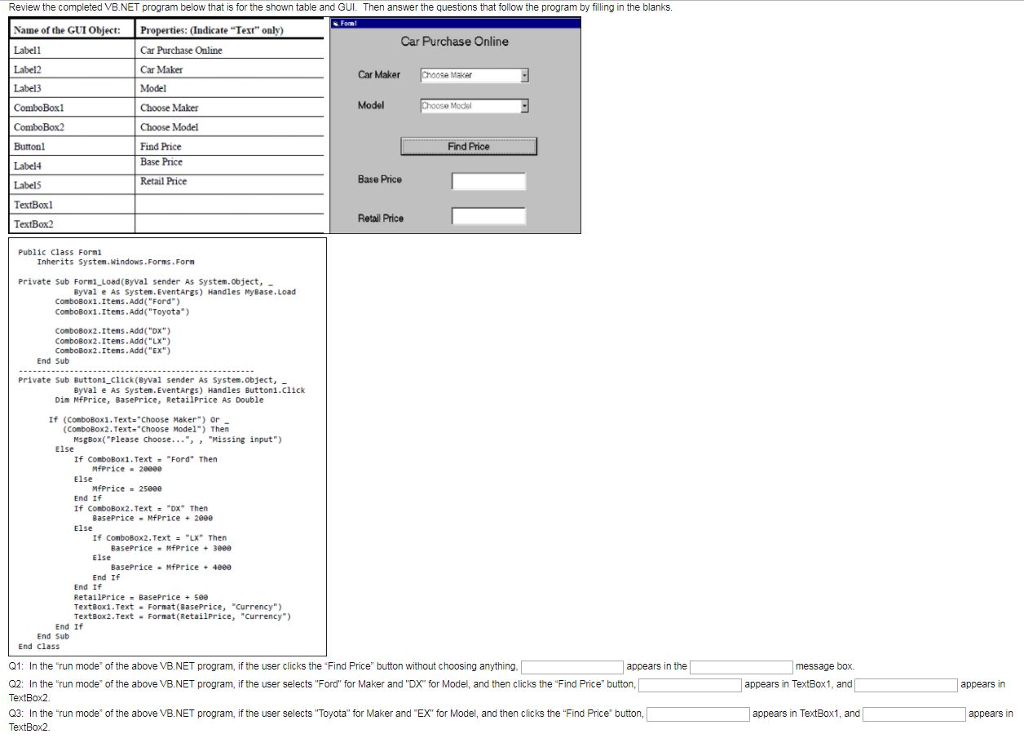
Review the completed VB.NET program below that is for the shown table and GUI. Then answer the questions that follow the program by filling in the blanks. Name of the GUI Object: Properties: (Indicate Text" only Labell Label2 Label3 ComboBox1 Car Purchase Online Car Purchase Online Car Maker Model Choose Maker Choose Model Find Price Base Price Retail Prioe Car Maker Chse Maker Model oose Modsl Buttonl Label4 Label5 TextBox TextBox2 Find Price Base Price Retail Price Public Class Formi Inherits Systen.Windows Forms.For Private Sub Form1 Load(Byval sender As System.object, Byvai e As System. EventArgs) Handles MyBase.Load ComboBoxi.Itens.Add "Ford) ComboBoxi.Items.Add("Toyota" Conbobox2.Itens.Add("DX Combobox2.Itens.Add("LX ComboBox2.Itens.Add("EX End Sub Private Sub Buttoni ci1ck(Byval sender As System.object, Byval e AS System. EventArgs) Handles Button1.click Din NfPrice, BasePrice, RetailPrice As Double If (ConboBoxi.Text: Choose Maker) or (ConboBox2.Text-Choose Mode1") Then MsgBox"Please Choose..Missing input") If conbo80x1. Text "Ford" Then Else End If Else MfPrice-2eeee If conbo80x2. Text = -DX. Then BasePrice -NfPrice 2000 If ConboBox2. TextX Then Else End If Else End if TextBoxi.Text Format (8asePrice, "Currency) TextBox2.Text Format (RetailPrice, "Currency) End If End Sub End Cla55 appears in the Q1: In the run mode of the above VB NET program, if the user clicks the Find Price button without choosing anything, Q2: In the '"run mode of the above VB.NET program, if the user selects "Ford for Maker and "DX for Model, and then clicks the "Find Price' button, TextBox2 Q3: In the run mode of the above VB.NET program, if the user selects Toyota" for Maker and "EX for Model, and then clicks the "Find Price button, TextBox2 message box. appears in TextBox, and appears in appears in TextBox1, and appears in
Step by Step Solution
There are 3 Steps involved in it

Get step-by-step solutions from verified subject matter experts
 Study Help