







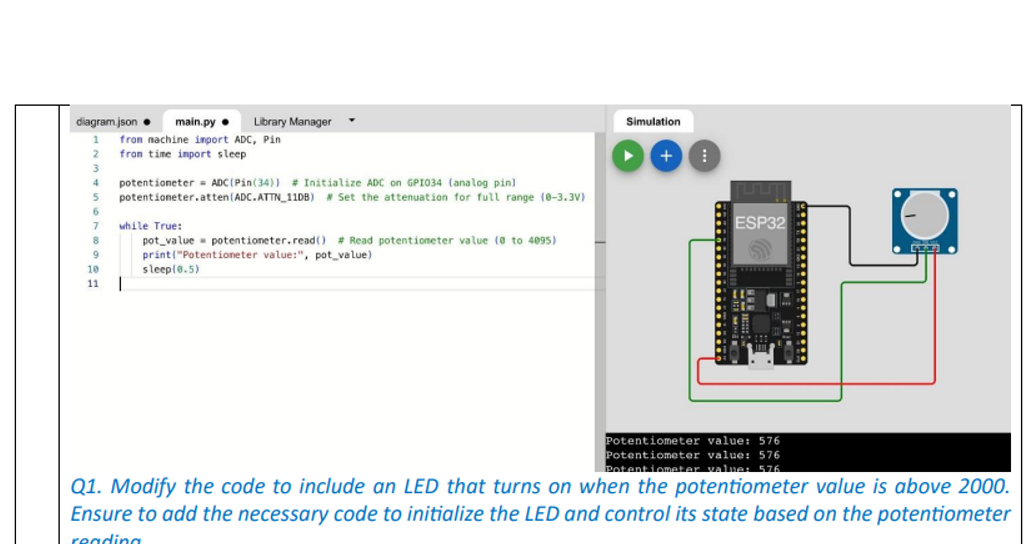
Question: Review the following MicroPython code that reads the value from a potentiometer connected to GPIO 3 4 from machine import ADC, Pin # Import necessary
Review the following MicroPython code that reads the value from a potentiometer connected to
GPIO
from machine import ADC, Pin # Import necessary modules for ADC and pin
control
from time import sleep # Import sleep for delayspotentiometer ADCPin
potentiometer.attenADCATTNDB # Set the attenuation for full range
V
while True:
potvalue potentiometer.read # Read the potentiometer value to
printPotentiometer value:", potvalue # Print the value to the console
sleep # Wait for half a second before the next readingfron nachine import ADC, Pin
fron time inport sleep
potentioneter ADCPin # Initialize ADC on GPIanalog pin
potentioneter.attenADCATTNDB w Set the attenuation for full range V
while True:
potvalue potentioneter,read # Read potentioneter value to
printPotentioneter value:", potvalue
sleep
Potentiometer value:
Potentiometer value:
Botantiomatar valma:
Q Modify the code to include an LED that turns on when the potentiometer value is above
Ensure to add the necessary code to initialize the LED and control its state based on the potentiometer. Implementantion in wowki
Step by Step Solution
There are 3 Steps involved in it
1 Expert Approved Answer
Step: 1 Unlock

Question Has Been Solved by an Expert!
Get step-by-step solutions from verified subject matter experts
Step: 2 Unlock
Step: 3 Unlock
 Study Help