







Question: Rewrite the print statement in the final version of handle_post.php (Script 5.7) so that it uses single quotation marks and concatenation instead of double quotation
Rewrite the print statement in the final version of handle_post.php (Script 5.7) so that it uses single quotation marks and concatenation instead of double quotation marks.
Files attached below:
handle_post.php
// Address error management, if you want.
// Get the values from the $_POST array. // Strip away extra spaces using trim(): $first_name = trim($_POST['first_name']); $last_name = trim($_POST['last_name']); $posting = trim($_POST['posting']);
// Create a full name variable: $name = $first_name . ' ' . $last_name;
// Get a word count: $words = str_word_count($posting);
// Take out the bad words: $posting = str_ireplace('badword', 'XXXXX', $posting);
// Print a message: print "
$posting
($words words)
";
?>
posting.html
Please complete this form to submit your posting:
thanks.php
// Address error management, if you want.
// Get the values from the $_GET array: $name = $_GET['name']; $email = $_GET['email'];
// Print a message: print "
Thank you, $name. We will contact you at $email.
";
?>
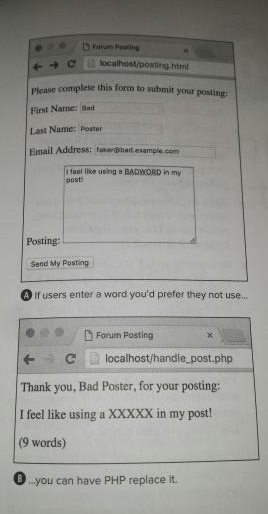
Your modifications to the handle_post.php file should give an output like this:
Step by Step Solution
There are 3 Steps involved in it

Get step-by-step solutions from verified subject matter experts
 Study Help