







Question: Re-write this code in 2 parts, to answer each question separetely WITHOUT using private static or ArrayLists (you can use regular arrays), or getter methods
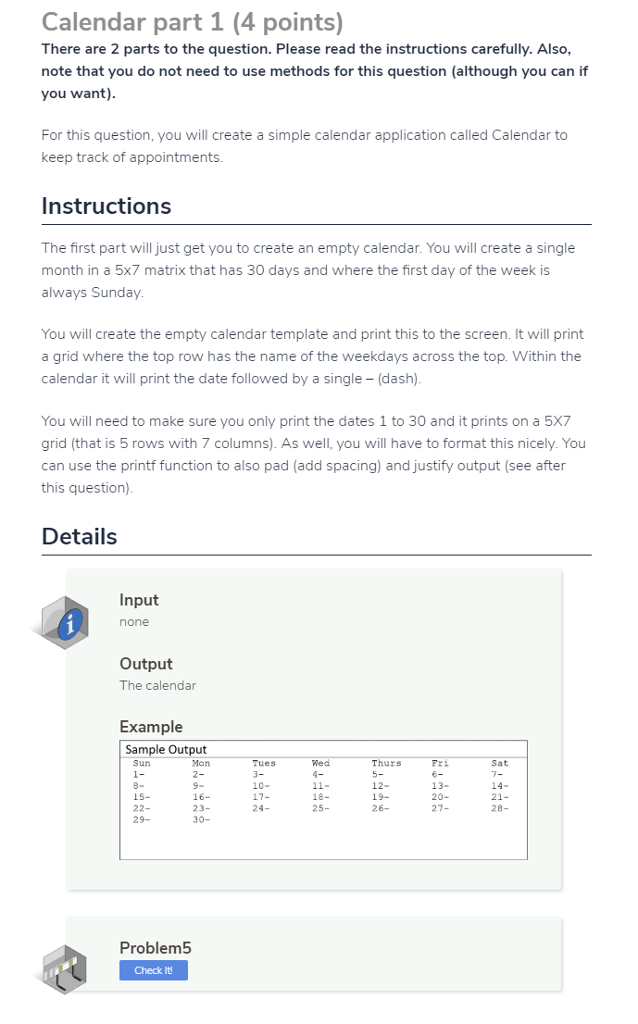
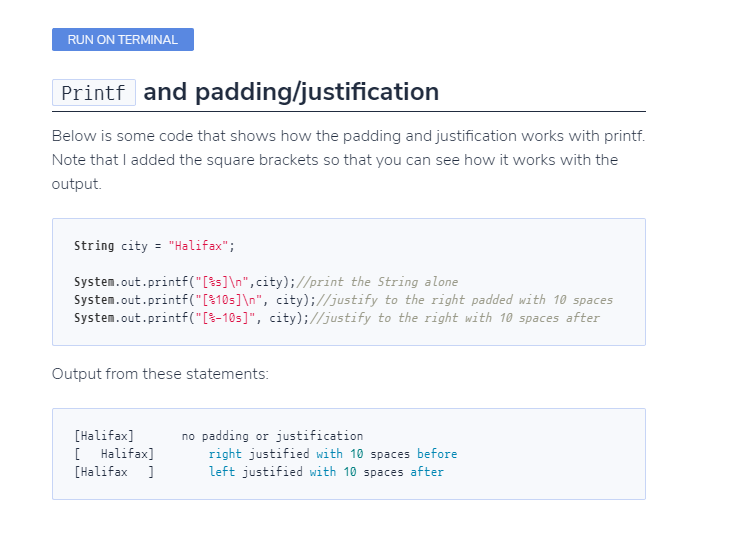
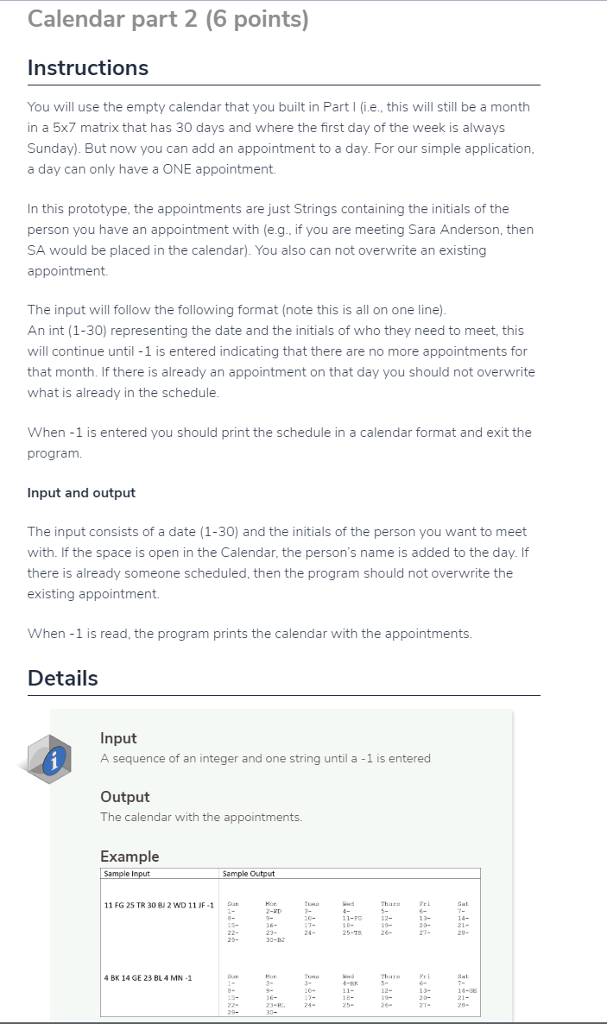
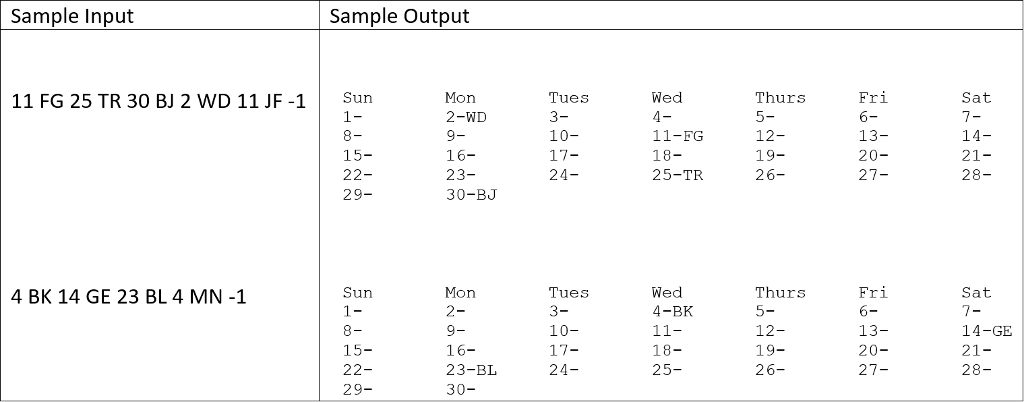
Re-write this code in 2 parts, to answer each question separetely WITHOUT using "private static" or ArrayLists (you can use regular arrays), or "getter methods" or any difficult concepts. Just solve it with nested loops and multidimensional arrays.
import java.util.ArrayList;
import java.util.Scanner;
public class Calendar
{
private static Scanner scanner; // to take input from user
private static CalendarDataModel[] calendarDataModel = new CalendarDataModel[30]; // to store calendar data
private static String day[] = {
"Sun",
"Mon",
"Tues",
"Wed",
"Thurs",
"Fri",
"Sat"
}; // days in week
public static void main(String args[]) // main method
{
scanner = new Scanner(System.in); // init scanner
part1(); // calling part 1
part2(); // calling part 2
}
private static void part1() // part 1
{
int dayCount = 0; // to count day
for (int i = 0; i
{
System.out.printf("%-10s", day[i]);
}
System.out.printf(" "); // to print new line
for (int i = 1; i
{
System.out.printf("%-10s", i + "-");
calendarDataModel[i - 1] = new CalendarDataModel(day[dayCount], i); // storing date
dayCount++;
if (i % 7 == 0) // condition to reset dayCount and printing new line
{
System.out.printf(" ");
dayCount = 0;
}
}
}
private static void part2() // part 2
{
int date; // to store user inputed date
String init = ""; // to store user inputed init
System.out.printf(" part 2-- ");
do // loop to store user input
{
date = scanner.nextInt(); // taking date from user
if (date != -1)
{
init = scanner.next();
}
if (date > 0 && date
// warning to user
{
calendarDataModel[date - 1].addAppointmentList(init);
}
} while (date != -1); // exiting loop when user enter -1
for (int i = 0; i
{
System.out.printf("%-10s", day[i]);
}
System.out.printf(" ");
for (int i = 1; i
{
calendarDataModel[i - 1].printData();
if (i % 7 == 0)
{
System.out.printf(" ");
}
}
}
}
class CalendarDataModel // calendar class model
{
String day; // to store day
int date; // to store date
ArrayList appointment; // to store all user appointment
public CalendarDataModel(String day, int date) // const
{
this.day = day;
this.date = date;
appointment = new ArrayList ();
}
//---------------------getter methods--------------------------------
public String getDay()
{
return this.day;
}
public int getDate()
{
return this.date;
}
public ArrayList getAppointmentList()
{
return appointment;
}
//--------------------XXXXXXXXXXXXXX----------------------------------
public void addAppointmentList(String init) // to add appointment to list
{
appointment.add(init);
}
public void printData() // to print all data
{
System.out.printf(date + "-");
for (String appointmentData: appointment)
{
System.out.printf(appointmentData);
}
System.out.printf("%-10s", "");
}
}
Calendar part 1 (4 points) There are 2 parts to the question. Please read the instructions carefully. Also, note that you do not need to use methods for this question (although you can if you want) For this question, you will create a simple calendar application called Calendar to keep track of appointments. Instructions The first part will just get you to create an empty calendar. You will create a single month in a 5x7 matrix that has 30 days and where the first day of the week is always Sunday You will create the empty calendar template and print this to the screen. It will print a grid where the top row has the name of the weekdays across the top. Within the calendar it will print the date followed by a single (dash) You will need to make sure you only print the dates 1 to 30 and it prints on a 5X7 grid (that is 5 rows with 7 columns). As well, you will have to format this nicely. You can use the printf function to also pad (add spacing) and justify output (see after this question) Details Input none Output The calendar Example Sample Output Thurs 5- 12- 19- 26- Sun Mon Tues 3- 10- Sat 15- 22- 29- 9- 16- 23- 30- 13- 20- 27- 18- 25- 21- 28- 24- Problem5 Check It Calendar part 1 (4 points) There are 2 parts to the question. Please read the instructions carefully. Also, note that you do not need to use methods for this question (although you can if you want) For this question, you will create a simple calendar application called Calendar to keep track of appointments. Instructions The first part will just get you to create an empty calendar. You will create a single month in a 5x7 matrix that has 30 days and where the first day of the week is always Sunday You will create the empty calendar template and print this to the screen. It will print a grid where the top row has the name of the weekdays across the top. Within the calendar it will print the date followed by a single (dash) You will need to make sure you only print the dates 1 to 30 and it prints on a 5X7 grid (that is 5 rows with 7 columns). As well, you will have to format this nicely. You can use the printf function to also pad (add spacing) and justify output (see after this question) Details Input none Output The calendar Example Sample Output Thurs 5- 12- 19- 26- Sun Mon Tues 3- 10- Sat 15- 22- 29- 9- 16- 23- 30- 13- 20- 27- 18- 25- 21- 28- 24- Problem5 Check It
Step by Step Solution
There are 3 Steps involved in it

Get step-by-step solutions from verified subject matter experts
 Study Help