







Question: rgrep.c #include #define MAXSIZE 4096 /** * You can use this recommended helper function * Returns true if partial_line matches pattern, starting from * the
rgrep.c
#include #define MAXSIZE 4096
/** * You can use this recommended helper function * Returns true if partial_line matches pattern, starting from * the first char of partial_line. */ int matches_leading(char *partial_line, char *pattern) {
//implement
return 0; }
/** * You may assume that all strings are properly null terminated * and will not overrun the buffer set by MAXSIZE * * Implementation of the rgrep matcher function */ int rgrep_matches(char *line, char *pattern) {
// // Implement me
//return 0; }
int main(int argc, char **argv) { if (argc != 2) { fprintf(stderr, "Usage: %s ", argv[0]); return 2; }
/* we're not going to worry about long lines */ char buf[MAXSIZE];
while (!feof(stdin) && !ferror(stdin)) { if (!fgets(buf, sizeof(buf), stdin)) { break; } if (rgrep_matches(buf, argv[1])) { fputs(buf, stdout); fflush(stdout); } }
if (ferror(stdin)) { perror(argv[0]); return 1; }
return 0; }
MAKEFILE
# Your program must compile with 'make'
# You must not change this file.
CC = gcc
FLAGS = -std=c99 -O0 -Wall -Werror -g -pedantic
rgrep:
$(CC) $(FLAGS) rgrep.c -o rgrep
clean:
rm -rf rgrep *.dSYM
check: clean rgrep
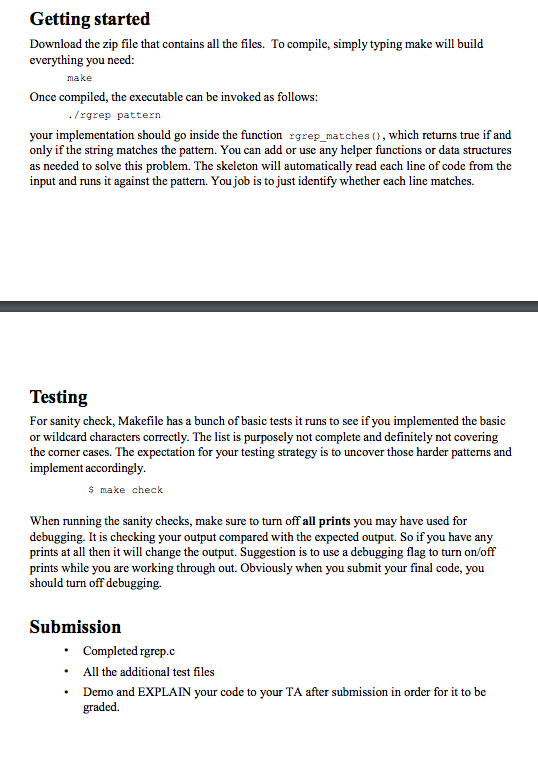
test "`echo "a b c" | ./rgrep 'a'`" = "a"
test "`echo "a " | ./rgrep 'a'`" = "a"
test "`echo "a" | ./rgrep '...'`" = ""
test "`echo "abc" | ./rgrep '.b.'`" = "abc"
test "`echo "h aaaaah" | ./rgrep 'a+h'`" = "aaaaah"
test "`echo "h aaaaahhhhh" | ./rgrep 'aa+hh+'`" = "aaaaahhhhh"
test "`echo "h aaaaahhhhh " | ./rgrep 'aa+hh+'`" = "aaaaahhhhh"
test "`echo "a" | ./rgrep 'a?a'`" = "a"
test "`echo "woot wot wat " | ./rgrep 'wo?t'`" = "wot"
test "`echo "CCCCCCC C+ C++" | ./rgrep '.\+\+'`" = "C++"
test "`echo "GG" | ./rgrep '.+'`" = "GG"
test "`echo "woooooo_CSE31.jpg" | ./rgrep 'w.+_...31\.jpg'`" = "woooooo_CSE31.jpg"
test "`echo "aab" | ./rgrep 'bb?'`" = "aab"
test "`echo "aaab" | ./rgrep 'a+b'`" = "aaab"
test "`echo "aaab" | ./rgrep 'a+ab'`" = "aaab"
@echo "Passed sanity check."
short.txt
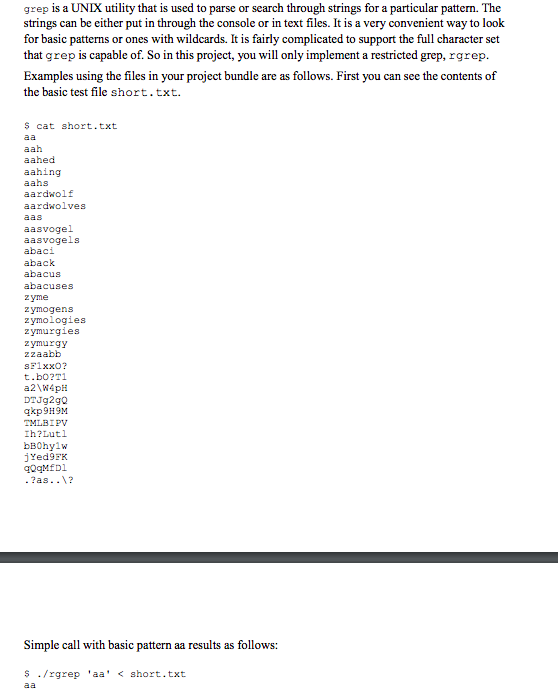
aa aah aahed aahing aahs aardwolf aardwolves aas aasvogel aasvogels abaci aback abacus abacuses zyme zymogens zymologies zymurgies zymurgy zzaabb sF1xxO? t.bO?T1 a2\W4pH DTJg2gQ qkp9H9M TMLBIPV Ih?Lutl bB0hy1w jYed9FK qQqMfDl .?as..\?
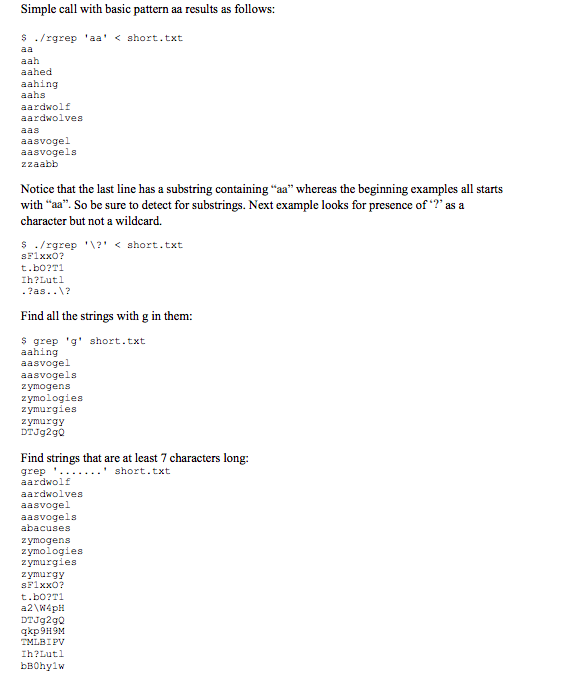
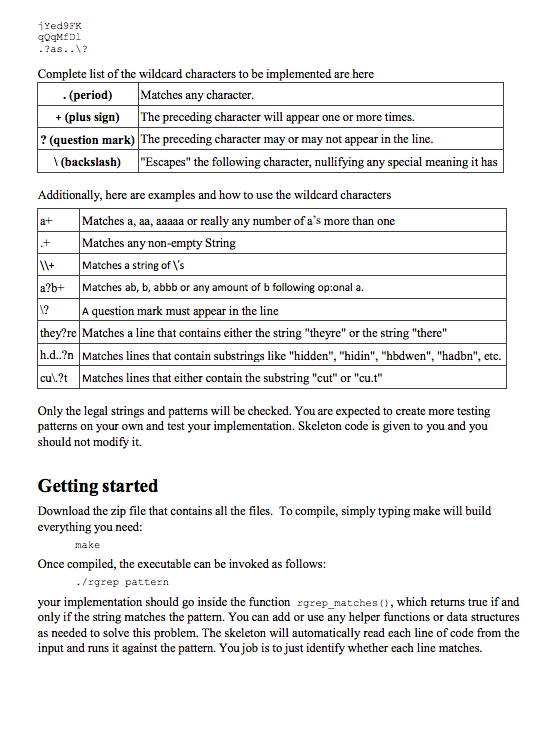
grep is a UNIX utility that is used to parse or search through strings for a particular pattern. The strings can be either put in through the console or in text files. It is a very convenient way to look for basic patterns or ones with wildcards. It is fairly complicated to support the full character set that grep is capable of. So in this project, you will only implement a restricted grep, rgrep. Examples using the files in your project bundle are as follows. First you can see the contents of the basic test file short.txt s cat short.txt aah aahed aahing aahs aardwolf aardwolves aasvoge aasvogels abaci aback abacus abacuses z yme z ymogens zymologies zymurgies zymurgy zzaabh sF1xx0? t.bo?T1 DTJg2gQ qkp9H9M MLBIPv Ih?Lutl bBOhy1w jYed95K OqMED ?as..1? Simple call with basic pattern aa results as follows: s ./rgrep 'aa
Step by Step Solution
There are 3 Steps involved in it

Get step-by-step solutions from verified subject matter experts
 Study Help