







Question: Robot.java A Robot object (Robot.java) has the following attributes: name (String) row (int) //row and col represent where the robot is currently on the track
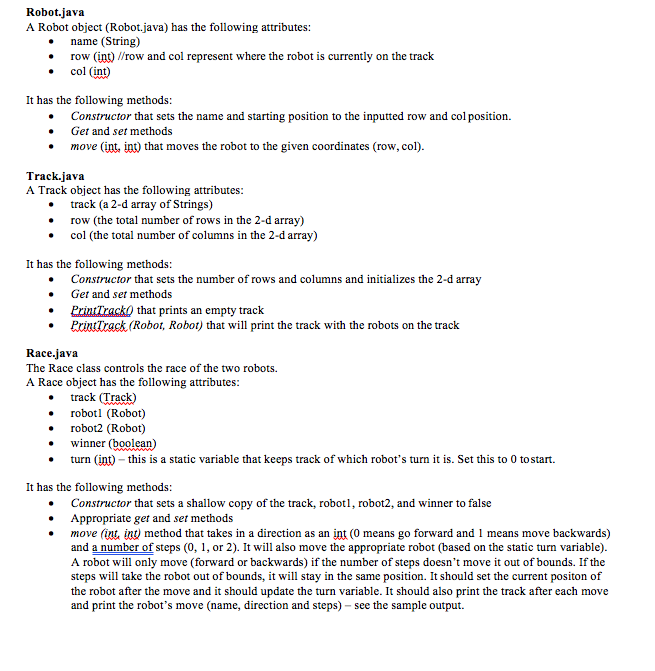
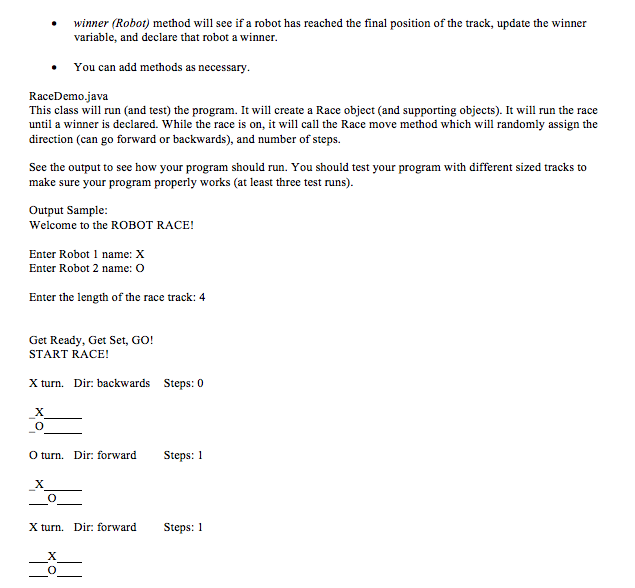
Robot.java A Robot object (Robot.java) has the following attributes: name (String) row (int) //row and col represent where the robot is currently on the track e col (int) It has the following methods: Constructor that sets the name and starting position to the inputted row and col position. Get and set methods move (int, int) that moves the robot to the given coordinates (row, col) Track.java A Track object has the following attributes track (a 2-d array of Strings) row (the total number of rows in the 2-d array) col (the total number of columns in the 2-darray) It has the following methods: . Constructor that sets the number of rows and columns and initializes the 2-d array Get and set methods . PrintfrackO that prints an empty track .Printrack (Robot, Robot) that will print the track with the robots on the track Race.java The Race class controls the race of the two robots. A Race object has the following attrbutes track (Track) robotl (Robot) robot2 (Robot) winner (boolean) turn (int)-this is a static variable that keeps track of which robot's turn it is. Set this to 0 to start. It has the following methods: Constructor that sets a shallow copy of the track, robotl, robot2, and winner to false Appropriate get and set methods . . move (int, int) method that takes in a direction as an int (0 means go forward and 1 means move backwards) and a number of steps (0, 1, or 2). It will also move the appropriate robot (based on the static turn variable). A robot will only move (forward or backwards) if the number of steps doesn't move it out of bounds. If the steps will take the robot out of bounds, it will stay in the same position. It should set the current positon of the robot after the move and it should update the turn variable. It should also print the track after each move and print the robot's move (name, direction and steps)-see the sample output
Step by Step Solution
There are 3 Steps involved in it

Get step-by-step solutions from verified subject matter experts
 Study Help