







Question: RStudio Please answer quesrions 1-25. Vectors and Matrices 1. Create a vector named two_to_fifty that contains numbers starting from 2, ending with 50, and increasing
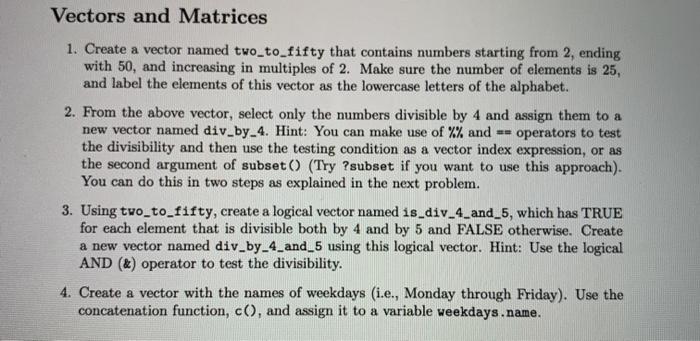
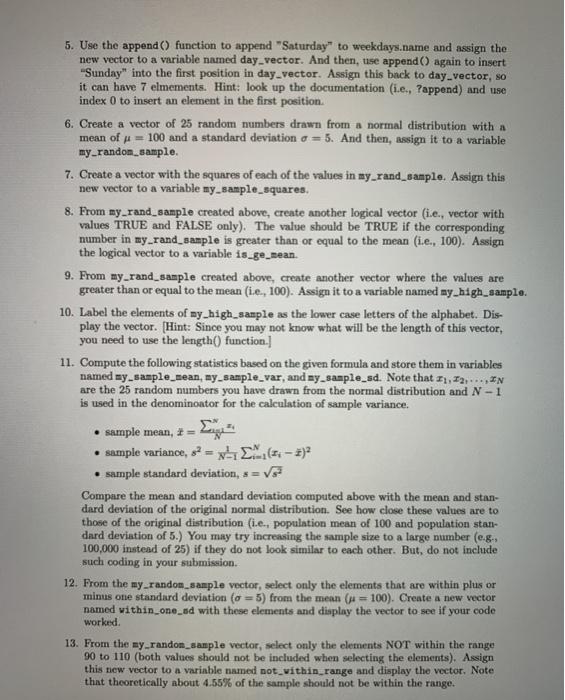
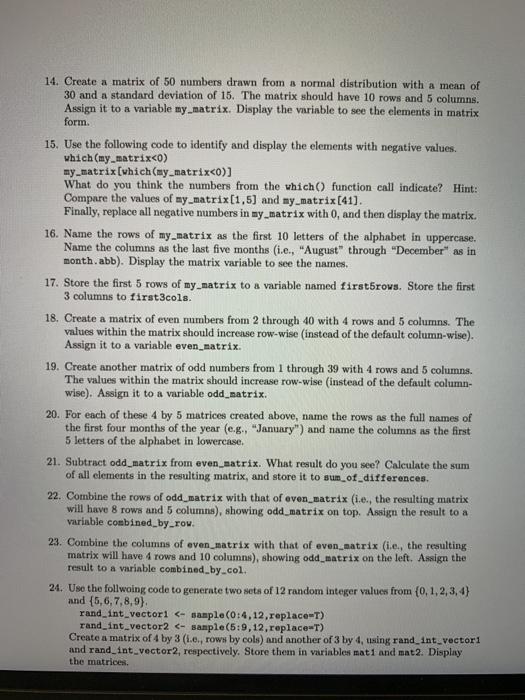
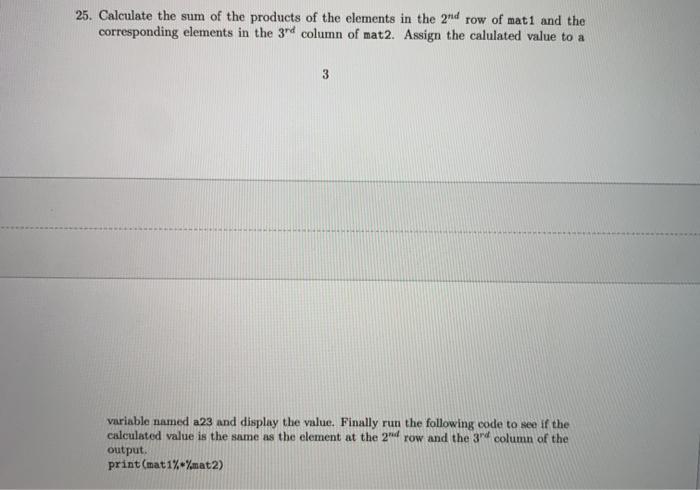
Vectors and Matrices 1. Create a vector named two_to_fifty that contains numbers starting from 2, ending with 50, and increasing in multiples of 2. Make sure the number of elements is 25, and label the elements of this vector as the lowercase letters of the alphabet. 2. From the above vector, select only the numbers divisible by 4 and assign them to a new vector named div_by_4. Hint: You can make use of %% and == operators to test the divisibility and then use the testing condition as a vector index expression, or as the second argument of subset() (Try ?subset if you want to use this approach). You can do this in two steps as explained in the next problem. 3. Using two_to_fifty, create a logical vector named is_div_4_and_5, which has TRUE for each element that is divisible both by 4 and by 5 and FALSE otherwise. Create a new vector named div_by_4_and_5 using this logical vector. Hint: Use the logical AND (&) operator to test the divisibility. 4. Create a vector with the names of weekdays (ie., Monday through Friday). Use the concatenation function, c(), and assign it to a variable weekdays.name. 5. Use the append() function to append "Saturday" to weekdays.name and assign the new vector to a variable named day_vector. And then, use append() again to insert Sunday" into the first position in day vector. Assign this back to day vector, so it can have 7 elmements. Hint: look up the documentation (ie., Pappend) and use index 0 to insert an element in the first position. 6. Create a vector of 25 random numbers drawn from a normal distribution with a mean of x = 100 and a standard deviation a = 5. And then, assign it to a variable my_random_sample 7. Create a vector with the squares of each of the values in my_rand_sample. Assign this new vector to a variable my_sample_squares. 8. From my_rand_sample created above, create another logical vector (i.e., vector with values TRUE and FALSE only). The value should be TRUE if the corresponding number in my_rand_sample is greater than or equal to the mean (i.e., 100). Assign the logical vector to a variable is_ge_mean. 9. From my_rand_sample created above, create another vector where the values are greater than or equal to the mean (i.e., 100). Assign it to a variable named my_high_sample. 10. Label the elements of my_high_sample as the lower case letters of the alphabet. Dis- play the vector. (Hint: Since you may not know what will be the length of this vector, you need to use the length() function. 11. Compute the following statistics based on the given formula and store them in variables named my_sample_mean, my_sample_var, and my sample_sd. Note that 11, 12,...,AN are the 25 random numbers you have drawn from the normal distribution and N - 1 is used in the denominoator for the calculation of sample variance. sample mean, = sample variance, 52 = x (51 )? sample standard deviation, s =V Compare the mean and standard deviation computed above with the mean and stan- dard deviation of the original normal distribution. See how close these values are to those of the original distribution (i.e., population mean of 100 and population stan- dard deviation of 5.) You may try increasing the sample size to a large number (08. 100,000 instead of 25) if they do not look similar to each other. But, do not include such coding in your submission. 12. From the my_random_sample vector, select only the elements that are within plus or minus one standard deviation (o =5) from the mean ( = 100). Create a new vector named within_one_ed with these elements and display the vector to see if your code worked 13. From the my-random_sample vector, select only the elements NOT within the range 90 to 110 (both values should not be included when selecting the elements). Assign this tew vector to a variable named not within_range and display the vector. Note that theoretically about 4.55% of the sample should not be within the range. 14. Create a matrix of 50 numbers drawn from a normal distribution with a mean of 30 and a standard deviation of 15. The matrix should have 10 rows and 5 columns. Assign it to a variable my matrix. Display the variable to see the elements in matrix form 15. Use the following code to identify and display the elements with negative values. which (my_matrixco) my_matrix[which (my_matrix
Step by Step Solution
There are 3 Steps involved in it

Get step-by-step solutions from verified subject matter experts
 Study Help