







Question: Ruby Write a program that will do the following, in order!: Under your home directory, print to the console, the name of your current directory
Ruby
Write a program that will do the following, in order!:
- Under your home directory, print to the console, the name of your current directory 1PT
- Under your home directory, create a directory called "Lab9" 1PT
- Change directory to "Lab9" 1PT
- Print to the console the name of the current directory 1PT
- Using a loop, create (touch) 10 files with the name of "test_.txt" where is the number from 1 to 10
- Using a loop, create 5 sub-directories with the name of "subdir_" where is the number from 1 to 5
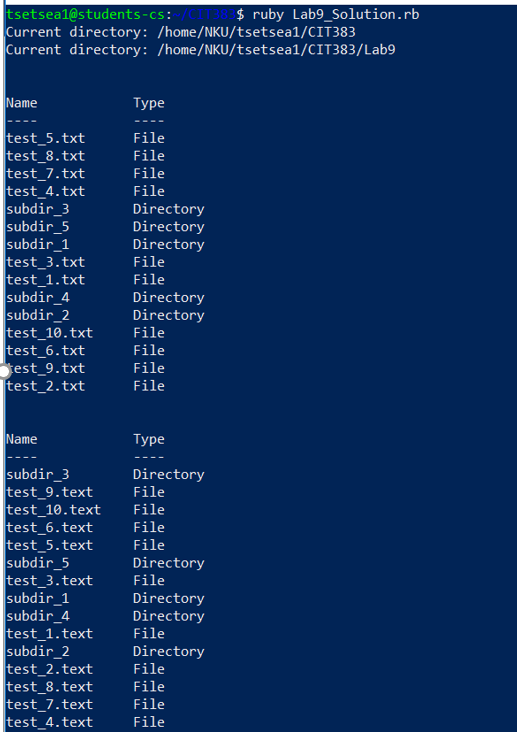
- List all entries within the "Lab9" sub directory in the following format: Note: Do not print the "." and ".." directories Name Type ------- ------
- Rename all files that end with .txt to .text
- Repeat step 7 ( List all entries within the "Lab9" sub directory in the following format: Note: Do not print the "." and ".." directories Name Type ------- ------ )
Write the following methods and use them to solve the problems above
- getInodeType: This method takes the name of a file/folder as a parameter returns a value indicating the inode type(File or Directory). 5PTS
- listEntries: Displays the contents of a directory per requirement 7 above. It takes the name of the directory as parameter 5PTS
- createFiles:Takes the directory name and number of files to create and creates the files per requirement 5 above 5PTS
- createSubDirectories: Takes the directory name and number of subdirectories to create and creates the subdirectories per requirement 6 5PTS
renameFiles:Uses directory name, current extension of the file, and new extension of files and renames all files based on requirement
Step by Step Solution
There are 3 Steps involved in it
1 Expert Approved Answer
Step: 1 Unlock

Question Has Been Solved by an Expert!
Get step-by-step solutions from verified subject matter experts
Step: 2 Unlock
Step: 3 Unlock
 Study Help